
ldddhclipgmgkcjfkeimcjgcpmkadkhl
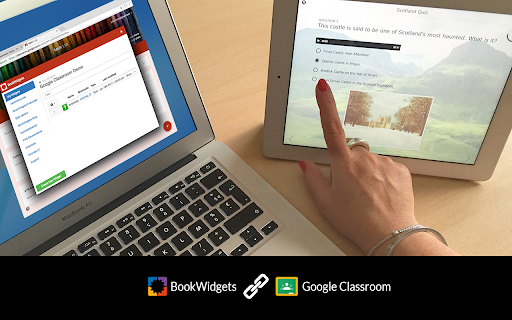
This extension integrates BookWidgets into Google Classroom. Create fun and interactive exercises for Chromebooks, iPads, tablets and PC. Right inside of Google Classroom! Interactive graphs, dynamic worksheets, and completely automatically graded exercises and tests. With BookWidgets, you can make over 40 different types of exercises, right inside of the familiar Google Classroom environment. Whether it's small exercises to supplement a textbook, complete lessons or elaborate web quests, with BookWidgets you finally have the tools you need to provide a tailored learning experience. Combine sources, text, video, quizzes and interactive widgets to let students learn and practice at their own pace. Track the work and evolution of your students over time. All student work is automatically graded, but you can of course override where needed, for instance to account for dyslexic students. When you're done, you return the graded work, including your feedback with a click. The grades automatically make their way into the gradebook. BookWidgets is completely free for students. Only teachers that use BookWidgets need a paid license. For pricing info, please see https://www.bookwidgets.com/pricing

Classwork Zoom for Google Classroom
Extension for Google Classroom As a teacher, I designed Classwork Zoom with a teacher's needs in mind, and my enthusiasm for it is based on how much it helped me with my own classes. Classwork Zoom for Google Classroom™ puts student work assigned in Google Docs, Sheets, Slides, Drawings, and even Sites into a scrollable and zoomable timeline. In this way, Classwork Zoom provides a missing piece in the puzzle of student effort and engagement. It can help you answer questions like… - Are my students engaged in the work that I've assigned? - Are they managing their time? - Are they doing their own work in individual assignments? - Is there an imbalance of effort in group projects? When you can clearly SEE student effort, then you can more effectively encourage and nurture it.

Add Doc to Classroom
Share the current page to Google Classroom with one click. This extension is not associated with Google. Add Doc to Classroom is an extension icon that lets you share normal pages as well as Google Docs/Slides/etc to Google Classroom. The button opens a new window which takes the Doc URL and gives it to Classroom (https://classroom.google.com/share?url=...), all on your computer. From there, do what you'd normally do when sharing a Doc or Slides on Classroom. The extension does use the images of the Classroom Share button (https://developers.google.com/classroom/guides/sharebutton)

Google Meet Breakout by Robert Hudek
Only the teacher needs to install. Completely Free and your Data is Private. Google Classroom integration, Slider Control. Welcome to Google Meet Breakout Rooms Extension ***** Only the teacher needs to install this extension. ***** ***** Please do not ask your students to install it, as they will not use it **** NEW Feature: Practice using the Extension on your own computer by simulating students, perfect for teachers to rehearse before going live.https://youtu.be/QMurrSyCPmY The Google Meet Breakout Rooms Extension has 5 key features: 1) See All Students: The teacher can always see ALL of the students in ALL of the breakout rooms. 2)Free: The extension is completely free to use. I am a software engineer and created this for my personal use as a teacher and then improved it for all teachers to use. I make no money off of this extension, there are no ads, and no data is shared with me or any third parties. 3) Private: Your breakout rooms data is privately stored in your personal computer's chrome browser. Your breakout rooms data is NOT shared with anyone and it is NOT stored on a server. Even the creator of this extension has no knowledge of any of your data. 4) Hassle-free: Only the teacher needs to install this extension. Please do not ask your students to install it, as they won’t need to use it. The extension is only for the teacher, and it will not affect the students in any way. Students will continue to use Google Meet as they normally do. 5) Online Help: The online help menu is completely updated and now has screen shots of every step of the way for setup and operation. This software is created by Robert Hudek and all rights are reserved. No part of this extension may be copied without the express written consent of Robert Hudek at Hudek Tech LLc. This extension is not affiliated with Google, Inc. 1) Breakout rooms may be viewed in either tab or tiled mode 2) A slider may be used to quickly move between rooms 3) Breakout assignments may be created at any time or in advance if desired 4) Teachers may broadcast their video and audio to all the breakout rooms 5) Customize themes! 6) Can use Google Meet Nicknames (if your Google subscription supports nicknames) 7) Basic reporting 8) Mute and Remove Students buttons 9) Import, Export functions 10) Google classroom integration *** Slovak: A big thank you to Lenka Zustiaková from SOŠ GaHS, Farského 9 in Petržalka (www.farskeho.sk) for the translation into Slovak. *** Ukrainian: A big thank you to Igor Kozachuk (email: disk.igor@gmail.com) for the translation into Ukrainian *** If you want a translation of this extension to your language, please send me an email and I will be happy to work with you to get this done. My email is robert@hudektech.com. I would like to add Spanish, Portuguese, German, Japanese, and Korean but any language is fine with me. *** This extension is owned and developed by Robert Hudek. This extension is independent from Google and is not owned by or part of Google or Google Meet. This extension is designed to enhance and extend the functionality of Google Meet. *** If you find a problem please inform me at robert@hudektech.com and I will try my best to reply as soon as I can. Data Privacy: I have a detailed data privacy section on my web page, but the short version is that I do not copy, transmit or share any of your data with anyone including myself. I also do not use cookies, nor do I drop third party cookies on you. Warranty and Guarantee: There is no warranty and there is no guarantee for this extension. I have a detailed warranty (none) and guarantee (none) description on my web page but the short version is this: By using this Extension, you understand and agree that the Extension is provided "as is" and "as available". The developer Robert Hudek EXPRESSLY DISCLAIMS ALL WARRANTIES AND CONDITIONS OF ANY KIND, WHETHER EXPRESS OR IMPLIED, INCLUDING, BUT NOT LIMITED TO THE IMPLIED WARRANTIES AND CONDITIONS OF MERCHANTABILITY, FITNESS FOR A PARTICULAR PURPOSE AND NON-INFRINGEMENT.

Meet Attendance
Meet Attendance requires logging in and Syncing your Chrome browser. When in Meet select the participants view. Accept the permissions. Close and reopen the people to capture attendance. Click the Attendance icon to open the Attendance Spreadsheet. Mouse over for further options, Add a sheet in the Spreadsheet, Create a new Spreadsheet, Turn Attendance collection off, Auto Scroll through participants, Snapshot attendance. Attendance duration will be tracked. Premium: Compare your classroom roster to the participants in the meet. Know who is absent from your Meet. Set the frequency for auto capturing attendance. Leaving the Participants view open attendance will be captured at the set frequency. Subscribe to premium for $2.50 monthly. Subscription management at claycodes.web.app
