
ldccebeaefaoadimnokgdemdnbpkjccc
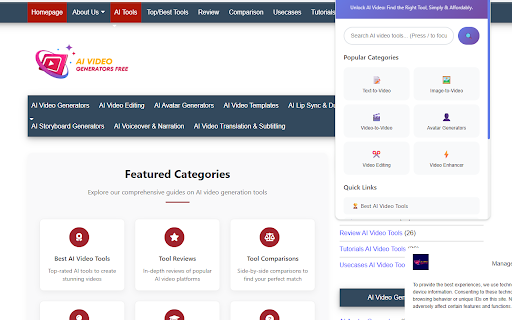
Unlock AI Video: Find the Right Tool, Simply & Affordably. Welcome to AI Video Generators Free, the official companion extension for aivideogeneratorsfree! This powerful tool is designed to streamline your search for the perfect AI video creation tool, making the process faster, smarter, and more efficient. Stop wasting time sifting through endless options and let our extension guide you to the best free and affordable solutions. Whether you're a content creator, marketer, or hobbyist, our extension provides the ultimate toolkit to navigate the world of AI video. Quick Popup Menu: Your central hub for AI video tools. Click the extension icon to access a clean interface with a powerful search bar and direct links to our most popular categories (Text-to-Video, Image-to-Video, Video-to-Video, etc.). Context Menu Search: Highlight any text on any website, right-click, and select "Search in AI Video Tools" to instantly find relevant generators on our site. ✨ Enhanced Website Experience Our extension supercharges your Browse experience exclusively on aivideogeneratorsfree.com with: Floating Action Button: A convenient button to quickly bookmark, share, search, or scroll back to the top of any page. Reading Progress Bar: A visual indicator at the top of the screen shows your progress as you read through our detailed reviews and tutorials. External Link Indicator: Know exactly where you're going. A small icon (🔗) appears next to links that lead to external websites. Keyboard Shortcuts: Use simple key combinations (Ctrl+Shift+A, Ctrl+Shift+S) to open the popup and initiate a quick search without lifting your hands from the keyboard. Comprehensive Options Page: Tailor the extension to your needs! Enable or disable features like the floating button, progress bar, and notifications. Customize which categories appear in your popup for a personalized experience. Data Management: You are in control. View your usage statistics, and easily export, import, or clear all your locally stored extension data anytime. 🔒 Privacy First & User-Centric Your privacy is our priority. The extension tracks your Browse history only on aivideogeneratorsfree to provide features like "Recently Visited" and personalized statistics. This data is stored locally on your device. We give you the tools to manage your data because we believe in transparency and user control. Install the AI Video Generators Free extension today and revolutionize the way you discover and use AI video tools!

AI Video Generator - Create videos from text and images
Generate videos from text prompts with our Text-to-Video tool base on AI. 🔹Features Idea to video Transform your ideas into stunning videos with AI voices, using our Idea to Video feature PPT to video Transform your powerpoint presentations (PPTs) into stunning videos in seconds Tweet to video Transform Tweets into engaging videos with our Tweet-to-Video feature Product to video Transform your Amazon & Airbnb product listings into engaging videos 🔹How to write the right AI prompts? Writing prompts for our AI Video generator can be easier than you think. You just need to put your imagination to work and follow these tips. You'll be a master in no time! ➤Be bold Put your creativity to the test and try anything you dream of! Craft impossible prompts—you’ll be surprised every time. The possibilities are endless. ➤Keep it simple The perfect prompt is all about simplicity. Don’t over-explain or use unnecessary words. Focus on taking small steps and including the most valuable details in your description. ➤Be detailed This is good: Colorful bird This is even better: A mixed media painting of a bird, volumetric outdoor lighting, midday, high fantasy, cgsociety, cheerful colours, full length, exquisite detail, post - processing, masterpiece 🔹Generate Video History The video you submit for generation will be in the left panel history, you can click on the generate button and go do something else, come back later to view the generated video in the left panel history, you can view and download it for 3 days, after 3 days it will be cleared. 🔹Privacy Policy Your data aren’t shared with anyone, including the add-on owner. We complies with privacy laws (especially GDPR & California Privacy Act) to protect your data. All data you upload are automatically deleted every day.

Runway Gen-4 Video Generator - Create AI Videos Efficiently
Runway Gen-4 video generator creating consistent, controllable videos from text or images with cinematic quality. A new generation of AI video creation. Maintain character identity across scenes, generate complex visual effects, and produce film-quality content from simple prompts or images. 🎯 Key Features 🎭 Character Consistency with Single Reference Maintain character appearance and identity across different scenes using just one reference image. Generate multiple videos with the same character while preserving facial features, clothing, and distinctive characteristics. ✍️ Text & Image to Video Generation Create videos from text descriptions or animate reference images. Describe scenes and actions, or upload images to transform into dynamic video sequences with natural motion. 🎥 Multi-Angle Scene Generation Get every angle of any scene. Generate the same scene from different camera perspectives and viewpoints for comprehensive coverage and editing flexibility. 🔥 Professional Visual Effects Generate complex visual effects including fire, water, smoke, explosions, and environmental effects. Create high-quality VFX without expensive production equipment or technical expertise. 🎨 Diverse Aesthetic Styles Handle a wide range of visual styles from photorealistic to stylized animation. Create whatever you want, whenever you need it - adapt to any creative vision or project requirement. 📹 Cinematic Quality Output Produce videos with film-quality aesthetics including realistic lighting, natural camera movement, professional color grading, and cinematic composition for polished results. 👥 Who It's For • Filmmakers & Content Creators - Generate consistent character videos, pre-visualization sequences, and cinematic content. Create professional-quality videos for storytelling and narrative projects. • Marketing & Advertising Teams - Produce branded content, promotional videos, and campaign materials with consistent visual identity. Generate multiple variations for testing and optimization. • Animation & VFX Artists - Create visual effects, character animations, and stylized content. Explore creative concepts and generate reference material for production workflows. • Social Media Creators - Generate engaging video content for Instagram, TikTok, YouTube, and other platforms. Create character-consistent series and compelling visual narratives. • Game Developers - Produce cutscene concepts, trailer footage, and promotional content. Visualize game characters and environments from multiple angles. • Independent Artists - Bring creative visions to life without expensive production budgets. Generate professional video content for portfolios and personal projects. 🚀 Get Started in 3 Simple Steps 1. Choose Your Mode - Select Text to Video to create from descriptions, or Image to Video to animate from reference images. 2. Write Your Prompt - Describe your vision in detail - scene, character, actions, camera angles, lighting, mood, and style. Upload reference images for character consistency. 3. Generate & Download - Click generate to create your video. Preview results and download high-quality output ready for immediate use. 💡 Pro Tips for Better Results Use Reference Images for Character Consistency Upload a single reference image of your character to maintain consistent appearance across multiple generated videos and different scenes. Tip: Clear, well-lit character images with distinct features work best for maintaining consistency. Describe Multiple Angles Request different camera perspectives of the same scene to get comprehensive coverage for editing and storytelling. Example: "Wide shot of character walking through forest" then "Close-up of character's face as they walk" for the same scene. Specify Visual Effects Details When creating VFX shots, describe the effect behavior, intensity, and interaction with the environment. Examples: "Flames rising from ground with orange and red hues," "Smoke billowing slowly from left to right," "Water splashing with realistic motion". Write Cinematic Descriptions Use film terminology and cinematography language to guide the visual style and camera work. Examples: "Shallow depth of field focusing on subject," "Golden hour lighting with warm tones," "Slow tracking shot following character". Layer Scene Elements Build rich environments by describing foreground, midground, and background separately for depth and visual interest. Example: "Foreground: desert sand with heat waves, Middle: character walking, Background: mountains with dramatic sky". Create Character-Driven Narratives Focus on character actions, emotions, and interactions for compelling storytelling that leverages Gen-4's character consistency strengths. Example: "Young woman turning to look back with concerned expression, wind blowing through her hair, cinematic lighting". Experiment with Visual Styles Gen-4 handles diverse aesthetics. Try photorealistic, animated, stylized, or artistic approaches to find what works for your project. Styles: Photorealistic, cartoon animation, painterly, vintage film, modern commercial, artistic interpretation. 🔐 Privacy & Data Protection We respect your privacy. The extension processes your prompts and images only with your permission. Generated videos and inputs are stored according to your account settings - see our privacy policy on the website for details. 📚 Support & Resources If you have questions or need help, contact support with details and screenshots for faster assistance.

NyanVid - AI Video Generator
Create AI-powered videos directly from your browser sidebar Create stunning short form videos in seconds with NyanVid. This AI powered video generator turns simple text prompts into scroll stopping TikToks, Reels, YouTube Shorts and X content instantly. No editing knowledge. No clunky software. No waiting forever for a final cut. Perfect for creators, agencies and brands who want to increase output without increasing hours. Just describe your idea and NyanVid produces a polished cinematic video that is ready to post across all social platforms. Save time, reduce editing costs and publish more content with ease. NyanVid is built for speed and growth. Generate videos in under one minute. Choose from viral templates including UGC styles, product showcases, hook story CTA structures and more. Export in every format you need including vertical for short form and widescreen for long form. Add your own brand elements for custom content at scale. Subscriptions bill by seconds so you only pay for what you use. No guessing. No fixed video caps. Try it free with ten seconds included and upgrade when you are ready. Top plans include commercial licensing, team collaboration and white label options for agencies. Trusted by over one hundred thousand creators. Proven to cut editing time and boost publishing volume. NyanVid helps creators grow faster, brands convert better and teams produce at scale. If you want to generate more content and dominate social feeds this extension is your shortcut. Install now. Start creating instantly. No credit card required to try.

Wan 2.6 Video Generator - Create AI Videos with Audio
Wan 2.6 creates multi-shot cinematic videos from text, images, or videos with audio sync and character consistency. Advanced AI video generation with native audio synchronization. Create multi-shot stories with character consistency, realistic motion, and professional 1080p quality from text, images, or reference videos. 🎯 Key Features 🎬 Multi-Shot Video Generation Create cohesive sequences with multiple scenes in a single generation. Maintain character consistency across shots for storytelling content up to 15 seconds. 🎵 Native Audio Synchronization Generate videos with synchronized audio and natural lip-sync. Perfect for talking head videos, character dialogues, and product demonstrations. ✍️ Three Generation Modes Text to Video - Create videos from descriptions. Supports prompts up to 5,000 characters in Chinese and English. Image to Video - Animate static images with realistic motion and natural movement. Reference to Video - Cast characters from reference videos into new scenes with appearance and voice consistency. 🎭 Video Reference Generation Upload reference videos to maintain character identity across different scenarios. Supports human or human-like figures with consistent appearance and voice in entirely new contexts. 📹 High-Resolution Output Produce professional 1080p videos with exceptional clarity. Choose 720p for speed or 1080p for maximum quality. ⏱️ Flexible Duration Control Generate videos from 5 to 15 seconds. Optimized for social media, advertisements, and short-form content. 🎨 Advanced Temporal Coherence Smooth motion between frames, stable characters, and realistic physics - eliminating common AI artifacts like flickering or morphing. 💼 Commercial Usage Rights All content includes commercial licensing for marketing, client projects, and production workflows. 👥 Who It's For • Content Creators - Generate multi-shot stories with audio sync for social media. Create character-consistent series for Instagram, TikTok, and YouTube. • Marketing Teams - Produce branded content, product demos, and promotional videos with professional quality and natural lip-sync. • Filmmakers - Create pre-visualization sequences, concept videos, and storyboard animations with multi-shot capabilities. • Small Business Owners - Produce professional product videos without expensive equipment or editing expertise. • Educators - Generate educational videos with synchronized narration and visual demonstrations for engaging course materials. • Social Media Managers - Create platform-optimized video content in minutes with native audio synchronization. 🚀 Get Started in 3 Simple Steps 1. Choose Your Mode - Select Text to Video, Image to Video, or Reference to Video based on your source material. 2. Configure Settings - Enter prompts, upload images/videos, and select duration (5/10/15s) and resolution (720p/1080p). 3. Generate & Download - Click generate to create your video with synchronized audio. Download video ready for immediate use. 💡 Pro Tips for Better Results Write Detailed Descriptions Include specific visual elements, camera movements, lighting, and atmosphere for accurate generation. Example: "Woman walks through sunlit forest, camera tracking from side, golden hour lighting, cinematic shallow depth of field." Specify Camera Work Direct cinematography like "slow zoom in," "aerial drone shot," "tracking shot," or "static wide shot" for professional results. Include Dialogue for Audio Sync For multi-shot videos, describe character speech and emotional delivery clearly. Example: "Character looks worried and says anxiously, 'Where did everyone go?' Then smiles and says cheerfully, 'There you are!'" Use Quality Source Materials Upload clear, well-composed images with good lighting. Reference videos work best with visible characters and minimal blur. Leverage Character Consistency Use Reference to Video mode to maintain the same character across multiple scenes while preserving appearance and voice. Specify Visual Style Reference cinematography styles, lighting techniques, or aesthetics to guide the overall look. Examples: "Cinematic high contrast lighting," "Pastel color grading," "Film noir aesthetic," "Bright commercial style." 🔐 Privacy & Data Protection We respect your privacy. The extension processes your prompts and images only with your permission. Generated videos and inputs are stored according to your account settings - see our privacy policy on the website for details. 📚 Support & Resources If you have questions or need help, contact support with details and screenshots for faster assistance.
