
lcokjifkaialinobgmpkofklogfmebjh
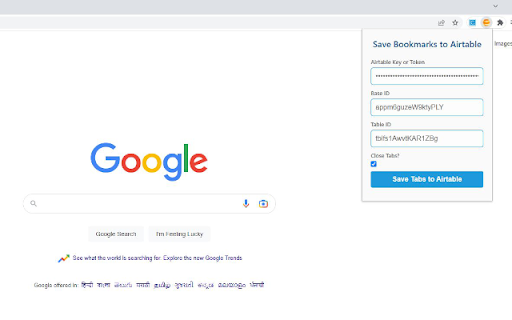

1. The extension helps you store currently open tabs in Chrome to your Airtable Base. 2. It also allows you an option to close tabs after saving them, to save memory. The Airtable Base should have 3 columns with the same Names (including case) as below: 1. URL 2. Title 3. Favicon * Refer to the screenshot. The extension stores the airtable key, base ID and table ID on your local storage so they are completely safe and private. The storage helps to ensure you don't need to re enter the keys everytime.

Note pad online
Note pad online — your quick, private online notepad in the browser side panel. Open this notes extension with a single click, jot anything down, close it. Notes save automatically and stay on your device. No account, no sign-up. 📝 What this online notepad does ➡️ Create multiple notes, each with a title and rich-text body ➡️ Format with bold, italic, headings, bullet lists, numbered lists, and task lists ➡️ Tag notes and filter the list by tag ➡️ Mark favorites and filter to just those ➡️ Search across all your notes ➡️ Word count for every note ➡️ Sort by newest or oldest ➡️ Built-in emoji picker ➡️ Export to TXT, Markdown, or JSON ➡️ Lives in the browser side panel — always one click away 🔒 Private by design Everything you write is stored locally on your device via Chrome's storage API. Your notpad data is never sent to a server, never shared, never sold. No account required. Because notes live on your device, they do not automatically sync between computers. To move notes to another machine, use Export (Markdown works great). 🎯 Who this notes extension is for 🔹 Students taking class or study notes 🔹 Writers and bloggers brainstorming ideas 🔹 Professionals tracking to-dos and meeting notes 🔹 Researchers collecting quick excerpts while browsing 🔹 Anyone who wants a clean note pad online without yet another login ⭐ Why people like it ✅ Opens instantly in the side panel ✅ Autosaves as you type ✅ Works offline ✅ No login, no ads, no upsell ✅ Lightweight — doesn't slow your browser ✅ Clean interface, just the tools you actually use 💡 Tips ⭐ Pin the icon to your toolbar for one-click access ⭐ Use tags like #work, #ideas, #recipes to organize ⭐ Star anything you reference often ⭐ Export to Markdown to move notes into Obsidian, Notion, or any other app 🚀 Getting started 1. Install Note pad online 2. Click the icon to open the side panel 3. Start writing — autosave kicks in immediately 4. Close anytime; everything stays saved ❓ FAQ Q: Do I need an internet connection? A: No. Everything works offline. Notes are stored on your device. Q: Do my notes sync between computers? A: No — notes are stored locally for privacy. Use Export to move notes between devices. Q: How do I delete a note? A: Open the note's menu and choose Delete. To remove text inside a note, highlight it and press delete or backspace. Q: What about my data if I uninstall? A: Export first if you want to keep your notes. Uninstalling may clear extension storage.

Save to Bookmark OS
The Bookmark OS extension makes it easy to save bookmarks and tabs (for session and tab management) to the Bookmark OS website. Bookmark OS is a bookmark manager and online desktop for organizing your digital life. Easily manage your bookmarks, to-dos, notes, and files, all in one elegant, customizable desktop.

Bookmark Plus
If you have a lot of bookmarks to manage. Difficulty finding the right folder when saving bookmarks. ★ Quickly search for folder names; ★ Create or search folders using commands (in the search box): Command: #[folder name] Description: Show the subfolders of the folder, only find one level deep, you need to enter the full folder name, not fuzzy search. ------------ Command: ##p Description: Show all pinned folders. ------------ Command: [folder name] > [keyword] Description: Show subfolders that contain keywords in the folder. ------------ Command: #[parent folder] ![new folder name] Description: Create a new folder within the parent folder. ------------ Command: ![new folder name] Description: Create a new folder in the root directory ------------ Double-clicking the Shift key will copy the folder name from the drop-down list to the search box. ★ Pin commonly used folders,support drag and drop sorting (Maximum 20 items); ★ 100% offline execution. Protect data security and privacy; =============================== Found a bug? Have a problem and need help? Please Visit : https://github.com/a90120411/BookmarkPlus/issues If you like this extension, you can now buy me a coffee~ https://www.buymeacoffee.com/bigbigwolf90

Zoho Mail Bookmarks
Effortlessly save and organize bookmarks in Zoho Mail. Zoho Mail Bookmarks is integrated with your Inbox and can be accessed from anywhere. With this plugin, you can easily save any URL/ link to your Zoho Mail Bookmarks for your personal reference or to share with your team.
