
lcgabkjfibeakijbhicjjilchhmjaiid
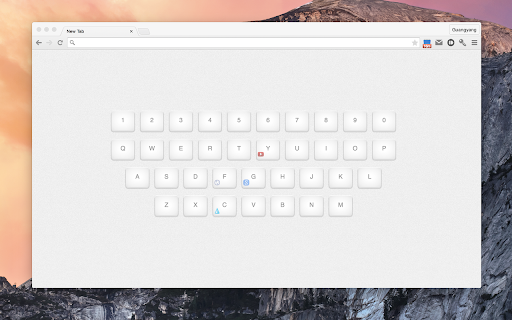
Open your favorite websites with visualized keyboard shortcuts. This is an alternative start page for Chrome. It will replace the new tab page while you can also set it as home page when startup. On the page there's only a virtual keyboard and you can set each key to the link you want. By pressing down any key on the keyboard, no matter the virtual one or physical one, you can jump to your favorite website as you set. Available shortcuts of opening links: Mouse left click In the same tab. Mouse middle click In a new tab in the background. In the same tab. Shift+ In a new tab in the background. Ctrl+click In a new tab in the background. Ctrl+Shift+click In a new tab and switches to the newly opened tab. Shift+click In a new window. For more information: https://github.com/ligyxy/KeyboardStartPage For Privacy Policy: https://github.com/gyli/KeyboardStartPage/blob/master/PRIVACYPOLICY.md

Losderi Virtual Keyboard Online
231 online virtual keyboards - tape your documents in the native and favorite language. Virtual keyboard online with 231 layouts in all languages of the world: Akan, Albanian, Arabic, Armenian, Azeri (Azərbaycan), Bambara, Bemba, Bengali, Blackfoot, Bosnian, Bulgarian, Chechen, Cherokee, Chichewa, Chinese, Croatian, Czech, Danish, Dari, Devanagari, Dinka, Divehi, Duala, Dutch (Nederlands), Dzongkha, English, Estonian, Ethiopic, Ewondo, Faeroese, Farsi-Persian, Finnish (suomi), French, Fulfulde, Ga, Gaelic, Gbe (British), Georgian, German, Greek, Gujarati, Hausa, Hebrew, Hindi, Hungarian, Icelandic, Igbo (Ndị Igbọ), Irish (Gaeilge), Italian, Japanese, Kannada, Kazakh, Khmer, Kikuyu, Kirundi, Korean, Krio, Kru, Kurdish, Kyrgyz, Lakhota, Lao, Latvian, Lingala, Lithuanian, Luganda, Luo, Luxembourgish, Macedonian, Malayalam, Maltese, Mande, Maori, Marathi, Mongolian, Multilingual, Nepali, Norwegian, Oromo, Pashto, Polish, Portuguese, Romanian, Russian, Sanskrit, Serbian, seSotho, Shona, Slovak, Slovenian, Somali, Spanish, Swahili, Swedish, Syriac, Tagalog, Tajik, Tamil, Tatar, Telugu, Thai, Tswana, Turkish, Turkmen, Uighur, Ukrainian, Urdu, Uzbek, Vietnamese, Wolof, Xhosa, Yoruba, Zulu.

Arabic and English Keyboard
Arabic and English on screen Keyboard . You can type on any input on a website you visit using Arabic or English from your screen. Easy to install and easy to use.

On-Screen Keyboard by LKWFahrer_300KMH
On-Screen Keyboard / Virtual Keyboard for chromium based browsers. On-Screen Keyboard / Virtual Keyboard » Langauges: German / English / Arabic / French / Russia » Works in --kiosk mode » variable position » zIndex: 2147483647 1. Add the extension 2. Restart the browser (safest way, reloading tab might also do it) 3. Manage the settings of the keyboard by clicking on the extension in your extension toolbar (top right of the browser window, next to the searchbar).

Bookmarks HotList
A Speed Dial in your toolbar, with easy set-up and keyboard shortcuts Set up your HotList in the Bookmark Manager, access it from the toolbar in a choice of layouts and colours. For keyboard access, the default shortcut to open the extension is Alt+B (or Command+B). To change the shortcut, paste this into the address bar: chrome://extensions/shortcuts When the extension is open, shortcut keys (1-9 and A-Z) are available for each bookmark. Hold down the Space Bar to reveal hints. Open multiple tabs: 1 click will open a bookmark in a background tab, but the Popup stays open. A 2nd click on that bookmark will close the Popup and activate the tab, or you can open other bookmarks instead. The only automated modification to your bookmarks will be the creation of a new folder to contain those displayed by this extension, and a bookmark to get you started. The Star icon is “Actions bookmark new list Icon” by Oxygen Team, available from Icon Archive under the GNU Lesser General Public License: http://www.iconarchive.com/show/oxygen-icons-by-oxygen-icons.org/Actions-bookmark-new-list-icon.html Icons used in promotional images are in the public domain and available from http://paomedia.github.io/small-n-flat/
