
lcakapipncajeiklnmblchgbehlfghnd
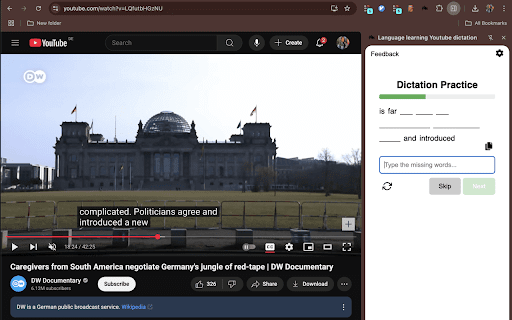


Allows language learners to use Youtube videos to dictate senteces and improve their listening and writing skills. ✨ Turn YouTube into your personal dictation coach and practice any language! Level up your listening and writing skills while watching your favorite videos! This Chrome extension automatically pauses your video, shows you a fill-in-the-blank sentence from the subtitles, and you type in the missing words — so you learn to really listen and write with confidence. 🎉 How it works: ✅ Watch any YouTube video with subtitles. ✅ Every few seconds, the video pauses. ✅ You see the last sentence with some words missing — type them in! ✅ Get it right? The video keeps playing! 🔁 Replay tricky sentences, set how long each sentence is, and control how often the video pauses — so you learn your way! Learn smarter, not harder! 🚀✨ How to use it? - Simply navigate to an youtube video and turn on the subtitles. - Open the extension and wait until it recognizes a sentence. The extension will pause the video and ask you to type the last words that were just said. It allows you to repeat the sentence, update the size of sentences to type and the time between new sentences.

Language Reactor
Learn languages effectively by watching films and series in your target language. Language Reactor is a powerful toolbox for learning languages. It helps you to discover, understand, and learn from native materials. Studying will become more effective, interesting, and enjoyable! (formerly called 'Language Learning with Netflix') Netflix The extension adds dual language subtitles, a popup dictionary, precise video playback controls and many more features when watching films and series on the Netflix website! YouTube Thousands of channels for you to watch on any topic you can imagine! Develop your comprehension with authentic language in context. Books and Websites Import text, Language Reactor will add a machine translation in your language and read the text with super-realistic text-to-speech. Our extension runs on Google Chrome on desktop and laptop computers running Windows and MacOS.

Youtube Video Transcript Generator
Use Youtube Video Transcript Generator to quickly transcribe Youtube video-to-text and summarize insights with transcript generator. 🚀 Ultimate Youtube video transcript generator – the perfect tool to generate full transcript from YouTube video and summarize important content. Quickly receive condensed information and use it for study or work. The Youtube video transcript generator and summarizer AI will transform the way you work with media content. 👀 Please Leave your feedback. We will be happy to receive it and improve the product for you! 🌟 Why Choose the Youtube Video Transcript Generator 1️⃣ Generate transcripts from youtube video effortlessly in just a few clicks. 2️⃣ Use it as an AI tool to generate transcript from youtube video for research, content creation, or accessibility. 3️⃣ Convert any YouTube video to transcript with youtube summarizer, perfect for students, creators, and professionals. 4️⃣ Access the Youtube summary AI to quickly summarize YouTube videos. 5️⃣ Simplify your movie analysis with the most reliable youtube transcriber. 🌐 Key Features ➡️ It works as a youtube video summarizer for quick insights. ➡️ Offers both youtube transcript AI and manual review options. ➡️ Compatible with any YouTube to text converter needs. ➡️ Enhances accessibility with accurate transcribe youtube video to text capabilities. 🎯 Designed for you 1) Content creators: Use the transcript generator from youtube video for captions and SEO. 2) Students: Quickly generate transcript from YouTube video for study materials. 3) Researchers: Analyze long content using the transcriber for valuable insights. 4) Professionals: Create minutes or reports with ease using the Youtube video to text converter. 5) Language learners: Enhance your skills by reviewing YouTube video summary. 🎯 Practical Use Cases 1. Save time by using the video-to-text converter to quickly summarize lengthy clips. 2. Improve accessibility for diverse audiences. 3. Repurpose clips into articles, blogs, or guides with the youtube video-to-text feature. 4. Create detailed educational resources with transcribe youtube video to text. 5. Analyze key points of interviews or speeches. 6. Smooth integration for creating transcript youtube video. 7. Updates with enhanced transctipt yt features. 🌟 Why You Need Youtube video transcript generator ✔️ Quickly generate a transcript from YouTube with unmatched accuracy. ✔️ Get insights with AI Youtube summary for faster comprehension. ✔️ Convert any YouTube video to transcript for study, work, or content creation. ✔️ Use the video transcript generator to save time and effort. ✔️ Perfect for creating summaries. ✔️ Quickly create insights with the youtube video link transcript generator 📂 Organize and Archive Content By using the youtube transcript generator, you can: 🟡 Convert media into structured text for future reference. 🟡 Integrate transcripts into knowledge bases or note-taking apps. 🟡 Archive valuable information using youtube to transcript capabilities. 📖 Learn and Grow Gain deeper insights with the youtube video transcript generator by transcribing talks, lectures, and interviews with this powerful tool. Whether you’re learning a new language, researching industry trends, or analyzing educational content, the yloutube transcript feature ensures you capture every detail. 📈 Streamline SEO and Accessibility Use the Youtube video transcriber to generate keyword-rich text that improves visibility on search engines. Create subtitles or summaries to make your content accessible to a global audience. The extension supports multiple languages, allowing you to transcribe or summarize clips from diverse sources. Even clips with captions or auto-generated subtitles can be converted with the YouTube to transcript extension. 🧩 No clip length restrictions. Generate transcripts from YouTube video of any duration. 🧩 Multi-purpose: Use as a youtube video transcript generator and summarizer AI. 🧩 Accurate text for captions, research, or keyword analysis. 🧩 No ads, no distractions, and complete data privacy. 🧩 Compatible with various educational, business, and creative workflows. 📌 How to generate transcript from YouTube video? Simply install the extension, open your desired link, and click Transcribe. 📌 Does it support all clips? Yes, it works with any clips. 📌 What languages are supported? Transcribe video to text with multiple languages. 📌 Is my privacy protected? Absolutely! The tool works locally, so your data stays safe. 👆🏻 Click Add to Chrome button and start transcribing media, saving time and enhancing your content creation process.

YuLaF – YouTube Language Filter. Language Immersion & Focus
Filter YouTube videos by language for focus, privacy, and language immersion. YuLaF helps you take control of your YouTube feed by filtering videos and channels based on language. If you are tired of seeing content in languages you don’t understand, YuLaF keeps your homepage, search results, and recommendations clean, relevant, and distraction-free. Perfect for: • Language learners who want true immersion • Users who want a focused YouTube experience • Anyone who values privacy-first tools • Language-Based Filtering Show only videos in the languages you choose and hide all others. • Homepage & Search Cleanup Remove irrelevant foreign-language content from YouTube Home and Search. • Real-Time Detection Detects video language using titles and descriptions instantly, without delays. • Privacy-First & Local No tracking, no analytics, no servers. All processing happens locally on your device. • Lightweight & Fast Runs quietly in the background without slowing down YouTube. • Simple Controls Select your preferred languages and enable or disable filtering with one click. 1. Install YuLaF in Chrome 2. Select the languages you want to keep 3. Refresh YouTube and enjoy a clean, focused feed YuLaF is a Chrome extension designed for clarity, focus, and transparency. Watch YouTube in the language you understand.

YouTube To Transcript: AI Summarizer & Chat
Get instant YouTube transcripts with AI summaries, insights, and chat features. Ideal for faster learning and note-taking. YouTube to Transcript instantly turns any YouTube video into text you can use. Get accurate transcripts, AI-generated summaries, key insights, timestamps, and even chat with the video’s content. Perfect for learners, researchers, and creators who want to save time and understand videos faster. ⚡ Instant transcripts for any YouTube video 🧠 AI summaries, key points & takeaways 💬 Chat with the video to ask questions or clarify content ⭐ Works directly on YouTube or via popup 📘 Great for studying, note-taking, and research
