
lcadkfljmcmcflpdbfmgcpjlejmpcplg
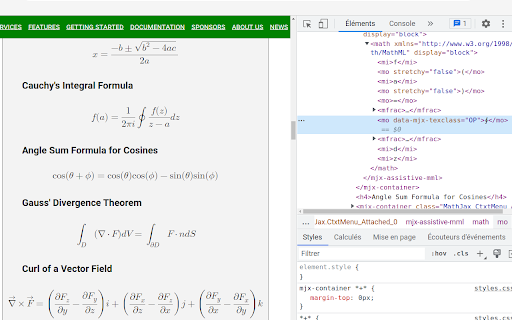
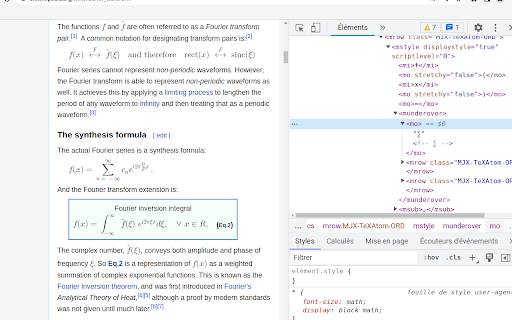
This add-on performs the following actions on each page to try and switch to native MathML rendering when possible: - Insert CSS stylesheets to display the hidden MathML output generated by MediaWiki, MathJax ≥ 3 and KaTeX ≥ 0.2. - Set the preference cookie of MathJax 2 so that it uses its NativeMML output processor. It is recommended to install math fonts for best MathML rendering.

LaTex Math Equations Viewer
Conveniently render LaTex Math formulas in the browser. Usage: Select the latex formula you want to render, then right-click and choose Render in LaTex Math Equations Viewer from the menu.

SE Chat MathJax
A Chrome Extension that enables the use of MathJax in all open chat windows. This extension allows Chrome to incorporate MathJax on any Stack Exchange Chat tabs. MathJax is a utility which performs typesetting on formatted LaTeX content. Users can freely create and share Math expressions and equations, as well as Chemical Molecular formulas and expressions using the included mhchem extension for MathJax. LaTeX is the standard for typesetting in many disciplines including, but not limited to, Mathematics, Physics, and Chemistry. It is widely used in academics for typesetting papers as well as individual expressions or equations. More information about MathJax and mhchem can be found here: https://www.mathjax.org/ https://mhchem.github.io/MathJax-mhchem/

PiTEX
Effortlessly extract mathematical equations from AI chatbots in your preferred format! PiTEX is your go-to tool for seamlessly copying LaTeX and MathML equations from AI conversations. ✨ Key Features: • One-click copying of math equations to WORD • Support for both LaTeX and MathML formats • Clean, intuitive interface • Smart hover detection • Zero configuration needed 🤖 Works with: • ChatGPT • Deepseek Chat • Abacus AI Perfect for students, researchers, and professionals who need to quickly grab mathematical equations from AI conversations for use in papers, presentations, or documents. Install π TEX now and make copying math equations from AI chats a breeze! 🚀

LaTeX From Web
Copy LaTeX formulas from web page with a hover and click. LaTeX From Web is a powerful browser extension that enables users to extract and copy LaTeX code from mathematical equations displayed on any website. With a simple hover and click, you can grab the exact LaTeX source without viewing the page’s HTML or developer tools. Key Features: - Wide Site Compatibility: Seamlessly works on Wikipedia, Stack Exchange, arXiv, and any other website using MathJax or KaTeX to render equations. - Cross-Browser Support: Fully functional on Chrome, Firefox, Edge, Safari, and other Chromium-based browsers. - Precision Copying: Each individual equation is recognized and linked to its correct LaTeX source, ensuring accurate results. - Smart Detection: The extension automatically identifies and activates only on supported equations, minimizing interference with other page content. - Modern UI: Comes with a clean, dark-themed popup panel designed for minimalism and usability. - Usage Tracking: Displays daily stats including the number of LaTeX copies and visited sites for your reference. - Lightweight and Secure: No third-party scripts or analytics — 100% privacy focused. How to Use: - After installing the extension, click on the icon in your browser toolbar. - Use the toggle to enable the extension. - Navigate to any webpage containing rendered equations. - Hover over any equation and a "Copy LaTeX" button will appear. - Click the button to copy the LaTeX code to your clipboard. - You can paste this code into your LaTeX editor, Overleaf, Notion, or anywhere you need it. Troubleshooting: - If the "Copy" button doesn’t appear, wait a moment for the equations to fully render, then try hovering again. - If the extension doesn’t respond, ensure it's toggled on in the popup and refresh the webpage. Bugs or glitches in older versions have been fixed in the latest release. License: This extension is open-source and distributed under the MIT License. Developed by Manoj Aryal Version 1.1 – Featuring enhanced LaTeX extraction and a streamlined, modern interface.
