
lbcbipoloacjakecofjkohgllhojdhhp


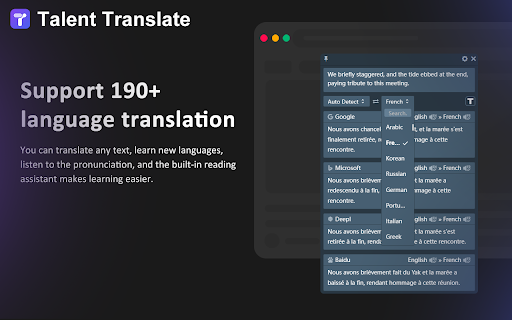
Professional aggregate translation, support Google, Baidu, Deepl, OpenAI and many other translation sources. Talent translation allows you to select text on any web page and translate it into the language you want. * Aggregate translation, which can display the results of various translation sources against each other so as to fit the best content for you. * Support for automatic reading aloud and the ability to customize settings for reading aloud. * Support multiple display results such as phrases, phonetic symbols, example sentences, etc. You can use it as an English learning tool. * Support a variety of user-defined configurations, and users can apply for the interface at the translation platform by themselves.

有道灵动翻译
【有道灵动翻译】使用有道翻译大模型,沉浸式网页翻译的首选工具! 实时对照翻译:让任何网页变成对照。图片翻译: 轻松提取图片文字。输入框即时翻译:输入中文轻松变英文。 v.10.16 修复新版谷歌中无法使用的问题 🔥功能亮点🔥: 1. 实时对照翻译:使用有道翻译大模型,无论是外文网站、学术资料还是国际新闻,一键转换为中英对照,提高阅读效率! 2. 图片翻译:图片右键即可开启,读懂图片上的文字 3. 音频翻译:转录翻译英文博客,听懂播客不用愁 4. 输入框即时翻译:无论是社交、邮件还是国际论坛,点击输入框旁图标,中文轻松变英文,跨文化交流从未如此简单! 🌟为何选择【有道灵动翻译】?🌟 提高学习与工作效率:无论是学术研究、工作报告还是日常浏览,我们都能助你一臂之力。 了解前沿资讯:无限量翻译音频和图片,让你理解更轻松 无缝跨文化交流:与外国朋友、同事或合作伙伴畅通无阻的交流。 👀简单介绍👀 是否因外文资料感到挫败?或与外国网友交流时语言不通? 【有道灵动翻译】是你的外文翻译首选工具!我们不仅仅是翻译,更是你的全球通行证,连接全球资讯和友人。学生、研究者或好奇的网页冲浪者,我们都能满足你。 🙏亲爱的用户🙏 觉得我们的插件有帮助?请给我们留下评价,帮助更多的人知道并受益!🌈,我们会不断优化翻译效果。

ScTranslator - Translator, Page Translator, Dictionary
Translate selected text with multiple sources, Webpage translating that have 3 display modes... An all-in-one translation extension. Translate with multiple translate sources at the same time / Various keyboard shortcuts / Translate history in single webpage / Separate translate window / Customize theme / Text preprocessing / Translation Collection / Webpage translating ... Preview GIFs of related features: https://github.com/chunibyocola/sc-translator-crx/discussions/19 * There are a variety of options in the options page for you to set up, so it is recommended to access the options page first after installing this extension to adjust a set of configurations that best suits you. This extension provide a variety of ways to correspond the inline web translation, and you can enable of disable these according to your preference. Support webpage translating, you can make it display original text and translation simultaneously. Support custom translate source, you can add custom sources which built by yourself or others. Support dark theme, you can also customize your own theme. Support PDF viewer, with the PDF viewer, this extension can be used on PDF files. Separate translate window will auto respond to the translate request when you click the "translate" item of context menus in the extension unavailable page. If you want to use the URL suffix of ".cn" in some translate source like "Bing", you can check the "Use '.cn' in URL" option. Notice: After installing or updating this extension, if you need to use this extension in existing webpage, please refresh the webpage first.

LuLu Translate
LuLu Translate, the world-leading cross-platform translation software, supports translation by selecting words.

会译:一站式 AI 翻译 Agent|对照式DeepL翻译|DeepSeek划词翻译|免费
一站式的免费AI翻译工具,由DeepL和DeepSeek双核翻译引擎驱动。提供沉浸式的网页双语对照翻译体验,支持PDF翻译(完美还原排版),视频双语字幕翻译(Youtube,B站),AI划词翻译(带音标及自然发音),截图翻译,在线翻译等全场景的翻译服务。 💡 会译 : 对照式翻译 & 沉浸式AI翻译,最好用的【AI沉浸式翻译】插件,智能识别网页内容,让你沉浸式浏览网页内容,支持多语种沉浸式对照翻译,支持划词、图片,PDF,视频字幕等多种方式翻译,体验沉浸式翻译体验。支持市面上所有web网站。 🧑💻 使用场景: 「会译 : 对照式翻译 & 沉浸式AI翻译」的能力非常强大,可以利用AI翻译能力帮助您更好地理解外文内容。使用场景非常广泛,比如阅读外文新闻、学习外语、浏览国外网站,查看外文文献等等。无论您是想增强自己的语言能力,还是需要快速了解外文内容,都能为您提供高效便捷的帮助。 🚀 快速使用入门: 1️⃣ 在浏览外文网页时,只需要一键点击“翻译当前网站”的功能按钮即可获得AI助力的沉浸式翻译结果。 2️⃣ 在浏览器中,悬停鼠标或者悬停鼠标+相应快捷键即可达到沉浸式翻译效果体验。 3️⃣ 自动检测原文语言,一键翻译成目标语言,省心省力,傻瓜式操作,沉浸式阅读网页内容。 4️⃣ 插件内置内置AI词典功能,拥有快速查词能力,随时随地查询陌生的单词。 ❓ 常见问题: Q: 如何开启/关闭翻译服务? A:点击网页右侧的插件小图标即可切换开启/关闭。 Q:插件的能力是基于什么的? A:插件的能力基于AI大模型,相比于机翻,能力更强大,翻译也会更加符合实际语境,从此告别晦涩难懂的外文阅读。 Q:关于权限 A:插件会读取和更改您网站的数据,所以需要用到相应浏览器权限,请允许会译-对照式翻译获取相应权限,但是请您放心,此权限仅用于提供翻译服务,不会用于其他。 📩 联系方式: 如果在产品使用过程遇到任何问题,或者有更好的产品优化建议,功能建议或者骂骂产品经理,都可发送邮件到:mopengcheng@nightingales.cn 或者访问官网网站找相应客服:https://huiyiai.net 如果我们的插件有帮助到您,请您给我们留一个五星好评,您的鼓励将会是我们持续努力的全部动力。如果您在使用过程中遇到问题,也欢迎随时留言或联系我们。🤝
