
lanneljlajlpfpkcgfkgiieedlbdomnd
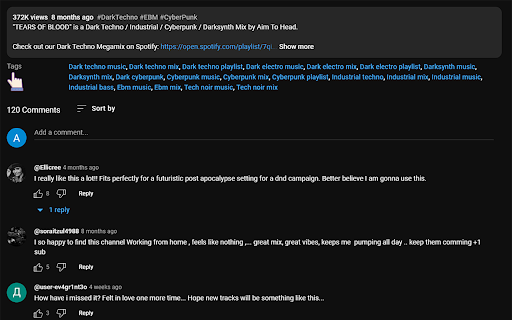
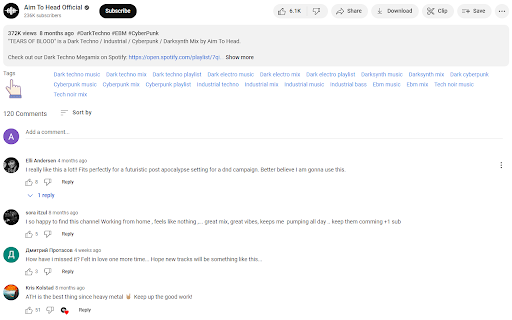
Want to see what tags your favorite Youtubers are using for their youtube videos? Once you install this software, the youtube tags are displayed beneath any youtube video you view. Try to boost the popularity of your own Youtube videos as a creator by figuring out what are the most popular tags to use for your own videos. Before you make your own Youtube videos, do more research and figure out how to make your videos more viral & popular by finding the most appropriate Youtube tags to use. This software is free of charge and you can find the Youtube tags below each Youtube video you view.

Autoskip for Youtube™ Ads
In 2025, enjoy YouTube™ the way it was meant to be, ad-free and uninterrupted!! Autoskip for YouTube™ is the ultimate YouTube™ ad blocker that helps you skip YouTube™ ads automatically, ensuring uninterrupted video streaming. Used by thousands globally, this Chrome ad blocker extension eliminates the need to manually click "Skip Ad," making it the perfect tool to block YouTube™ ads and enhance your viewing experience. Automatic Ad Skipping: This extension allows you to auto skip ads YouTube™ videos effortlessly, saving you time and delivering seamless playback. Block YouTube™ Ads: Removes pre-roll ads, banners, pop-ups, and sidebar ads, functioning as a reliable YouTube™ video ad blocker. Faster Video Loading: By preventing pre-roll ads, it speeds up video loading, making your streaming smoother. YouTube™ Live Stream Ad Blocker: Blocks ads during live streams, enhancing your real-time viewing experience. Block Video Ads Everywhere: Whether on YouTube™, Vimeo, or embedded videos, this extension ensures ad-free streaming across platforms How to Use Autoskip for YouTube™ Ads? Install the Extension: Click "Add to Chrome" to install this Chrome ad blocker extension. Skip YouTube™ Ads Automatically: The extension will automatically block ads, including banners and pop-ups, without requiring any extra effort. Enhanced Viewing: Enjoy a distraction-free experience with the best YouTube™ ad blocker and block video ads efficiently Why Choose Autoskip for YouTube™? Autoskip for YouTube™ is the ultimate solution to block YouTube™ ads and enhance your video streaming. This YouTube™ video ad blocker skips ads automatically and blocks various types of interruptions across platforms, including live streams and embedded videos. Whether you're looking for a tool to skip YouTube™ ads automatically, auto skip ads YouTube™, or need a reliable YouTube™ live stream ad blocker, Autoskip for YouTube™ is the perfect choice. Focus on what you love without delays or distractions, and enjoy faster, smoother streaming today. 1. Will Autoskip for YouTube™ work on all video platforms? Yes, this extension supports YouTube™, Vimeo, and several other popular video platforms. It also blocks ads on YouTube™ videos embedded in external sites. No, in fact, Autoskip for YouTube™ helps speed up video loading by blocking pre-roll ads. Yes, Autoskip effectively blocks ads even during live streams, allowing for uninterrupted viewing. Yes, Autoskip for YouTube™ Ads is free to use, providing ad-blocking benefits without additional cost.

YouTube Tags
The extension to view the tags of any YouTube video Browse the tags of any YouTube video with the YouTube Tags. Use your browser as before, because the extension for viewing tags from YouTube video does not affect its performance. Note: don't forget to reload the YouTube page after installing the extension.

Controls for YouTube™ Shorts
Add controls for videos of YouTube™ shorts, including shortcuts! Options: - Always visible controls: it's not necessary to hover over the video for the controls to appear. - Hide title and channel: when not hovering over the video, this option will hide the video information that overlays the video. - Control volume with Arrow Up/Down: allow you to control the volume with arrow keys without holding shift/cmd, it is optional, as many users use it to scroll between shorts. - Disable infinite loop. Keyboard shortcuts: - Left/Right arrow keys to backward/forward the video by 5 seconds. - Shift/Cmd + Up/Down arrow keys to increase/decrease the volume. - "M" to mute/unmute the video. - Spacebar to pause/resume the video.

YouTube Tag Extractor
Displays all tags from YouTube video under the video header The YouTube Tag Extractor extension is a handy way of extracting and revealing meta tags associated with any public video. Extracting YouTube Tags can be very insightful to understand how competitor videos and other high-performing videos are using these tags to boost their performance. YouTube tags are the hidden meta tags associated with videos on YouTube.
