
lannahclbgkjngcdpgdkjdedjjhlnicg
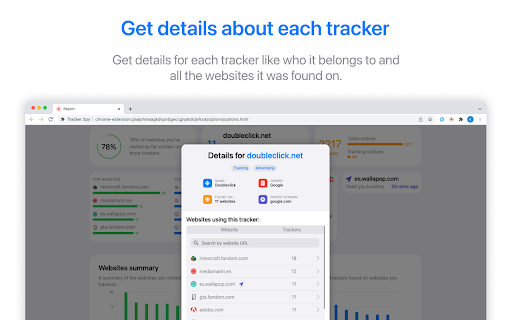

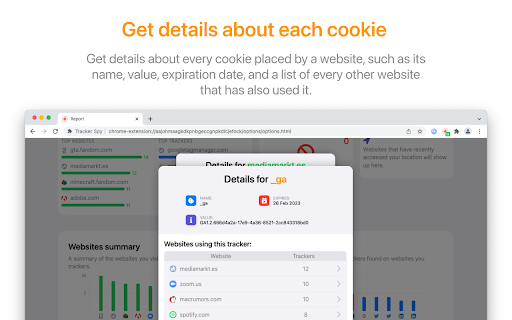
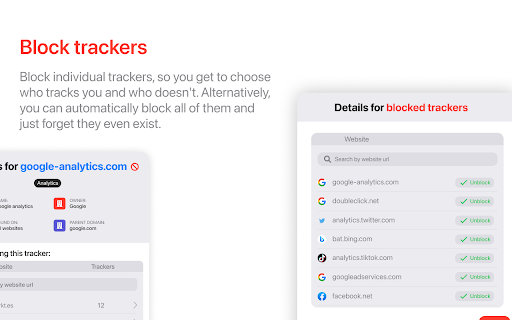
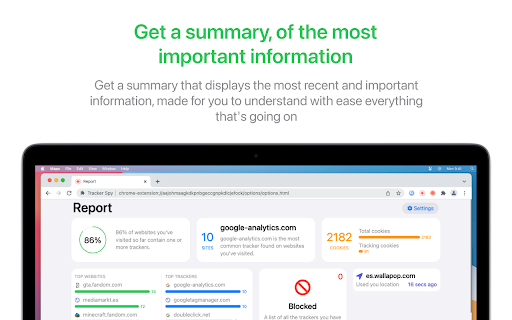
Get to know who is tracking you. Tracker Spy identifies trackers found within websites you visit, and creates a report that shows every tracker found, who it belongs to, and every website it was found on. You also have the option to block these trackers from loading, which removes ads and increases the website's performance. You can even see all the cookies each website has created, their value, when they expire, and the number of tracking cookies there are in your browser. Using all this information, Tracker Spy creates a summary that makes it easy for you to understand what's going on. Features: - Get to see all trackers found within a website. - Get information from each tracker (like who does it belong to and the websites it was found on.) - Get to see all cookies created by a website. - Block trackers from loading. - Clear all tracking cookies. - Hide your UserAgent. - Get to see what websites access your geolocation and when was the last time. - Spoof your HTML geolocation. - Improves page loading speed.

Site Spy
Track and monitor website changes with this web extension Know the moment any webpage changes. Site Spy monitors the sites you care about and shows you exactly what was added or removed with visual diffs. Use the extension or the web dashboard — your choice. Manage watches from the browser toolbar, or from the full dashboard at sitespy.app on any device. 🔍 Visual Diff Viewer — Side-by-side comparisons highlight every addition and removal. No more guessing what changed. 🖥️ Web Dashboard — Full dashboard at sitespy.app for managing watches, viewing diffs, and configuring notifications — works on any browser including mobile. 📸 Snapshot Timeline — Browse the complete change history of any tracked page. Compare any two versions. 🎯 Full-Page & Element Tracking — Monitor an entire page or target a specific CSS selector for precision tracking. 🏷️ Smart Tags — Organize tracked sites with color-coded tags. Filter and find what matters fast. 🌗 Dark & Light Themes — Clean interface that adapts to your preference. Two Ways to Track: • Track Current Page — One click adds whatever page you're viewing • Track Any URL — Enter any public website URL to start monitoring Great For: • Price and stock monitoring • Competitor website tracking • Documentation and changelog updates • News, blogs, and job postings • Any public webpage you want to keep an eye on Click the Site Spy icon in your toolbar Track the page you're on or enter any URL Get notified when something changes View exactly what changed with visual diffs

Analytics & Ad Blocker: Open Source Privacy Firewall
An extension for privacy and security for the internet. Analytics & Ad Blocker: The Ultimate Open-Source Privacy Firewall Take total control of your browser. Block ads, disable scripts, and visualize your carbon footprint with a professional-grade, open-source toolkit. Analytics & Ad Blocker is an open-source browser firewall that blocks ads and tracking scripts, lets you control heavy page resources, and shows what third parties try to load on the sites you visit. It is designed for people who want transparency, local processing, and granular controls instead of black-box blocking. Ad and tracker blocking: Blocks many common advertising and tracking requests Custom network request blocking: Create rules to block specific domains, URLs, or scripts Toggle content types: Quickly disable JavaScript, images, or videos to speed up pages and reduce load Live tracker dashboard: View third-party activity and request behavior in real time across tabs Local-first privacy: Blocking decisions and dashboard insights are processed on your device Open-source integrity: No paid whitelisting and no acceptable ads program Live tracker dashboard details. Use the dashboard to understand what a page is doing behind the scenes. Live tag monitoring: See tracker tags and third-party requests as they attempt to run Data audit visibility: Identify which sites are most aggressive with third-party connections Impact metrics: Correlate blocked requests with lighter page behavior for everyday performance gains. Extension Analysis: Have the ability to vet another extension to see if it is safely using permissions. Download source code for additional analysis. 🛠 Total Granular Control (New Features) Go beyond basic ad blocking. Our advanced toolkit allows you to toggle specific web elements on the fly to maximize speed and minimize energy consumption: Block Custom Network Requests: Create your own rules to stop specific domains or scripts from ever connecting. Toggle Content Types: Instantly disable JavaScript, Images, or Videos with a single click—perfect for "Ultra-Low Power" browsing and extreme speed. Open-Source Integrity: 100% transparent. No "Acceptable Ads" programs, no paid whitelisting. Check our code on GitHub and contribute to the mission. Stops common trackers and analytics tags from loading so you share less data by default Reduce page bloat by blocking unwanted network requests and optionally heavy resources Help you identify which websites load the most third-party scripts and requests Improves browsing focus by removing ad interruptions 📊 The Live Tracker Dashboard See exactly what’s happening behind the scenes. Our Custom Dashboard provides a real-time visualization of your privacy: Live Tag Monitoring: Watch exactly how tracker tags (Google, Adobe, Yahoo) try to fire across all your open tabs. Impact Metrics: See the direct correlation between blocked scripts and your reduced carbon footprint. Data Audit: Identify which websites are the "hungriest" for your data and your device's energy. View Other Extension Permissions: Have the ability to use AI analysis to identify if an extension is using their requested permissions appropriately. 🚀 Why We Outperform the Rest By combining the light footprint of uBlock Origin with the deep insights of Ghostery, we offer a unique "Sustainability Suite": A greener internet: By blocking JavaScript and heavy media, you drastically reduce CPU/RAM usage, extending your laptop’s battery life and lowering CO2 emissions. Privacy-First Architecture: We never collect your data. All request blocking and dashboard analytics are processed locally on your device. 🌍 A Greener Internet Starts with You The internet consumes more electricity than many countries. A massive portion of that is wasted on tracking scripts you never asked for. Analytics & Ad Blocker lets you opt-out of the waste and join the Globemallow.io mission for a sustainable digital future. Key Features at a Glance: Advanced Blocking: YouTube Ads, Google Analytics, Social Pixels, and custom CSS/JS. Performance: Drastically reduces page weight for 2x faster loading. Stop being a passenger in your own browser. Switch to the open-source ad blocker that gives you the dashboard, the control, and the conscience to browse better. Does it collect my data? No. The extension is built to work locally and does not require an account. Can I block a specific website or script that annoys me? Yes. You can add custom blocking rules for domains or specific requests. Will disabling JavaScript or media break sites? Some sites rely on scripts and media. The one-click toggles make it easy to turn resources off for speed, then turn them back on if a site needs them. Is it really open source? Yes. The project is open source so you can review the code, verify behavior, and contribute. Who is it for? Privacy-focused users who want fewer trackers and ads Power users who want per-site controls and custom rules Anyone who wants faster browsing and fewer unwanted third-party connections Take control of what loads in your browser with an open-source ad and analytics blocker that prioritizes transparency, local processing, and real user control.

Malware Protection
Malware Protection shields you from dangerous websites automatically Malware Protection shields you from dangerous websites automatically — no configuration needed. Every site you visit is scanned in real time against McAfee SiteAdvisor's threat database. If a domain is flagged as malicious or a phishing site, the page is blocked instantly and replaced with a clear warning — before any harmful content can load. You can still choose to proceed to the site if you believe it was flagged in error. Features: 🛡️ Real-Time Protection — Every website is scanned the moment you navigate to it. Dangerous domains are blocked before the page loads. 🔍 Search Advisor — Safety icons appear directly on Google and Bing search results, so you can see which links are safe before you click them. ⚡ Smart Caching — Scan results are remembered for the duration of your session, so previously checked sites load instantly without repeated lookups. ↩️ False Positive Override — If a safe site gets wrongly blocked, a single click lets you proceed without disabling the extension. Privacy: Domain lookups are sent to McAfee SiteAdvisor for scanning. No personal data or browsing history is collected or stored by this extension. Free. Open source with public license (GPLv3)

FDev Security
You are protected absolutely with our awesome features: Realtime protection, block seen and typing indicator, blur messenger! # INTRODUCTION You are often afraid about "malicious" websites on the internet. It seems that you cannot know when your sensitive data was stolen by attackers. And when your information, data is hacked by someone (such as banks account, Facebook, ...), you just realized that your data is very importance and you begin to care about the security when you browsing in the Internet. Let's CoderDocs Security protect you with real-time protection feature. And we also has another awesome features like: Facebook (+Zalo) privacy, Privacy Web Experience, Blur Messenger, Malware URL scanning, .... # FEATURE 1: REAL-TIME PROTECTION When you install CoderDocs Security extension successfully, this feature will enable real-time immediately. This feature is the most important, so you cannot disable it. When you visit a malware site, the warning popup will be displayed to warning you about this malicious site. # FEATURE 2: FACEBOOK (+ZALO) PRIVACY You can easily enable / disable this feature by check or uncheck the checkbox of every small functions. This feature includes: - Block "Seen" indicator: When you receive a Facebook message, you click to view this message, the sender will see the status "seen" in their message space. But if you enable this function, the sender can not see the status "seen" any more. They never know whether you saw the message or not. - Block "Typing" indicator: Similar with block "seen", the sender can not see the "typing" indicator when you compose the message in Facebook message space (the three dots indicator "..."). - Block "Seen" status in Story: When you click to view the Story of someone, they will know that you have seen their Story. But with this function, nobody can know that you saw their Story. You can click and see your ex-girlfriend any time. - Block "Typing" indicator in Comments space: When you are typing the comment in any post. People can see the indicator "Someone are typing ...". But if you enable this function, this indicator will be disappear forever. - NOW, it support block seen and typing indicators in Zalo web version. Note: Block "Seen" status in Story and block "Typing" indicator in Comments are disable now because some technical problems. # FEATURE 3: PRIVACY WEB EXPERIENCE You can also easily enable / disable this feature by check or uncheck the checkbox of every small functions. This feature includes: - Block important sites when you absent: When you go out, you forgot to lock your computer, someone can open you browser, they can open some important site such as Facebook, Gmail and see your sensitive information. If you don't want that thing happen. Let enable this function. It allow you to block some importance sites that you don't want anyone access to if you have to lend your computer or you go out. - Block tracking Ads Scripts: This function allow you to block the tracking scripts like Facebook, Google. For example, you go to an e-commerce website, when you comeback to Facebook, the previous items in e-commerce website will be display. You can enable this function to block them. - Browser for kids: This function allow you to block almost porn sites in the world. If your kids uses your computer, let enable this function. # FEATURE 4: URL MALWARE SCANNING This is a feature that allow you to operate directly on the user interface. Let go to menu path: TOOLS / SECURITY / MALWARE SCAN and explore this feature. This feature allow you to analyze any URL and inform for you if the URL will be redirected to the website that contains any malware/virus. # FEATURE 5: BLUR MESSENGER This feature allow you to hidden all information when you chat with someone in the Messenger (messenger.com). Just don't care anyone who often peek at your messages. It only work with Messenger - Open Messenger (messenger.com) - Click Settings Icon in the left side bar. - Enjoy the new Messenger feature. More information about CoderDocs Extension: https://lenhatthanh.com/en/coderdocs-security/
