
lakceeelkccloehcppjkiaifkkmfcdin
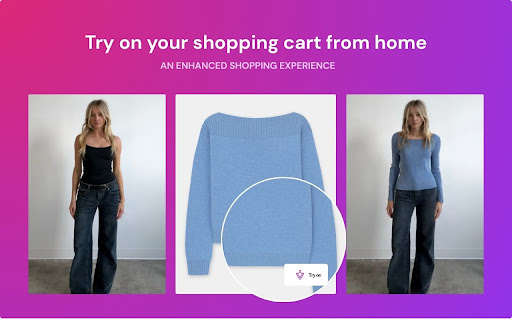


Experience the perfect fit — try on clothes from your favorite brands online! Vesti AI– The AI Fitting Room for Every Website Vesti is reinventing the way people shop online. Our AI-powered Chrome extension lets you upload a photo of yourself and instantly preview how clothing from any website would look on your body. Whether it’s Nike, Zara, or White Fox – Vesti brings the fitting room to your browser. No more guessing how something will fit or look! …to build the most immersive and social shopping experience on the internet. From everyday consumers to fashion influencers, Vesti helps people: ✔️ Discover their style ✔️ Try on anything ✔️ Share their looks — all with just a click.

VoicyMail: The Ultimate AI Email Assistant for Gmail
VoicyMail: Your AI Email Assistant Get pro-level emails, powered by voice & text both. VoicyMail: The Ultimate AI Email Assistant for Gmail Improve your email accessibility and productivity with VoicyMail, the easiest way to compose polished, professional emails using your voice or text, directly inside Gmail. Whether you're a busy professional, founder, HR, or anyone who lives in Gmail, VoicyMail is your one stop solution for frictionless, high quality communication. ◦ Seamless Gmail Integration: Compose or reply smarter directly in Gmail no need to switch tabs or copy-paste. Instantly insert AI generated emails in your drafts and send in seconds. ◦ Context Aware AI: The AI understands your intent and message purpose, no need to waste time on word to word dictation or typing a very descriptive message keep it relevant , concise and Our AI will generate a professionally crafted email within seconds. ◦ Voice to Email: Simply record your message and let advanced AI instantly transform your speech into a perfectly structured, grammatically correct, and context aware email. Save time and boost productivity with lightning speed . ◦ Text to Email: Don't feel like Speaking ? Type a quick note and VoicyMail’s AI will expand, improve, and rewrite your draft for optimal clarity, grammar, and style. ◦ Smart Formatting: Automatic subject lines, paragraphs, and bullet points ensure your messages always look professional. ◦ Privacy First Design: Your voice data is processed locally in your browser and never stored your privacy is always protected. ◦ Customizable Tone: Choose from professional, friendly, apologetic, urgent, marketing, or HR specific styles… you name it, VoicyMail adapts the message for your audience. ◦ Flexible Workflow: Use voice, perfect for everyone from executives to support teams or those with accessibility needs. ◦ Write Emails 10x Faster: No more struggling with wording or tone. Just speak your mind casually or however you want and get a finished email instantly. ◦ Professional Quality Every Time: Grammar and spelling checks, context aware formatting, and polished language for every message. ◦ Boost Productivity: Talk your thoughts, let AI do the writing, and get more done in less time. ◦ Privacy and Security: Local processing and no server side data storage for maximum safety. ◦ Perfect for Teams and Individuals: From sales follow ups and HR queries to personal outreach. VoicyMail scales with your needs. ◦ Business Professionals: Instant client communication, professional internal updates. ◦ Sales Teams: Personalized outreach at scale, rapid follow ups. ◦ Customer Support: Quick, consistent responses to tickets and customer queries. ◦ Content Creators: Effortless collaboration and sponsor communications. Try VoicyMail Now! Get 5 AI powered emails for free , no signup required. Upgrade to VoicyMail Pro for unlimited use. 🛠️ How to Use the VoicyMail voice to email extension 1. Install the Extension: Download VoicyMail from the Chrome Web Store. 2. Click on Compose or Reply: ◦ After that Click on the mic icon in Gmail. ◦ Record your message or type a quick note. ◦ Click on Generate Email ◦ With one click, It will insert a well crafted email of your favourite selected tone into the Gmail compose window, review and tweak the AI generated draft if needed and send! ◦ You can enable private mode to mask sensitive data like emails,phone numbers,company name,zip codes,date's etc. Let VoicyMail be your AI email writer, AI email assistant, AI email generator and help you write emails much 10x faster just by speaking. Q: Do I need to dictate word to word or type complete emails and then it will draft using AI? A: No ! You Just need to give context whether you are speaking or typing and it will draft a well crafted email automatically once you click on generate email. Q: Is my data secure? A: Absolutely. All voice processing is done locally on your browser and never stored on our servers. You can also enable the private mode to mask sensitive information. Q: Is VoicyMail free? A: Yes! You get 5 free AI powered emails on the starter plan. For unlimited usage, upgrade to VoicyMail Pro. Q: Can I customize the email’s tone? A: Yes! Pick from a variety of tones like professional, friendly, urgent, HR specific, etc. before you generate your email. Upgrade your email workflow and experience the speed, privacy, and power of AI driven communication. Install VoicyMail today and change the way you write emails!

Global Tech Mass Message Sender
Global TECH Mass Message Bulk SMS Sender is a powerful and user-friendly tool designed to simplify your bulk messaging needs. Whether you're a business owner, marketer, or just someone looking to reach a large audience, this Chrome extension allows you to send personalized SMS and WhatsApp messages to multiple recipients with ease, directly from your browser. Key Features: - Bulk Messaging: Send messages to unlimited contacts in just a few clicks. - Customization: Personalize each message with custom fields for a more tailored experience. - Fast and Reliable: Enjoy swift delivery of messages with real-time status updates. - Contact Management: Import and manage your contact lists effortlessly from Excel or CSV files. - Multi-Platform Support: Send messages via Global Tech Mass Message to engage your audience on their preferred platform. Boost your communication efficiency with Global TECH Mass Message Bulk Sender and connect with your audience instantly.

Bookmark King – Save & Return to Text Instantly
Save and scroll to highlighted text anywhere on your current or previous pages! — works even on ChatGPT! Bookmarks are now created only when you use the hotkey or context menu (no more auto-bookmark on every highlight) Improved stability on dynamic sites like ChatGPT, Medium, and news sites Import & export bookmarks from the Settings panel In-popup user guide to explain common issues and workarounds !!! – Bookmark King highlights and saves text on any site you choose — to do this, it needs permission to read the text you select when you invoke the extension and remember where it lives. We never collect, log, or send your data anywhere. All highlights are stored locally in your browser. 🔹 Bookmark King 👑 – Highlight and Save Text Anywhere! 👋 Made by Students for Students – your support keeps this dream alive! 📌 Highlight. Save. Jump Back Instantly. Bookmark King is the easiest way to save and return to specific text on any webpage. Highlight a passage, press the hotkey, name your bookmark, and it’s saved — forever linked to that exact spot, even after reloading the page or coming back later. ✅ Highlight-to-Bookmark (on demand) Highlight any text on any page, then either: Right-click and choose “Bookmark this Message” You’ll be prompted to name your bookmark, and Bookmark King will remember exactly where it was. ✅ Scroll-Back Functionality From the popup, click a bookmark and Bookmark King will scroll you back to that highlight, even on many dynamic pages. ✅ Popup Bookmark Manager Use the toolbar icon to open a sleek popup that lets you: View all bookmarks for the current site (or all sites) Rename or delete bookmarks with a click ✅ Show/Hide Highlights Toggle all on-page highlights with a single switch if you want to read without visual noise. ✅ Smart Retry Engine On pages that load content slowly or dynamically, Bookmark King retries applying highlights so they appear as soon as the content is ready. ✅ Site-Specific Bookmarking Bookmarks are grouped by website origin, so your notes stay organized and tied to the sites they came from. ✅ Import / Export Backup or move your bookmarks via JSON from the Settings panel. ✅ Dark & Light Mode Switch between Dark Mode and Light Mode from the Settings modal to match your vibe (or your OS theme). ✅ No Account Required No login. No signup. Everything is stored locally in your browser. Press Alt+Shift+M or use the right-click menu to create a bookmark. Name your bookmark in the small prompt window. Bookmark King saves the text, URL, and an anchor to that spot. Later, open the popup, click the bookmark, and Bookmark King scrolls you back and re-highlights that text (where possible). PDFs: Support is limited and works best for PDFs rendered in standard in-browser viewers. Some embedded/custom PDF viewers may not bookmark correctly. Rapidly changing pages: Apps that constantly rewrite the page (live chats, auto-updating feeds) can still delay or break highlight re-application in edge cases. I’m continuously improving support for dynamic content and tricky sites. Access to active tab & all sites – So it can inject the highlighting logic on pages you visit when you use the hotkey or context menu. Storage access – To store your bookmarks on your device. We never track, transmit, or analyze your browsing activity. All bookmarks are stored locally in your browser. No external servers. No analytics on what you highlight. Hi! I’m a solo student developer building Bookmark King in my spare time. I made this because I constantly lose important lines in long articles, research papers, and ChatGPT conversations — and I wanted a way to jump back instantly. Your support — even a small amount — makes a huge difference. 🙏 If you love this project, please consider supporting me (e.g. via Patreon) so I can keep Bookmark King ad-free and keep pushing real features instead of ads. Optional cloud sync for bookmarks and backups Folders / tags to organize your saved notes Deeper support for complex editors (Google Docs, more chat apps) More theme customization and appearance options Extra shortcut actions and faster workflows for power users ⭐️ Thank You! Thanks for trying Bookmark King. I hope it saves you time, keeps you focused, and gives you back control over your web reading and research.

EmptyBG - AI Background Remover
Remove backgrounds from any image with AI. Right-click any image to instantly remove its background and copy to clipboard. EmptyBG – AI Background Remover for Chrome Say goodbye to time-consuming image editing. EmptyBG is the fastest, most accurate AI background remover built for Chrome users. Remove backgrounds from any image online in just one right-click, and have the cutout instantly copied to your clipboard—ready to paste into your favorite design tools, product listings, presentations, and more. Whether you’re a shop owner, content creator, designer, student, or marketer, EmptyBG saves you hours of tedious work, giving you clean, professional-looking images in seconds. 🚀 Why EmptyBG Beats the Rest 🎯 AI-Powered Precision – Handles tricky edges like hair, fur, and shadows for perfect cutouts every time. ⚡ Lightning Fast – Get your processed image in seconds, without leaving your browser. 💡 Perfect for Every Use Case – Product photos, social media graphics, presentations, ID pictures, ads, and more. 🔒 Privacy-First – No unnecessary data collection. GDPR-compliant and built with security in mind. 🌍 Cross-Platform – Works seamlessly with Canva, Photoshop, PowerPoint, Google Slides, Shopify, Amazon, Etsy, and more. Install the EmptyBG extension from the Chrome Web Store. Select "Remove Background with EmptyBG." Our AI processes the image and copies it directly to your clipboard. Paste anywhere instantly—your favorite design app, social post, ad creative, or document. 🎯 Perfect For... E-commerce sellers – Instantly create clean, professional product images for Amazon, Etsy, Shopify, and eBay. Marketers & advertisers – Speed up ad creative production with ready-to-use transparent images. Content creators & influencers – Make high-quality thumbnails, social posts, and branded visuals faster than ever. Educators & students – Add clean, background-free images to presentations, reports, and projects without leaving your browser. Free Plan: Remove up to 2 images per day, no sign-up required. Premium Plan: Unlimited removals, priority processing, and faster AI performance for power users. Unlike other background remover tools that require uploading images to separate websites or saving files before use, EmptyBG removes all friction. Your image goes straight from the web to your clipboard, ready to paste—cutting your workflow time in half. Plus, our advanced AI model delivers cleaner cutouts than most competitors, especially on complex images, while keeping your privacy protected. 💡 Pro Tip: Use EmptyBG alongside Canva or Google Slides for rapid creative production. Just paste the cutout and start designing—no background erasing needed. Install EmptyBG now and experience the fastest, cleanest way to remove image backgrounds directly from Chrome. The best AI background remover for e-commerce, content creation, marketing, and everyday productivity—right-click, remove, paste, done.
