
lajphkkjljibbnoloaifdcglhkjmpnnk

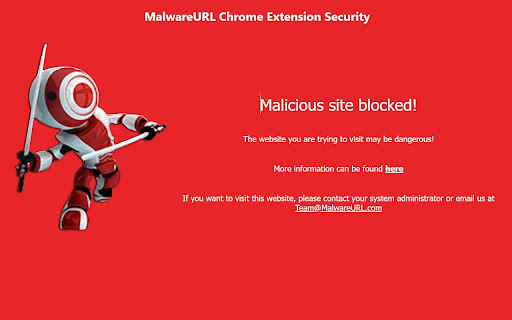
Checks visited websites against MalwareURL's world renowned security databases for a safer web navigation Our new MalwareURL Safe Browsing Extension provides exceptional protection against malicious web sites such as Phishing, ransomware, viruses and other online threats. When you visit a web site, it will be checked in realtime against our extensive databases of malicious web sites. Our cybersecurity databases contain over 15 million threats with 14 years of historic data and thousands of new threats added daily. Our security databases are trusted by the world's leading antivirus and security providers, governmental institutions as well as by Google via its VirusTotal service. Of course, you already have antivirus protection on your PC, laptop or server that gives you some level of protection. However, we specialize in detecting and blocking the most recent and fast-moving threats that criminals put on the Internet in ways that often avoid detection by typical antivirus products. Our Extension is a necessary compliment to your existing cybersecurity protection measures. Our Safe Browsing Extension is completely transparent and requires no user configuration or interaction. You simply install it in the normal way and you will be protected. In the event that you visit a malicious web site or IP address using your Google Chrome browser, our Extension will prevent the malicious web page from loading and you will receive a red MalwareURL warning page. You can also use this warning page to visit our web site and look up the URL to better understand why it has been blocked. Our protection is primarily designed for business and organizational usage and we provide detailed documentation about how to deploy it automatically using software distribution tools such as Windows Active Directory. That said, it is also an excellent option to improve browsing safety for home and small business users.

Total WebShield: Chrome Antivirus Protection
Enjoy a safer internet browsing experience, secure from phishing and malware. Total WebShield is modern web browsing antivirus protection for Chrome. Using cloud-based technology, Total WebShield is an advanced first line of defence against online malware, phishing and other harmful websites. Combined with a suite of privacy protection tools, Total WebShield provides a clean browsing experience whilst quietly protecting your computer from online threats in the background. Total WebShield blocks access to websites which could harm your device or put your identity at risk. This eliminates the chances of falling for online scams and socially engineered tricks, and perhaps most importantly, suffering viruses or malware. Total WebShield utilises the most up to date block lists to ensure your safety online. Powered by AI, threat research and crowd-sourced reports, Total WebShield is able to untangle and uncover networks of dangerous websites and put blocks in place at source. - Protects against online threats - First line of defence for blocking malicious, phishing and scam websites that could result in computer damage, identity theft or financial fraud. - Stop Nuisance Browser Notifications - Prevent the annoyance of websites asking you to subscribe to notifications, quickly access and manage previously subscribed notifications and experience cleaner browsing. - Dark Web Monitoring - Stay on top of, and react quickly, to any data breaches which expose private data such as account passwords. - Tracking and Online Privacy Protection - Prevent being stalked or tracked around the web, keep your private data private and see a less biased picture of the online world. Get back in the driving seat today and take full control of your browsing experience with Total WebShield for Chrome 7-day free trial, no credit card required. The trial license provides complimentary access to our premium service. Upon expiration you have the ability to continue to use some security features free of charge but will require a premium license if you wish to remain protected against dangerous websites. Premium licenses also include free access to our Security Suite of features at TotalAV. Industry certified antivirus software with real-time protection for Windows, MacOS, iOS and Android. We collect your IP address on initial installation in order to allocate your free trial access without requiring any personal information. You will only be required to provide personal details such as your name, email address & payment credentials should you wish to activate a premium subscription. Further details can be found on on pricing page https://www.totalwebshield.com/pricing Total WebShield will not store or log your data, your privacy is our priority.

CyberGuard - Online Privacy & Security Protection
Free online security scanner. Detects network threats, unsecured WiFi, trackers, and AI risks. No ads, no tracking, no paywalls. CyberGuard keeps you safe online without collecting your data, showing ads, or locking features behind a paywall. It's completely free. We built CyberGuard because online security tools are either too complicated or too expensive. This extension runs security checks on your network and browser to catch threats before they become problems. When something looks risky, you get a straightforward alert with clear steps to fix it. Everything runs locally on your device. We don't track what you do, store your data, or sell your information. Your privacy is yours. We believe security shouldn't be a luxury. Download CyberGuard today and browse with confidence. 🌟 Key Features 🔐 Real-Time Threat Detection Scans for common cyber risks like unsecured WiFi, MITM attacks, DNS hijacking, ARP spoofing, port scans, WebRTC IP leaks, HTTPS connection status, TLS certificate validation, and open ports on your network. 📡 WiFi & Network Safety Automatically checks for insecure or fake public WiFi networks that could compromise your data. Verifies VPN and proxy connections to ensure you're truly protected. 🕵️♂️ Tracker & Fingerprinting Blocker Blocks ad trackers, cross-site cookies, and fingerprinting scripts to protect your identity online. Monitors clipboard access and detects JavaScript injection attempts. 🤖 AI Security & API Protection Warns you if websites have exposed AI keys from OpenAI, Anthropic, Google AI, and other providers. 🔍 AI Traffic Monitoring Spots suspicious activity when you use ChatGPT, Claude, and similar tools. Blocks cross-origin injection attempts targeting AI applications. 🚨 Sensitive Data Alerts Warns you before submitting personal info to AI services. Scans input fields for sensitive data like passwords, credit cards, and personal identifiers. 📁 File Privacy Scanner Checks files for location data and personal details before upload. Detects metadata that could expose your privacy when sharing documents. 🛡️ Session Protection Guards your conversations on AI platforms from hijacking attempts. Protects against session theft on ChatGPT, Claude, Gemini, and other AI services. ⚔️ Prompt Injection Defense Protects against malicious prompts trying to manipulate AI tools with optional LockLLM integration for advanced AI security scanning. 🎥 Webcam & Mic Monitoring Get notified if any site attempts to access your webcam or microphone without your knowledge. ⚡ One-Click Scan with Smart Alerts Quickly check your current connection for vulnerabilities and get easy-to-follow fix suggestions, no tech skills needed. Most scans finish in under 5 seconds. 📊 Performance Tools Built-in internet speed test and connection quality monitoring to help you understand your network performance. ☁️ Sync Across Devices Save your security preferences via Chrome Sync, totally private, no personal data shared. 1. Zero Data Collection We don't track your browsing, collect your information, or send data to any servers. All security checks run on your device. The only time data leaves your browser is when you use the optional LockLLM integration, and that's only the text you're scanning, nothing else. 2. Built for Everyday Users CyberGuard is simple, intuitive, and doesn't require any technical knowledge to use or understand. Clear explanations and actionable steps for every alert. 3. Detects More Than Just Ads Unlike basic blockers, CyberGuard scans your network environment and browser activity for real cyber threats including MITM attacks, DNS hijacking, and AI-specific vulnerabilities. 4. Fast & Lightweight Optimized for performance so your browsing stays fast and smooth, with no lag or heavy memory use. Uses minimal resources and won't slow down your browser. 5. Transparent & Trustworthy Open about what we do and what we don't. No dark patterns, trackers, or sketchy upsells. No analytics, no tracking pixels, no "anonymized" data collection. 📈 Perfect For: - Remote workers who connect to public WiFi - Privacy-conscious users who want more than just ad blocking - Developers and security researchers testing systems - Students on university networks - AI users who want to protect their prompts and API keys - Anyone who wants straightforward protection without technical knowledge or paying for subscriptions 📥 Get Started 1. Install CyberGuard 2. Click the icon and hit Scan 3. Review any alerts and follow the fix steps 4. (Optional) Add your LockLLM API key in Settings for AI security features AI Security Features We added a full suite of AI-specific security checks: • Detects exposed API keys for OpenAI, Anthropic, Google AI, and other providers • Monitors AI platform traffic for suspicious patterns • Scans for sensitive data in input fields before you submit • Browser AI Guard integration with LockLLM API for real-time prompt injection detection • Protects against session hijacking on ChatGPT, Claude, Gemini, and other AI platforms • Blocks cross-origin prompt injection attempts Enhanced Privacy • File metadata scanner warns about location data and personal info in uploads • Improved clipboard protection • Better fingerprinting detection UI Improvements • Cleaner settings interface with organized sections • API key configuration for LockLLM integration • Real-time connection testing • Better error messages and status indicators Download CyberGuard today and browse with confidence.

AntiPhish.AI – Email Security for Gmail
AntiPhish.AI is a Chrome extension designed to protect you from phishing attacks. AntiPhish.AI Chrome Extension: Your Ultimate Shield Against Phishing Attacks In today's digital age, cyber threats are more sophisticated than ever, with phishing attacks being one of the most common and damaging forms of cybercrime. These deceptive attempts to steal personal information can compromise your financial security, privacy, and peace of mind. Introducing AntiPhish.AI, a powerful Chrome extension designed to protect you from phishing attacks in real-time, ensuring a safe and secure browsing experience. Real-Time Phishing Detection AntiPhish.AI uses advanced algorithms and machine learning techniques to detect phishing attempts as they happen. It analyzes websites and emails in real-time, identifying malicious links and warning you before you can be tricked into revealing sensitive information. Instant Alerts: Receive immediate notifications when you encounter a suspicious email. Comprehensive Scanning: The extension scans links and email content for known phishing indicators. Artificial Intelligence-Powered Protection Our extension leverages artificial intelligence to stay ahead of emerging phishing tactics. By continuously learning from new data, AntiPhish.AI adapts to recognize and block even the most sophisticated phishing schemes. User-Friendly Interface AntiPhish.AI is designed with simplicity in mind. Its intuitive interface ensures that users of all tech-savviness levels can navigate and utilize its powerful features without hassle. Easy Installation: Add AntiPhish.AI to your Chrome browser with a single click. Minimal Disruptions: Non-intrusive notifications allow you to browse without unnecessary interruptions. Privacy-Focused Design Your privacy is our priority. AntiPhish.AI operates without collecting or storing your personal data. All processing occurs locally on your device, ensuring complete confidentiality. No Data Collection: We do not store or share your browsing history or personal information. Secure Processing: All threat detection happens within your browser. URL and Domain Analysis: Checks the authenticity of website URLs and domains against a database of known malicious sites. Content Inspection: Scans web page content for phishing characteristics, such as fake login forms or requests for sensitive information. Email Link Verification: Examines email links and attachments for potential phishing threats. Behavior Monitoring: Observes website behaviors, such as redirects and script executions, that may indicate malicious intent. User Alerts: Provides clear warnings and guidance when a potential threat is detected. Protect Your Personal and Financial Information By blocking phishing attempts, AntiPhish.AI safeguards your sensitive data, including passwords, credit card numbers, and personal identification details. Prevent Identity Theft: Avoid falling victim to scams that can lead to identity fraud. Secure Transactions: Shop and bank online with confidence, knowing your information is protected. Enhance Your Cybersecurity Posture AntiPhish.AI adds an extra layer of security to your browsing experience, complementing existing antivirus and security measures. Comprehensive Protection: Covers gaps that traditional antivirus software may miss. Stay Informed: Educates users about potential threats and safe browsing practices. Confidence Online: Navigate the internet knowing that AntiPhish.AI has your back. Reduce Anxiety: Minimize the stress associated with potential cyber attacks. Individuals For everyday internet users, AntiPhish.AI provides essential protection against common phishing scams encountered while browsing, emailing, or engaging on social media. Professionals Protect work-related information and maintain professional integrity by preventing data breaches that could result from phishing attacks. Businesses Implement AntiPhish.AI across your organization to protect employees and company data, reducing the risk of costly security incidents. Compliance Support: Helps meet regulatory requirements for data protection and cybersecurity. Easy Installation and Use Download the Extension: Visit the Chrome Web Store and search for "AntiPhish.AI." Add to Chrome: Click "Add to Chrome" and confirm the installation. Activate Protection: The extension activates automatically, starting your protection immediately. Regular Updates and Support We are committed to providing the most effective protection against phishing threats. AntiPhish.AI receives regular updates to enhance performance and security. Automatic Updates: Stay protected with the latest features and threat intelligence. Customer Support: Access our support team for assistance with any questions or issues. Q: Does AntiPhish.AI slow down my browser? A: No, AntiPhish.AI is optimized for performance and operates seamlessly without impacting your browsing speed. Q: Is my personal data safe with AntiPhish.AI? A: Absolutely. AntiPhish.AI does not collect or transmit your personal data. All threat detection is performed locally on your device. Q: Can I use AntiPhish.AI alongside other security software? A: Yes, AntiPhish.AI is designed to complement your existing security measures, providing an additional layer of protection. Take Control of Your Online Security Today Don't leave your personal and financial information vulnerable to cybercriminals. With AntiPhish.AI, you can proactively defend against phishing attacks and browse the internet with confidence. Download AntiPhish.AI Chrome Extension Now

Phishy.pro - Phishing | Malware Scanner
Phishy.pro tool designed to detect and prevent phishing attempts. Discover potential phishing with the linked web page. Phishy.pro serves as an indispensable and swift security tool. Our phishing URL checker detects if a domain is used for phishing campaigns, is associated with crypto scams or used in malware campaigns. Empowers any user navigating the internet to verify the safety of links and URLs, ensuring a secure online experience. It operates seamlessly and efficiently. When you Scan, it initiates a search process to assess the potential phishing risks associated with the linked web page, specifically regarding phishing campaigns.
