
labdpnhmdmbddlonokmdfmefhppcppmn

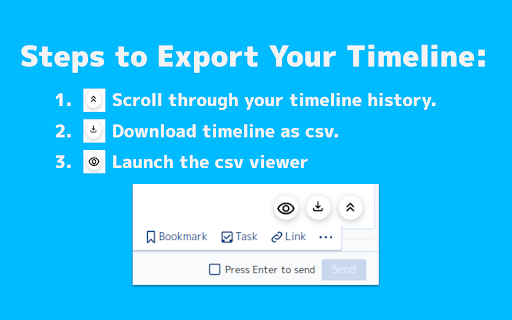

Boost your ChatWork experience with the ChatWork Exporter! Great news for all ChatWork fans! We've created the ChatWork Exporter, a tool that makes using ChatWork even more efficient. This tool allows you to effortlessly download entire chat room timelines as CSV files. These downloaded files can be used for a variety of purposes, such as: Analyzing past conversations Organizing and archiving data Integrating with other tools Start streamlining your workflow with the ChatWork Exporter today! Message from the Developers: We're passionate ChatWork users ourselves! In our daily work, we often encountered situations where downloading chat history as a CSV file would be incredibly helpful. That's why we built this tool, and we actively use it for data analysis within our team. We sincerely hope this tool enhances your ChatWork experience and makes it even more productive and enjoyable.

Group Contact Extractor for WA
Easily export WhatsApp group contacts and chats contacts to CSV, Excel files. 🏷 What is Group Contact Extractor for WA? Group Contact Extractor for WA is a Chrome extension that allow people export and save all WhatsApp contacts, includes unknown phone numbers of group contacts. 🏷 Who is the WhatsApp group contact extractor designed for? We developed this extension to make it easier for marketers, salespeople or e-com sellers to better use WhatsApp for marketing and sales. 🏷 What can it do for you? Whether you're looking to boost your brand's visibility or drive product sales, whether you operate offline or sell on platforms like Amazon, Shopify, Shopee, or MercadoLibre, as long as your potential audience utilizes WhatsApp, this Chrome extension is your key to initiating communication with them. Group Contact Extractor for WA enables you to export contact details of members from the groups you've joined, as well as the phone numbers of individuals you chat with. Additionally, the extension can save your extracted WA numbers locally as a file, allowing you to review them at your convenience. You can download phone numbers of group member in various formats such as csv, xlsx, json, and more. 🏷 Feature: Export contacts Export the phone numbers you have chatted with. Export the phone numbers of WA group members (optional whether to include administrator) Save contact information to csv, xlsx, json and other file formats Easy to use Constantly updated. Respecting your privacy and security, the chrome extension will not record any of your information. 🏷 Disclaimer: This Chrome extension is an unofficial enhancement tool, not endorsed or certified by WhatsApp Inc., and must not be used in violation of its policies.

Exporter for Followers
Exporter for Followers (previously known as "Exporter for IG", "IG Exporter", "IGExporter") is a tool that export followers from Instagram profiles to Excel or CSV. 🆕 Here's what's new in our 2025 Q1 product update: - Detailed export mode: 14 additional fields, such as bio, email, and website URL. Features: * Export followers or following * Export up to 50,000 followers * Fast export mode for quick data extraction * Detailed export mode with bio, email, and additional profile details * CSV and Excel formats with properly structured columns * Automatically handles IG rate limit errors (see details below) Supported Columns: - id – Numeric IG ID - userName – IG username - fullName – Full name of the user - profilePic – Profile picture URL (HD if available) - isVerified – 1 if the profile is verified Additional Columns in Detailed Mode: - accountType – PERSONAL, BUSINESS, or MEDIA_CREATOR - isPrivate – true if the account is private - biography – Bio text - occupation – User's occupation / Business category - followerCount – Number of followers - followingCount – Number of accounts followed - mediaCount – Total number of posts - publicEmail – Publicly listed email address - contactPhoneNumber – Listed phone number - whatsappNumber – WhatsApp contact (if available) - externalUrl – Website link in bio - cityName – City location (if provided) - addressStreet – Street address (if available) How to use: 1. Open the extension’s popup by clicking the puzzle button in the right section of the toolbar. 2. Find the Exporter for IG icon there and click it 3. Select the “Export Instagram data” option 4. The export tool is opened 5. Specify IG username or URL 6. Optionally check "Detailed" checkbox 7. Click the “Start” button and follow the instructions within the app Rate limit: Instagram enforces rate limit i.e. limit on the number of requests. The rate limit is not public information and varies depending on your IP address. How it works in Exporter for IG: If you export a huge list of followers, you can experience a rate limit error The igexport app goes into “Cooldown” mode. The timer shows the time remaining. If the error persists, the cooldown period increases 2x. Once the cooldown period end and the subsequent request is successful, the app switches to the Normal mode. Please note, Exporter for IG is a freemium software. You can export up to 550 followers for free. You should upgrade to export more. To upgrade, you should create an account or log in with your Google account. Use Cases: * Implement a Follow/Unfollow Strategy: Use the ig follower export tool to identify and unfollow users who don't follow you back, ensuring an optimized follower-to-following ratio. * Analyze Instagram Audience: Extract follower data with the Instagram follower export tool to gain insights into audience demographics and improve engagement strategies. * Competitive Research: With igexporter, export competitor's following lists to uncover trends and identify growth opportunities. * Identify Influencers: Use ig export to gather data on potential influencers and evaluate their profiles for impactful collaborations. * Generate Leads: Leverage igexport to export follower data for lead generation and create targeted outreach campaigns. * Backup Instagram Data: Safeguard your network by utilizing the ig follower export tool to back up followers and following lists. * Improve E-commerce Strategies: Target the right audience and boost sales performance with the Instagram follower export tool. Limitations: * Account Usage: It is recommended not to use your primary Instagram account with any igexport or ig exporter. Frequent data extraction through an ig follower export tool could flag unusual activity, potentially leading to temporary restrictions or account blocks. * Rate Limits: Instagram enforces strict rate limits on the number of requests that can be made within a specific time. Overstepping these limits while using an igexporter or Instagram follower export tool may result in errors or temporary suspensions. * Automation Risks: While ig export simplifies data collection, Instagram discourages automated activities, and excessive use of an Instagram following export tool could violate platform policies. * Data Integrity: Exporting data using an Instagram follower export tool depends on the availability of public information. Private accounts or restricted profiles may not provide full data. * Incomplete Exports: For accounts with a large number of followers, the ig follower export tool may occasionally result in incomplete data. Running igexport multiple times might produce slightly different results due to Instagram's limitations and changing follower lists.

Shopify Export Data
This extension allows the user to export shopify data in csv,excel format. Export product listing data with just one tap, no setup, no sign-up, Free to start. Download the export file automatically into two formats Excel and CSV. Shopify Export Data is a complete product data exporter extension, download all product details with a single click and import them quickly into the Shopify store. Simple and easy to use. There is no limit to product listing download. You can export an unlimited number of collection pages. With Shopify Export Data, you can • Easy to operate • Free to start • All language website data exporters • Easy export and download automatically • With just one click, you can export thousand of products data • The extension supports all screen resolutions of your desktop • Use CSV files format to import products to or export products from your Shopify store • Information may contain Handle, Title, Body (HTML), Vendor, Type, Tags, etc... How Extension Work • Tab the extension icon. • Go to the Shopify website and click on that collection page for the product listing data you have to download. • Select the export file format and click on the Export/Download button. In extension, you can export all collection data by choose to all collections. • When you choose the collection, the number indicates how many products are in that collection. • It will redirect automatically after the download is over. You can save your data in your selected folder. • The data that will download will be in Excel and CSV files. • You can easily import the data on your Shopify website. Shopify Export Data is an easy to operate extension to facilitate the best user experience while dealing with the export product data. Note: Some time extension can take long time to download due to larger product details, so be patient until the download is over.

Youtube Playlist Exporter
🚀 Introducing Youtube Playlist Exporter Pro: The Ultimate Tool for Exporting YouTube Playlists 🚀 Transform the way you manage and export your YouTube playlists with Youtube Playlist Exporter Pro. This professional tool allows you to effortlessly export detailed information from any YouTube playlist into a CSV file. 📊 Export detailed playlist information quickly and efficiently. Supports CSV format for easy data management. Extracts comprehensive data fields including: Title Video URL Video ID Views Publish Date Thumbnail Small Thumbnail Large Home Page Length Seconds Length Text Playlist URL Playlist ID Overview 1. Install the Extension: Add Youtube Playlist Exporter Pro to your Chrome browser. 2. Locate a Playlist: Navigate to any YouTube playlist. If you aren't in a playlist, click the "Goto Playlist" button. 3. Export Playlist Data: Click the "Export 20" button. The tool will automatically scroll page an get the playlist and export the desired number of videos, then download a CSV file. 4. Verify the CSV File: Open the CSV file to ensure the data meets your needs. 5. Subscribe for More: Subscribe to unlock the ability to download more entries per playlist. With Youtube Playlist Exporter Pro, streamline your YouTube data management and save valuable time. Try it now and experience the convenience and efficiency for yourself! 🌟
