
kpmfbegcokajgaglfidpbplkdllflhof
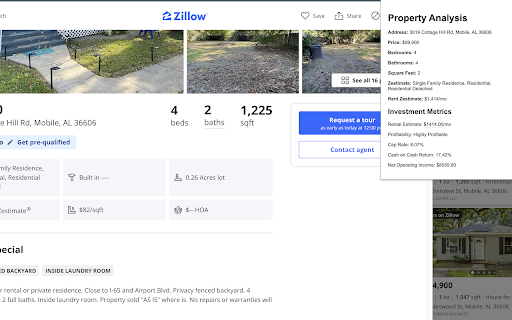
Analyze Zillow for-sale listings for rental profitability. Cap rate, NOI, cash-on-cash return. Edit rent estimates. Unlock the full potential of your real estate investments with the Real Estate Profitability Analyzer. This Chrome extension seamlessly integrates with Zillow for-sale listings to provide instant profitability insights. Whether you are an investor or a real estate enthusiast, this tool helps you quickly analyze properties for their potential return on investment. **Automatic Data Fetching:** Pulls key data from Zillow for-sale listings, including price, rent Zestimate, address, beds, baths, square footage, and property details. **Profitability Metrics:** Calculates essential metrics such as Cap Rate, Cash-on-Cash Return, and Net Operating Income (NOI) to give you a clear picture of the property’s financial performance. • **Net Operating Income (NOI):** Calculates the annual effective income (rent minus vacancies) minus operating expenses (assumed as a percentage of gross income). This helps determine the property's ability to generate profit. Formula: NOI = (Annual Rent × (1 - Vacancy Rate)) - Operating Expenses • **Cap Rate:** Measures the annual return on investment based on the NOI and property price, expressed as a percentage. Formula: Cap Rate = (NOI / Property Price) × 100 • **Cash-on-Cash Return:** Evaluates the return on cash invested (down payment) by considering the annual cash flow after mortgage payments. Formula: Cash-on-Cash Return = (Annual Cash Flow / Down Payment) × 100 • **Mortgage Calculation:** Uses the standard mortgage formula to compute monthly payments based on loan amount, interest rate, and loan term. Formula: Monthly Payment = [Loan Amount × (Monthly Interest Rate × (1 + Monthly Interest Rate)^N)] / [(1 + Monthly Interest Rate)^N - 1] **Editable Rent Zestimate & Rental Estimate:** Both the Rent Zestimate (in property details) and the Rental Estimate (in investment metrics) are fully editable. Click to change the value and see all metrics recalculate instantly—no need to refresh. Perfect for testing different rent scenarios against local market projections. **User Preferences:** Customize your analysis with your own assumptions. Set Vacancy Rate, Operating Expense Ratio, Down Payment Ratio, Interest Rate, and Loan Term. Save your preferences and they persist in your browser—no account or login required. **Profitability Classification:** Classifies the property as "Highly Profitable," "Moderately Profitable," "Potentially Profitable," or "Potentially Unprofitable" based on Cap Rate and Cash-on-Cash Return thresholds. **Easy-to-Use Interface:** Clean popup displays all property data and investment metrics. Works on Zillow single-property listing pages (not search results). Accurate parsing of formatted prices (e.g. "Est. $102,600") so calculations stay correct. **Works Only on Zillow For-Sale Listings:** The Real Estate Profitability Analyzer is designed to work exclusively with Zillow's for-sale listings, ensuring you're analyzing only relevant investment opportunities. **Why Install It?** If you're serious about making smart real estate investments, Real Estate Profitability Analyzer helps you make data-driven decisions. It saves time and effort by delivering critical insights directly from Zillow, with no login required and your preferences saved locally. An invaluable tool for both seasoned investors and those new to the real estate market.

PaTMa Property Insights
See price history on Rightmove, Zoopla and others. View investment yield, ROI and rent. See comps and addresses. Free access to property price history on Rightmove, Zoopla, OnTheMarket, PropertyNews and PropertyPal. Use the PaTMa browser extension to enhance your property negotiating position - see the pricing history of each property as you search. For property investors - access yield, ROI and rent estimates instantly while browsing all these property portals. Just create a free PaTMa account - see the link when using the extension. Property comparables (sales and rental), property addresses and extended data, available in PaTMa Prospector, is also easily accessed from this browser extension. If you can't see the embedded PaTMa panel, click on the PaTMa extension icon in the browser bar to access all the property data. Property price history, yield, ROI and estimated rent are available free. Property addresses and other advanced features require a PaTMa subscription. Should you ever experience problems with the extension, you can find our support email address on the PaTMa website. Improve property detail display panel on Rightmove and Zoopla. Support price history summaries on more Rightmove search results pages. New graphs for regional trends and better visibility of displayed numbers. Update for change in Rightmove HTML. Add "PaTMa" to the extension name. Add support for a new layout (including enhanced graphs) - coming soon. Updates for improved Zoopla support. Fix missing data when a search result is hidden on Rightmove. Thanks to Alex for reporting. Adjust embedded panel placement and prepare support for future display improvements. Fix missing panel on Rightmove after some page changes. Adjust the property price history embedded panel placement on Rightmove and Zoopla. Improve support for the new style of Rightmove property pages. Updates for the new Rightmove page designs. Add support for some additional portals. Fix loading of data on search results pages beyond the first (due to change on Rightmove). Added support for improved visual elements that will be introduced soon. These will enable better display of property data, especially around local comparable information. Fixes to improve the integration with Rightmove search results so the property data is displayed more reliably. Support for property pricing history and investment data to be included within Rightmove search screen results. Embed property price history, additional data and easy access to PaTMa Prospector features within Rightmove property detail pages.

Deal Analyzer for Zillow
A/B/C deal grades, live cash flow, cap rate, and cash-on-cash on every Zillow listing. Not affiliated with Zillow Group, Inc. ▸ Color-coded A/B/C deal grades pinned to every search-result card. Scroll the map view and instantly see which listings are worth opening. ▸ One-click full analysis on every listing page: cash flow, cap rate, cash-on-cash, 1% rule, full PITI breakdown, and a plain-English verdict ("Strong deal — cash-flows $284/mo at 25% down"). ▸ Tells you what would make a marginal deal work: "Rent at $4,200/mo" or "Buy at $545k." ▸ Adjust everything in one place: a floating widget on search pages re-grades every visible card the moment you change down payment, expense assumptions, or rent strategy. ▸ Customizable to your strategy: toggle vacancy, CapEx, management on or off, override taxes and HOA per listing, set a manual rate from your lender's quote. ▸ Plain-English risk callouts: "Built in 1925 — plan for higher CapEx." "On market 75 days — sellers often soften pricing past 60 days." 100% on-device. No account, no tracking, no data leaves your machine. See full privacy policy at https://deal-analyzer-for-zillow.netlify.app/privacy/ Built for real estate investors who underwrite 50+ deals a week. Disclaimer: Deal Analyzer for Zillow is an independent third-party tool. Not affiliated with, endorsed by, or sponsored by Zillow Group, Inc. Zillow® is a registered trademark of its respective owner.

Comp Crunch (Analyze Zillow Data)
Get insights on your Zillow search in just a few clicks! With the Comp Crunch Chrome extension, you can easily analyze and/or export any Zillow search. This saves you time spent talking to real estate agents or laboriously copy and pasting data points into excel! We offer the ability to export your Zillow search data as either a PDF or CSV file. Additionally, we provide a quick summary of your searched area by showing the average, median, 25th percentile and 75th percentile prices of the results in your search. You also can see how sold homes have trended in an area over time. How to use (free plan): 1. Conduct your search like you normally would in Zillow 2. Open the Comp Crunch chrome extension 3. Click the "Get Results" button to search over an area 4. Click the "Export CSV" button to export the data as a CSV file or the "Export PDF" button to export results as a PDF If using a paid plan, you can also get advanced results How to use (paid plan): 1. Make sure you have setup a paid account (if not, visit https://www.compcrunch.com/pricing) 2. Conduct your search like you normally would in Zillow 3. Open the Comp Crunch chrome extension and login to your account 4. Click the "Get Results" button to search over an area 5. Click the "Get Advanced Results" button in the extension to initiate a pro export 6. Visit your reports page available at https://app.compcrunch.com/reports to see your advanced results You also can, of course, use all the free features as much as you'd like with a pro plan. *Currently the pro export only supports exporting 250 urls at a time Want to search over a new area? Simply update your search criteria or search boundary, open the chrome extension and click the "Get Results" button again. What type of properties can I analyze? Properties for rent, sale and recently sold properties are all available. We also have introduced the ability to export saved homes. What data points are included? * Beds * Baths * Price (sold and for sale listings only) * Rent (rental listings only) * Date Sold (sold listings only) * Date Sold Numeric (sold listings only) * Sqft * Price Per Sf (sold and for sale listings only) * Rent Per Sf (rental listings only) * Lot Area (sold and for sale listings only) * Lot Area Type (sold and for sale listings only) * Address * Zip Code * City * State * Zillow Url * Latitude * Longitude * homeType * Zestimate * Rent Zestimate * imageUrl Looking for more data? Upgrade to our pro plan. You can see what pro fields are available here: https://www.compcrunch.com/pricing Note that each search result will return as many as 500 listings but possibly less. If you would like to capture all listings, keep changing your search criteria and exporting until you've gathered all your results. Does this cost any money? Nope! While there may be some paid features down the road, all features described above are completely free! Disclaimer: Comp Crunch does not own any of the data displayed in the extension. It simply makes this data easier to analyze and understand. Comp crunch has no affiliation with Zillow.com nor any of its intellectual property. All data and Intellectual property belong to Zillow.com and its owners. Listing data is bound to the data provided by Zillow and may be incomplete. Comp crunch is not legally responsible for the accuracy of the data provided and all information should be double checked.

Doorhacker: cash flow properties on Zillow
Analyze returns of Zillow listings in one click and screen properties with the highest returns Filter for cash flowing properties on Zillow in 5 seconds! 🔷 Automatically generate rent estimate and returns for ALL properties that match your Zillow filters 🔷 Export returns and listing data directly to Excel Benefits: 💙 Get rental estimates, rent-to-price ratios, and annual gross returns for multiple properties with just one click 💙 Focus on in-depth analysis solely for properties with substantial cash flow 💙 Export returns and listing data directly to Excel How does it work? 1️⃣ Install the Chrome extension 2️⃣ Conduct property searches on Zillow using your preferred filters (as usual) 3️⃣ Simply click the "ANALYZE" button in the DoorHacker sidebar to obtain instant, auto-calculated returns 4️⃣ Sort properties based on price, rent, rent/price ratio, or gross return Why we built DoorHacker? 🏠 In the past, I used to manually collect rental data from various estimation tools and painstakingly calculate returns in Excel. Now, I obtain this information in just 5 seconds, allowing me to focus on conducting in-depth analyses of properties with significant cash flow potential. Note: DoorHacker is an independent tool that enhances your experience on Zillow and is not affiliated with or endorsed by Zillow.
