
kphppeblbegfkjeffpbchfelbeaghjia
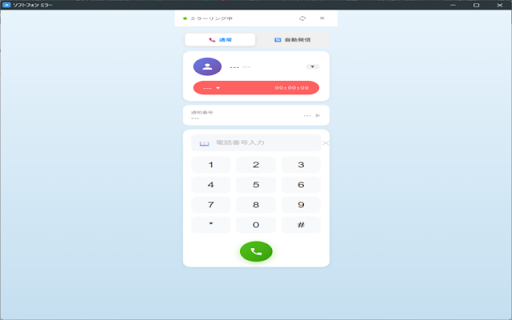
HybridConnectソフトフォンをミラーリングして遠隔操作 + 自動発信機能搭載 + tel:リンク発信対応 【ソフトフォン ミラー & リモート操作】は、HybridConnect(ハイブリッドコネクト)のソフトフォン画面をブラウザ拡張のパネルにミラー表示し、同じブラウザ内で遠隔操作できるChrome拡張機能です。 ■ こんな方におすすめ ・HybridConnectのワークベンチを開いたまま、別ウィンドウや別モニターで発信・着信操作をしたい ・電話番号リストに沿って連続発信(プレディクティブ)を行いたい ・外部サイトの「tel:」リンクをクリックしたときに、HybridConnectで発信したい

Naruhodo — Furigana & Japanese Dictionary for Reading
Add furigana to any Japanese web page, look up words with a hover dictionary, hear pronunciation, and save vocabulary — offline. Naruhodo adds furigana (reading annotations) to kanji on any Japanese web page and includes a built-in Japanese-English dictionary with hover lookup — no internet required. Whether you're preparing for JLPT, reading Japanese news, manga, novels, or light novels, Naruhodo helps you read and learn naturally. 🔤 Furigana for Any Japanese Web Page Toggle furigana above kanji on any site. Color-coded by JLPT level (N5–N1) so you can focus on words at your level. Use Adaptive mode to automatically hide furigana for words you already know. 🔍 Hover Japanese Dictionary Hold Alt (Option on Mac) and hover over any word for an instant popup with readings, definitions, JLPT level, and pitch accent. Or enable Hover Mode for hands-free lookups. Compound words (like 東京都) are detected automatically. Powered by the full JMdict dictionary — 215,000+ entries, all running locally. 🔊 Audio Pronunciation Hear any word spoken aloud — click the speaker icon or press P. Uses your device's built-in Japanese voice, no internet required. 📖 Example Sentences See real Japanese-English example sentences from Tatoeba for thousands of words, with the target word highlighted. Great for understanding words in context. 📚 Vocab Bank & Anki Export Save any word with one click. Tag and organize your vocabulary, filter by JLPT level, group by source page, and export to Anki for flashcard review. ✅ Known Words & Adaptive Learning Mark words as "known" to track your reading progress. Load JLPT presets (N5–N1) to bulk-add words. Adaptive Furigana automatically hides readings for kanji you've already mastered. 📊 JLPT Learning Stats See your JLPT coverage at a glance, track vocabulary activity over time, and view a difficulty badge showing each page's JLPT breakdown. Know exactly how much of the page you can read. 🌙 Page Dark Mode Switch to dark mode for comfortable night reading. Darkens web pages for easier reading in low light, while keeping furigana colors and images intact. 🗂️ English Glosses for Grammar Short English annotations appear above particles and grammar patterns in furigana mode, so you never lose track of Japanese sentence structure — perfect for beginners and intermediate learners. 🌐 Selection Translate Select any Japanese text and click Translate (or press T) for an instant on-device translation. Uses Chrome's built-in Translation API — no internet, no API keys, completely private. HOW IT WORKS - Full JMdict Japanese-English dictionary (215,000+ entries) runs locally in your browser - Japanese text tokenization by Kuromoji, also running locally - 14,000+ example sentences from the Tatoeba Project - Everything runs 100% offline — no data is sent to any server Built with privacy in mind. No tracking, no analytics, no ads. Your reading data stays on your device. Perfect for JLPT N5, N4, N3, N2, N1 preparation, reading NHK News, Japanese Wikipedia, light novels, visual novels, manga sites, and any Japanese text on the web.

Color Picker - BestDevTools.io
Professional color picker with pixel zoom, history and gradient generator, image export and favorites. The BestDevTools.io Color Picker is a complete and powerful extension designed for designers, developers, and content creators. Capture any color on screen with pixel precision, generate professional gradients, and export everything in various formats—all within a clean and elegant side panel. This extension includes a professional color picker with pixel zoom, full history, favorites, gradient generator, and even image export, making it one of the most versatile tools for modern visual workflows. - Select any color directly from the screen with pixel precision - Native browser technology for maximum accuracy - Intuitive and responsive interface - Manually adjust colors with the color picker - View changes in real time - Perfect for fine-tuning and refinements - HEX: Hexadecimal code (RRGGBB) - web standard - RGB: Red, Green, Blue values (rgb(r, g, b)) - HSL: Hue, Saturation, Lightness (hsl(h, s%, l%)) - Instant copy with a single click - Automatically save up to 50 captured colors - Quick access to recent colors - Remove individual colors or clear everything at once - Organize your favorite palettes - Linear: Linear gradients with direction control (0-360°) - Radial: Circular gradients with center positioning (X/Y) - Conical: Conical gradients for unique and modern effects - Adjust the direction of the linear gradient (0-360 degrees) - Position the center of radial and conical gradients (X/Y in percentage) - Individual control of the position of each color (0-100%) - Real-time preview of all changes - Choose from 2 to 5 colors to create complex gradients - Intuitive visual interface for selection - Reorder colors with drag and drop - Fine-tune the position of each color in the gradient - Save up to 30 custom gradients - Quickly access your favorite gradients - Edit saved gradients with a Click - Organize and reuse your creations 📤 Export and Sharing - Generate complete and optimized CSS code - Instant copy with a single click - Compatible with all modern CSS frameworks - Support for linear-gradient, radial-gradient, and conic-gradient Export Images in Multiple Formats Create gradient images optimized for different platforms: 🎯 Who is this extension for? - Capture color palettes from inspiring websites - Create professional gradients for projects - Organize and reuse brand palettes - Export backgrounds for social media - Instantly generate CSS code for complex gradients - Capture colors from designs for implementation - Quickly test different color combinations - Easily integrate into web projects - Create optimized backgrounds for each social network - Generate custom thumbnails for videos - Develop a consistent visual identity - Export in platform-specific formats - Maintain brand color consistency - Quickly create visual materials - Organize color palettes by project - Share gradients with the team 1. Click the extension icon in the toolbar 2. Click "Find a Color 3. Select any color on the screen with the EyeDropper 4. The color will be automatically copied and saved to the history 1. Select 2 to 5 colors from your history 2. Click the "Generate Gradient" button 3. Choose the gradient type (Linear, Radial, or Conical) 4. Adjust direction and positioning as needed 5. Copy the CSS code, export as an image, or save as a favorite 🔒 Privacy and Security - No data collection: All colors and gradients are stored locally in your browser - No connection to external servers: Everything works offline after installation - Added support for Italian and Hindi - Language selector interface improvements - Alignment and usability fixes - Performance optimizations - Initial release - Color capture with EyeDropper - Gradient generator (Linear, Radial, Conic) - Export in multiple formats - Support for 8 languages - Favorites system Developed with ❤️ by the BestDevTools.io team

Text Blaze: Templates and Snippets
Create smart text expansions to get more done and streamline your work. Billions of keystrokes saved! 5-star rated, free text expander loved by over 700,000 users in more than 60,000 companies—easy to use, powerful and secure. Save hours and avoid mistakes by eliminating repetitive typing using customizable templates. Insert standard greetings, commonly used phrases, canned responses, text, calendar links, and signatures. Format and style your templates - change color and size, add pictures, links, and lists. ★ Works anywhere you work Text Blaze works with text fields on any website. Wherever you are in Chrome, the Text Blaze Chrome Extension is there to help you save time. ★ Trusted by over 500,000+ users across the world Support and sales teams, teachers, health-care professionals, HR, lawyers, students, writers, real estate agents, and users in other roles across the world trust Text Blaze to help them supercharge their work. ★ Use placeholders in your templates - Text Fields, drop down menus and more Build forms with fill fields that you can edit when you insert the templates. Form fields include text fields, dropdown menus, dates, toggles, and more. ★ Make your template dynamic with the current date, formulas or more Automatically insert the current date, perform date calculations, including website information, and much more! ★ Supercharge your team with sharing and collaboration Collaborate on shared snippets to ensure your team always hits exactly the right notes in your messaging. Everyone's snippets are updated automatically when changes are made, keeping team communication consistent. ★ Tab between form fields and select menu options with AutoPilot Automate form filling or any other workflow you can perform with your keyboard by simulating key presses. For example, you can simulate Tab key to move between form fields. ★ Easily search your templates from any web page Quickly search your templates from anywhere with the Text Blaze Assistant or right click on any web page to insert a template from a menu. Text Blaze works for everyone, everywhere. Here’s a few examples: 🤝Customer Support: create shortcuts for frequently used responses, troubleshooting tips, or knowledge base articles. This can be especially helpful when handling multiple tickets at once, on customer support sites like Zendesk, Freshdesk, and Intercom. 🎓Teachers: create shortcuts for frequently used phrases or feedback comments. This can be especially helpful when grading papers on educational sites like Google Classroom, Blackboard, Canvas, and Edmodo. 🩺Healthcare Professionals: doctors and nurses, including veterinarians, can create shortcuts to save time on healthcare sites like Epic, Cerner, Athenahealth, and Allscripts. 💼Recruiting: create shortcuts for frequently used interview questions, email templates, or job descriptions. This can be especially helpful when working on multiple job openings at once, on recruiting sites like LinkedIn, Greenhouse, JazzHR, and Workable. 💰Sales: create shortcuts for frequently used sales pitches, email templates, or proposals. This can be especially helpful when working on multiple deals at once, on sales sites like Salesforce, HubSpot, Pipedrive, and Zoho CRM. 📊Marketing: create shortcuts for frequently used marketing messages, social media updates, or ad copy. This can save time when creating campaigns or managing multiple accounts, on marketing sites like Hootsuite, Buffer, Sprout Social, and SEMrush. 🏛️Lawyers: create shortcuts for frequently used legal terms, clauses, or citations. This can save time on legal sites like LexisNexis, Westlaw, Clio, and MyCase. 🏠 Real Estate: create shortcuts for frequently used phrases or listing descriptions. This can save time when creating listings or responding to inquiries, on real estate sites like Zillow, Realtor.com, and Redfin. Text Blaze has a lot of other great features, but it's time to give it a try. Simply install the extension to get started! ★ Text Blaze In the News: Fast Company: “This keyboard shortcut secret is a huge time saver in Gmail—and beyond” Tech Crunch: “Fell in love with the product,” adding that he “wanted to invest as soon as I tried the product.” Android Police: “Text Blaze is a tool that can save you a ton of time when you need to type the same words over and over.” For questions about Text Blaze, please email us at More information and documentation: Privacy policy:

うみとこころとぼく
When you use social networking services on a regular basis, you may find yourself worrying too much about what you posted a while ago, or even what you said that hurt someone. I created this service because I thought it would be nice to have a social networking service where people who are tired of social networking can relax in a relaxed world view. Features Tweeting function → By tweeting about what happened today, you can relieve your desire to "tell someone". The function that someone's tweets flow in randomly → Events that someone has muttered will flow onto the beach as bottle messages. Change the character's clothes → Create your own character by changing the character's clothes! Island Redecoration → Change the island's design to make it more comfortable for you! Soothing World View → The background, sun, and moon will change depending on the current time, allowing you to heal! Report tweets → In order for you to use the site with peace of mind, there is a filter function to prevent slanderous or defamatory tweets from reaching the island, and if they do, you can report them so that similar tweets will not reach the island in the future.
