
kpdbmhebnejiiidjijapacgojinalnnf
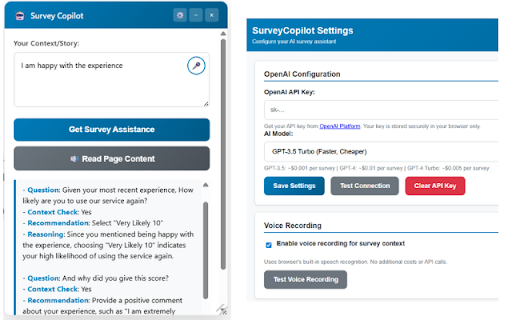
AI survey assistant with voice recording, personalized recommendations, and text-to-speech features. Transform your survey experience with SurveyCopilot - the intelligent assistant that makes completing surveys faster, easier, and more accessible. 🎤 VOICE RECORDING - Speak your context instead of typing lengthy responses - Automatic speech-to-text conversion - Perfect for capturing detailed experiences quickly 🤖 AI-POWERED ASSISTANCE - Get personalized response recommendations based on your context - Smart analysis of survey questions - Authentic, contextual suggestions that sound like you wrote them 🔊 TEXT-TO-SPEECH - Listen to survey content read aloud - Accessibility support for visual impairments - Hands-free survey review ✨ KEY FEATURES - Drag & drop resizable interface - Secure OpenAI API integration - Auto-saves your context between sessions - Works on all survey platforms (Qualtrics, Medallia, Question Pro, SurveyMonkey, etc.) - Privacy-focused - your data stays local 📋 PERFECT FOR - Market research participants - Customer feedback providers - Academic survey respondents - Anyone who regularly completes surveys - Users seeking accessibility features 🔒 PRIVACY & SECURITY - API keys stored securely in your browser - No data sent to our servers - Voice processing happens locally when possible - Full control over your information SETUP REQUIRED: You'll need an OpenAI API key (get one free at platform.openai.com). Detailed setup instructions included. Transform tedious surveys into effortless conversations with SurveyCopilot! The "Failed to analyze survey: API request failed" error is most likely one of these common issues: 🔍 Most Common Causes: 1. API Key Issues (90% of cases): Incorrect key format - Missing characters when copy/pasting Expired or revoked key - OpenAI deactivated the key Trial credits exhausted - Free tier limits reached Billing issues - Payment method problems 2. Network/Firewall Issues: Corporate firewall blocking OpenAI API calls VPN interference - Some VPNs block API requests Browser extensions interfering with requests 🛠️ Quick Diagnostic Steps for Your Friend: Step 1: Verify API Key Go to OpenAI Platform Check if the key is still active (not revoked) Copy a fresh key directly (don't retype) Step 2: Test Connection in Settings Open extension settings Paste the fresh API key Click "Test Connection" See what specific error appears

Quillbot: AI Writing Assistant to Grammar Check, Paraphrase & Translate
Write better emails, essays and messages with Quillbot's Grammar Checker, Paraphrasing Tool, Generative AI, Summarizer and more! Quillbot for Chrome: AI Writing Assistant, Grammar Checker, and Paraphrasing Tool Quillbot is a multilingual writing assistant extension that helps you write clearly, quickly, and with more control, right where you work. This AI writing assistant combines a Grammar Checker, paraphrasing tool, and AI writing tool to improve your writing in real time. From quick emails to full drafts, Quillbot helps you say what you mean without overthinking it. ➤ How It Works Install the extension and keep writing like you normally do. Quillbot works in the background, ready when you need it. Write in any text field across the web, then highlight text or open the toolbar to get instant suggestions. You can fix grammar, use the sentence rewriter to adjust phrasing, or generate new text with the AI text generator. Everything happens in one place, so you don’t have to copy, paste, or switch tabs. ➤ Privacy and Data Safety Your writing is personal. We treat it that way. Quillbot processes only what’s needed to provide suggestions and does not sell your data. Our systems are designed with modern security standards in mind, and we continuously improve how we handle and protect user information. You stay in control of what you write and what gets changed. ➤ Key Features A writing productivity tool that does more than just fix typos; it helps you communicate better. ✓ AI Writing Assistant Get real-time suggestions as you write. Improve clarity, tighten structure, and keep your ideas moving without stopping to edit. ✓ Grammar Checker Catch grammar, spelling, and punctuation issues instantly. Get clean, readable writing immediately to improve communication. ✓ Paraphraser Rewrite text to sound clearer, more concise, or more natural. Adjust tone without losing your original meaning. ✓ Sentence Rewriter Quickly reshape awkward or unclear sentences into communication that reads smoothly and lands the point. ✓ AI Cursor Access Quillbot’s AI tools directly where you write. Use the AI Cursor to generate text, refine drafts, and take action without leaving the page. ✓ AI Text Generator Draft emails, outlines, or full responses in seconds when you need a starting point—or a reset. ✓ Tone and Clarity Suggestions Understand how your writing comes across. Make it more direct, more polished, or more conversational as needed. ✓ Multilingual Writing Tool Write and edit across languages, including English, Spanish, French, German, Portuguese, and Dutch. ✓ Translation Translate text as you write or edit, helping you communicate clearly across languages. ✓ In-Page Editing Make changes directly in emails, docs, and forms. No switching tabs or breaking your flow. ✓ GIF Insertion Drop in relevant GIFs directly from the editor to add context or personality to your messages. ✓ AI Image Generation Create images from prompts without leaving your workflow—useful for quick visuals, drafts, or ideas. ✓ Custom Modes Tailor writing style to your needs, whether that’s formal, simple, or aligned to your voice. ➤ Use Cases Quillbot works for anyone who writes—and wants fewer rewrites. ✓ Professionals Send emails and updates that get to the point faster and don’t need a follow-up to clarify. ✓ Students and Researchers Turn rough drafts into clear, structured writing without losing your original ideas. ✓ Marketers and Creators Adjust tone across channels without rewriting everything from scratch. ✓ Multilingual Writers Write confidently across languages with built-in support and suggestions. ➤ Why Quillbot? Quillbot focuses on improving your writing—not replacing it. It works directly where you write, so you don’t lose time switching tools. Suggestions are fast, practical, and easy to apply. You get more than surface-level fixes, with support for tone and clarity when you need it. And with frequent updates, the extension keeps getting better at helping your writing do its job. ➤ Free vs Premium Start with the essentials. Upgrade when you want more control. ✓ Free Plan Includes: • Grammar checker and basic corrections • Limited paraphrasing tool access • Core writing suggestions • Multilingual writing support ✓ Premium Unlocks: • Full paraphrasing and rewriting capabilities • Expanded modes for tone and style • Advanced tone and clarity insights • More detailed, sentence-level suggestions ➤ Supported Languages Quillbot supports writing and editing in English, Spanish, French, German, Portuguese, and Dutch, with continued expansion to additional languages over time. Get Started Install Quillbot in seconds and start improving your writing immediately. Write faster. Say it better. Keep your voice intact.

LeetCopilot: LeetCode AI Assistant for Coding Interview Prep
Practice LeetCode smarter with AI-powered hints, structured study notes and realistic mock interviews — all inside the problem page. 🚀 LeetCopilot — AI Assistant for LeetCode & Coding Interview Prep LeetCopilot is an AI-powered assistant for LeetCode that helps you practice data structures & algorithms, understand problems deeply, and prepare for coding interviews — all without leaving the LeetCode page. Instead of switching tabs for hints, notes, and explanations, LeetCopilot provides context-aware guidance directly inside your workspace, helping you stay focused and learn more effectively. 💬 AI Coding Hints Get Unstuck Without Spoilers - Step-by-step hints that guide your reasoning - Understands your code, test cases, and submissions - Helps you think through solutions instead of giving full answers 🛠️ Built-in Smart Tools Tools that act, not just explain - Run code instantly on sample inputs and auto-generated edge cases - Step through execution to visualize algorithms and data structures - Capture quick notes and insights while solving problems 📚 Auto-generated Study Notes Turn Practice into Long-Term Understanding - Auto-generate structured study notes from each problem - Track mistakes, edge cases, and reusable patterns - Build a personal knowledge base for fast review before interviews 🎤 Mock Code Interviews Practice Interview-Style Thinking - Adaptive mock interviews that test reasoning, not memorization - Realistic interview scenarios inspired by real-world tech interviews - Clear feedback with structured breakdowns and performance insights 🧠 Smart Context Help that matches your approach - Reads your code, test cases, and error messages to provide tailored guidance - Responds to your solution strategy instead of generic templates - Reduces guesswork so you can stay focused and in flow ✨ Why LeetCopilot? - Learn algorithms faster with personalized, contextual guidance - Build durable understanding with notes and structured review - Practice interview-style problem solving with real feedback - Stay inside LeetCode — no distractions, no tab switching 🎯 Who is LeetCopilot for? - LeetCode users preparing for coding interviews - Students learning data structures & algorithms - Software engineers improving problem-solving skills 👉 Install LeetCopilot to make your LeetCode practice more focused, effective, and interview-ready.

QuestionAI Homework Powered AI Assistant
AI Copilot can answer screenshot queries and assist with writing, summarizing, translating, and grammar checking. Question.AI is your comprehensive AI Copilot, powered by GPT, and accessible in the sidebar for all your needs. It is designed to answer screenshot queries, questions on learning platforms and assist with writing, summarizing, translating, and grammar checking. It's a versatile tool available directly in your browser, ensuring you have the support you need anytime, anywhere. Your Ultimate Homework and Learning Assistant Question.AI, integrated as a ChatGPT plugin, serves as your AI Copilot. It's ready to tackle complex questions and assist with your homework, offering instant, accurate answers. Simply take a screenshot of your query, and Question.AI will provide precise solutions in no time. Key Features 🔥 Get answers to questions with easy screenshots Take or upload a screenshot to receive accurate answers to your learning inquiries. Perfect for all subject questions, espeically mathematical questions. Our AI tutor powered by advanced technology provides precise and step-by-step answers instantly. 💡 Real-Time AI Conversations with no fees Click the Question.AI icon for real-time conversations or select text on any webpage to get instant and detailed AI responses. Stop wasting time searching for answers. Our AI learning tool is available 24/7 to provide answers and support without usage limits or hidden fees whether you're studying late at night or during the weekend. 📏 LaTeX Equation Recognizer Identify LaTeX equations on any webpage and ask AI for explanations. Perfect for students dealing with complex formulas. 📝 Perfectly compatible with learning platforms Get correct answers and suggestions for coursework, quizzes, and tests directly within your learning platforms like Canvas, Blackboard, McGraw, etc. You can use Question.AI on any website. 📚 Supports All Subjects and Grades with High-Quality Answers From math and history to literature and foreign languages, Question.AI covers a wide range of topics for students at all levels. Benefit from our advanced AI technology that ensures accurate and quick solutions to your queries. ✍️ AI Writing Assistance Create high-quality content in seconds. Provide you with intelligent suggestions and create engaging and well-structured content, making writing tasks easier and faster and saving time and effort. 🔗 Easy Chrome Integration Install the Question.AI Chrome extension with a few clicks and start getting answers instantly. 🔒 Safe and Secure We prioritize your privacy. Question.AI ensures the safety and protection of your data. 🚀 Quick Start Tips 1. Click the Question.AI icon on the side of the screen to start a conversation. 2. Select any text on the webpage, click the Question.AI icon that appears, and let the AI give you answers. 3. Press Cmd+E or Ctrl+E to take a screenshot and send your question to Question.AI for immediate answers. 4. Press Cmd+K or Ctrl+K to open Question.AI and ask any question. 5. Use the prompt library with user-provided prompts for inspiration and streamline your ChatGPT interactions. 💻 How to use: 1. Click the "Add to Chrome" button and pin it to your toolbar. 2. Log in to your Question.AI account. 3. Start using Question.AI in the sidebar. It's accessible in the sidebar for all your needs 24/7. ❓ Frequently Asked Questions: 📌 Do I need a ChatGPT/OpenAI account? No, you don't need a ChatGPT account to use this plugin. You can set up a free account directly with us. 📌 Is it free to use? Yes, we offer a free version with limited usage. 📌 What platforms does Question.AI support? Question.AI is available on multiple platforms. You can download our app from the Apple Store for iOS or Google Play for Android. For Windows and Mac users, you can enjoy the extension via Chrome or access our services directly on our webpage. Contact Us For any questions or feedback, reach out to us: ● Email: feedback@questionai.net ● Website: https://www.questionai.com Enhance your learning and productivity with Question.AI, your versatile GPT AI assistant. Start using it today and experience the benefits firsthand!

Prompt Copilot
Enhance your prompts and texts with AI-powered suggestions Advanced User Context and Memory Handling Across Major AI Tools
