
knndcegmilobcbdhgibafbnlaolgekhn

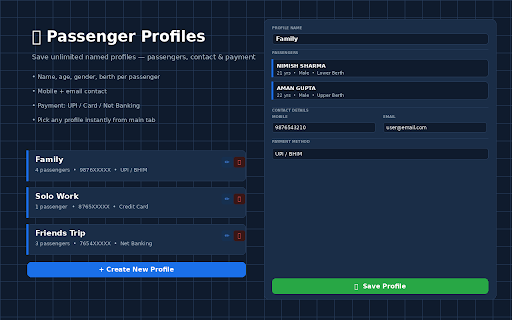


⚡ Quick Book AutoFill automates your entire IRCTC train booking in one click. ✅ WHAT IT DOES - Fills the Search Form (From, To, Date, Class, Quota) - Finds your train on the Train List and clicks Book Now - Fills all Passenger details, Contact and Payment - Clicks Continue for you — all 3 steps, automatically 🗺 MULTIPLE JOURNEY PROFILES Save as many journeys as you want — each with station names, travel date, train number, class and quota. Switch between them from a dropdown. 👥 MULTIPLE PASSENGER PROFILES Save multiple named profiles — each stores all passengers (name, age, gender, berth), your mobile, email, and preferred payment method (UPI, Card, Net Banking). 🚀 SMART FILL One button detects which IRCTC page you are on and fills it correctly — Search, Train List or Passenger Form. ⚡ AUTO MODE Turn on Auto Mode before clicking Smart Fill. The extension will automatically continue to the next page — Train List → Passenger Form — without you doing anything more. Important: Auto Mode only fires after YOU click Smart Fill. It never triggers on its own when you browse IRCTC normally. 🔒 PRIVACY All your data is stored locally on your device using Chrome storage. Nothing is sent to any server.

Solve Indianrail Captcha
Saves your time in Indianrail 1) This saves the journey search details(date of journey, station names) in the indianrail.gov.in and also solves the captcha for you. It is free to use. 2) It also saves PNR searched so you don't need to type them again and again Privacy Policy: It stores your journey date and station codes and PNR code in your browser which you can delete by uninstalling this extension and clearing browser history. It does not transfer any data out of your computer.

Jhatkal - Tatkal helper for IRCTC
Legally speed up IRCTC Tatkal booking by managing passenger profiles and manual autofill. Jhatkal – Smart Tatkal Helper for IRCTC 🚆 Make IRCTC Tatkal booking faster, easier, and stress-free with Jhatkal — a clean, modern tool that helps you manage passengers, save routes, and fill details instantly. It is 100% safe, legal, and fully compliant with Chrome Web Store policies. Fill passenger details instantly on IRCTC when you press the “Fill” button. No automation, no auto-submit — you stay in full control. Store your favorite station pairs (From → To) using auto-fetch or manually save them and load them instantly during booking. Create groups like Family, Friends, or Office passengers and switch easily. Automatically shows AC / Non-AC Tatkal opening time with a live countdown. Customize the extension with beautiful, modern UI themes. All your passengers, routes, templates, and settings sync securely via Chrome storage. It only fills the form after you click, following IRCTC and Chrome guidelines. All data stays on your device via secure Chrome storage. Support the developer and help add more features! Booking Tatkal is stressful. Jhatkal reduces typing, speeds up repetitive steps, and helps you stay ready when Tatkal opens. Perfect for frequent travelers, families, and office teams. Jhatkal does not collect, store, or transmit any personal data externally. All information stays on your browser. 🚀 Make your IRCTC booking smoother, cleaner, and faster — legally. Install Jhatkal and experience a better Tatkal preparation workflow.

IRCTC TatkalMate
Smart click fill, and built-in ad blocker for a better IRCTC experience. IRCTC TatkalMate – Your Smart Tatkal Booking Assistant Booking a Tatkal ticket can be stressful with high demand and limited time. TatkalMate is here to simplify and speed up the process so you can secure your seat without the hassle. 🚀 Features: - Fills details. - Instantly Built-in Ad-blocker for faster Responses. - Optimized for IRCTC page. - Secure – No data shared. Whether you're booking for an urgent trip or just hate the stress, TatkalMate helps you to book smarter. Disclaimer: TatkalMate is an independent, third-party tool. It is not affiliated with, endorsed by, or officially connected to Indian Railways or IRCTC in any way.

Ether-Spell
Warning: Turning Spellchecking on can deteriorate your performance (especially on older computers and with more active participants.) As a very dyslexic person that is highly dependent on spellcheckers, and considers them as assistive devices. I'm increasingly frustrated that Etherpad does not provide a spellcheck solution. Again and again I found myself going for Google Docs instead of Etherpad or at least typing in another program with better spellcheck support. Which totally goes against the collaborative aspect of Etherpad… This stops now! … at least for me. And maybe it is also useful for you :) This plugin is still a work in progress, so if you find an Etherpad installation that does not function with this plugin, please reach out to me.
