
knhkeligkfmclgkeedceenpopaleokfh
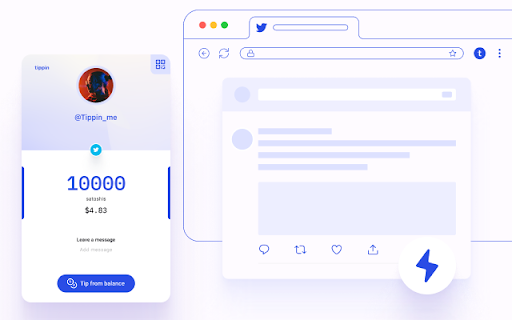
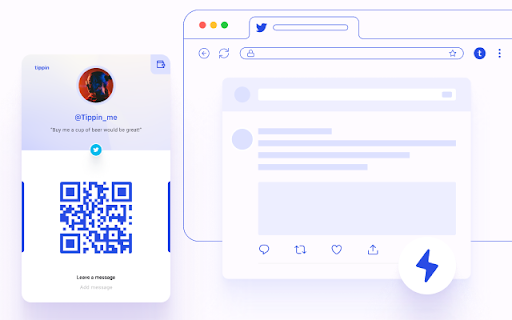
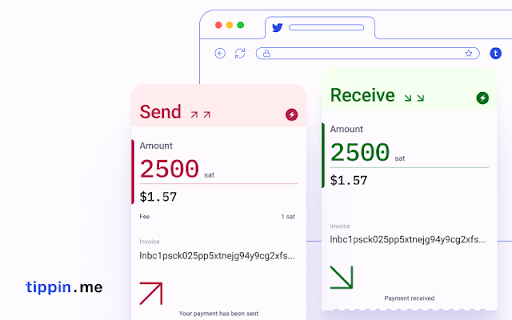

Send and receive Bitcoin tips to Twitter users! Start sending and receiving tips on Twitter right away, using Bitcoin. That's it. You don't need anything else. This extension will show Tippin.me buttons for every Twitter user (Twitter.com and more are coming), and will allow you to send them a tip. - Send tips using Lightning Network or your own balance. - Send and receive satoshi. - Top up your account with Bitcoin. - Leave a message with every Tip.

Leather
Leather Bitcoin Wallet - Your Bitcoin Wallet for DeFi, NFTs, and dApps Leather is a trusted self-custody Bitcoin Wallet designed to guide you to Bitcoin web3. Leather supports Bitcoin, Ordinals, Runes, BRC-20s, Stacks (STX), and Stacks NFTs in one place. Connect to hundreds of apps to swap tokens, mint NFTs, create inscriptions, and access DeFi. With Leather, you can: - Send, receive, and manage BTC with SegWit and Taproot addresses - Swap and trade Ordinals, BRC20s, Stamps, and Stacks NFTs across top marketplaces - Manage STX and other Stacks based assets - Access decentralized identities like the Bitcoin Naming System (BNS) names - Safely move your assets to cold storage with a Ledger Leather is 100% open-source and audited by top security firms. Be part of our community on X @LeatherBTC :warning: Beware of misleading Chrome store reviews offering phone support. Leather only offers support via email. If you see similar reviews in the future, please report them to the Chrome store immediately.

Mask Network
The portal to the new & open Internet. Send encrypted message and decentralized Apps right on top of social networks. Encrypt your posts & chats on You-Know-Where. Allow only your friends to decrypt. Mask Network is a portal to the new, open internet. With Mask Network, you can send encrypted posts to your friends, participate in cryptocurrency lucky-draws, and share encrypted files on the platforms you are already using. Now #OwnYourData and enjoy financial autonomy across mainstream social network sites through Mask Network. All you need to do is to go through the set up guide and you can use it immediately! Mask Network is a free software and we are willing to take any code audit from anyone. We do not and will never store any of your personal data! More info on Mask.io

TronLink
The first and most popular TRON wallet. Recommended by TRON Foundation. TronLink is firstly launched at TRON’s official website and backed by TRON foundation, TronLink is the TRON wallet with the most users,coming in three versions (Chrome Wallet Extension/iOS/Android), and you’re looking at the Chrome Wallet Extension for TRON. Functions of Chrome Extension: Provides extensive support for TRON and now also supports Ethereum & BTTC & BSC; Supports safe interactions with DApps; Provides built-in support for hardware wallet. About TRON: TRON’s market cap is among the top 10 on a global scale. Since June 25th 2018, TRON migrated its ERC20 tokens to TRON’s Mainnet, making TRX an independent cryptocurrency. Update(V4.9.0) 1. Added the "DeFi" tab on the homepage; 2. Bug fixes and improvements.

Keeper Wallet
Keeper Wallet is your entry point to the Waves blockchain and Waves-powered web services 🔷 Store your account keys securely Seed phrases and private keys are encrypted and stored within the extension and cannot be accessed by the dApps and services on the web, giving you peace of mind that your funds are always safe from hackers and malicious sites. 🔷 Manage your assets – Check full asset info and balance, add assets to favourites and filter them by name or ID – Transfer assets and NFTs quickly and intuitively: hover over the three dots next to the asset or NFT and choose the transfer arrow option. – Exchange assets instantly directly in Keeper. Click the “Swap” button, select the pair of assets and specify the amount. 🔷 Sign transactions Third-party applications are required to request your signature for each transaction. Before signing, you can review the transaction details, then confirm or reject it. Complete transactions with just one click, no need to enter any sensitive information. 🔷 Switch between wallets You can create or import multiple Waves wallets and switch between them easily. 🔷 Backup your accounts Export your accounts to the encrypted Keystore file and store it in a safe place. Use it to restore access to your accounts or import them into Keeper on a new device. To create the backup, go to settings and select “Export accounts”. 🔷 View transaction history Keeper displays up to 100 most recent transactions for each account. You can apply a range of filtering options, including transactions with incoming or outgoing transfers, transaction ID, asset ID or name, and wallet address.
