
knhapdniefaielflkkfifoipbjcoidgf
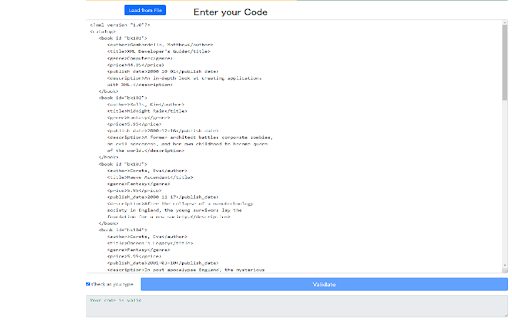
Quickly validate your XML and show the problem if there is any. Check your XML code for any syntax errors using our software today. Simply paste in your XML code and our extension will check the XML code for simple syntax errors etc to ensure your code works before you upload the XML files.

Basecamp: Sprint, Task Management
Sync daily tasks or work between Basecamp & Moon HRM. Use filters & enhanced features for seamless collaboration. From organizing tasks and tracking sprint progress to viewing work through smart cards and flexible filters, every element is built to simplify how your teams plan, execute, and stay aligned. View ongoing, completed, and on-hold tasks, manage workflows, and stay on top of your project deadlines. Get instant access to pinned projects, real-time activity tracking, and quick updates. Always know what’s happening and what truly needs your attention. It makes sure no information remains scattered. Project managers and team leaders can track the progress of the Basecamp sprints and todos using our extension. They can check and take necessary steps to meet the project timeline. Here’s why you should choose our extension for your Basecamp project management and time tracking over other traditional software. Centralized dashboard: Get a complete overview of your workspace from a unified dashboard. Direct access to key project details and everything that matters. Hey section: Never miss a beat with “Hey section,” which provides updates from across the team. For uninterrupted visibility, you can also enable it as a sidebar on your left, so that nothing slips through the cracks. Latest activity: Keep a close eye on recent activities across different projects. See updates, changes, and contributions, helping you stay aware of how work is progressing in real time. Sprint progress and status: Observe how your sprint is advancing with a clear view of task status and upcoming stages. Understand the current status at a glance and assure everything is progressing as planned. Task filters: Smart filters to refine your task view and concentrate on what matters most. Sort tasks based on whatever criteria you want and quickly access relevant work without distractions. Project list: Zoom into all your projects in an organized list that makes navigation pretty much easier. Switch between projects and keep track of ongoing and completed work without confusion. Smart card view: Users can visualize tasks in a structured card layout that highlights details at a glance. Such a format makes it very easy to oversee and act on tasks with better clarity. Work Summary: Review a comprehensive summary of work done across tasks and projects by different team members. Take a closer look at whether efforts are being utilized in the right way. Connect with Moon HRM: Directly link an advanced HRM software, Moon HRM, with Basecamp in order to align project activities with employee management. Organize tasks, teams, and monitor performance without any extra effort. Download Basecamp: Sprint, Task Manager Extension & follow these steps. 1. Open Basecamp and log in to your Basecamp account 2. In the top right corner of the screen, click on the sign-up button 3. Choose Moon HRM while signing up 4. Complete the sign-up process by filling in the required details. 5. Start adding projects and managing workflow with time log reports Why integrate with Moon HRM? Basecamp: Sprint, Task Manager integration using Moon HRM is best for managing the workflow of your team members. It helps track each sprint’s card or to-do status management and the time to complete the assigned tasks. Once integrated with Moon HRM, it automatically syncs the time log for each employee as per the tasks completed or the time dedicated to each task. Using Moon HRM integration, the project manager can closely monitor each sprint’s progress, thereby checking the performance and status of each employee’s tasks.

XML Reader
Use XML Reader as a fast XML viewer, formatter & beautifier. Easily read, format, and edit XML online. 🗂️ Working with XML can be confusing if you do not have the right tool. That is why xml reader was created – a simple yet powerful extension that helps you view and structure your xml documents directly in the browser. Whether you need a quick solution for work, study, or testing, xml Readerprovides everything in one place. 📖 With xml reader, you no longer need to ask how to read xml file. Simply open your document and instantly see a clean, structured display. ✨ Why choose this xml reader online Using xml reader makes handling xml much easier. Here are just a few reasons: 1️⃣ Works online without extra software 2️⃣ Handles both small and large files 3️⃣ Easy guide for how to open xml file and how to read xml files instantly 4️⃣ Modern, simple interface with practical features 5️⃣ Trusted by developers, students, and analysts 🔍 How to open and view files Many users ask how do you read an xml file without special programs. The answer is simple: install this extension and let the xml reader online handle it. You can: - Upload or paste your code - Save time when you need to check data on the go ⚡ Fast formatting and beautifying Sometimes xml code looks messy. This is where the xml formatter online and beautify xml options come in. You can: - Format xml instantly - Use xml beautifier for improved readability - Export clean results - Share formatted code with colleagues 📝 Step by step: how to use XML Reader 1️⃣ Install the extension 2️⃣ Open any file in xml reader 3️⃣ Instantly see structured results 4️⃣ Copy or save the clean output 5️⃣ Continue working without distractions 🏆 Benefits of XML Reader • Runs directly in your browser • Helps you understand how to open xml file quickly • Provides structured results in seconds • Works as a universal viewing tool • Supports international users including those searching for formatador xml online 👨💻 Designed for professionals and beginners Whether you are an advanced developer or just wondering how to read an xml document, xml Rreader is made for you. It gives you: - A fast xml viewer to display content - A reliable way to understand your data ⏱️ Work faster, save time Stop searching how do i read xml files again and again. With xml reader, you always know how to check the content quickly. One click shows a structured result you can trust. ❓ Frequently Asked Questions 📌 How does it work 💡 xml reader is a Chrome extension that lets you work with xml instantly. Just open your file, and xml reader will show the content in an easy-to-read structure. 📌 How do I install 💡 To install xml reader, go to the Chrome Web Store and select Add to Chrome. Once installed, you can start using it immediately. 📌 How to open xml file 💡 Simply click on your file and choose xml reader. The extension acts as your viewer with no extra tools needed. 📌 How do you read an xml file with this extension 💡 Upload the document or paste your code. Use the built-in xml formatter online tool, beautify xml, and enjoy a structured xml format. 📌 Is my privacy protected when using xml reader 💡 Absolutely ✅ xml reader runs locally in your browser. When you view or format, no data is sent to external servers. 📌 Can it handle large files 💡 Yes, the xml file reader is designed to work with both small and large documents. Whether you want to format xml or read xml files, it will handle the task efficiently. 📌 Does it support multiple languages 💡 Yes. For example, Brazilian developers can also use it as formatador xml online or an ml formatter online tool. 📌 What can I do if xml looks messy 💡 Just click format xml and beautify xml. The xml formatter online will instantly organize your document, making it easy to read xml document structures. 🚀 XML Reader continues to evolve with new updates. If you are asking how can i read xml files faster, this extension is your solution. Is your go-to solution whenever you need to read, format, or beautify xml. From developers to students, from analysts to everyday users, everyone asking how to read xml files will find an answer here. Use this file reader, viewer, and online xml formatter to simplify your daily workflow. If you have ever wondered how to read xml document content, now you know the fastest way. Install this extension today and make working with xml format smooth, clean, and efficient

XML Formatter
Format your XML so that it is indented correctly for easier reading. This formatter lets you pretty print your XML. Just paste your XML and then click the Format button. You can also open a local XML file to format. The formatter checks that your XML is well-formed. If errors are found they are highlighted. Hover over the error icons to see a description of the error. Features: - select XML in a browser tab, right-click on the selected XML, and then choose "Format XML" from the menu. This will open a new tab and format the XML you selected. - download the result to an XML file - open local XML files for formatting - the current state is saved for your next session. - provides links to other tools from LinangData from the More tools menu - It's free!

XML Viewer
Open the XML file quickly and for free XML Viewer - extension for viewing XML documents. You have the ability to open XML and edit XML files instantly with this free extension. After you view and edit XML, you can save the edited XML file directly onto your desktop. Disclaimer: Please note this extension is NOT made by Google and is made by an independent development team. All copyrights belong to their respective owners. Google doesn’t endorse or sponsor this Chrome extension. XML Viewer is not owned by, it is not licensed by and is not a subsidiary of Google Inc.
