
knagfcflhbhfkkchfbfmpgogecndjmio
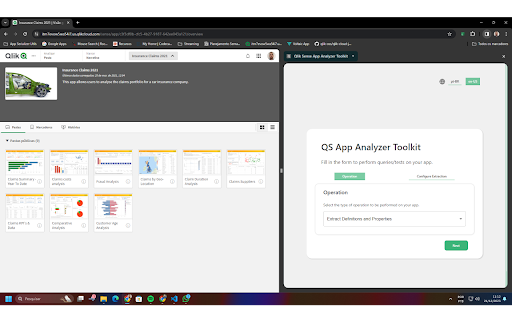


Set of tools made to make analysing your Qlik Sense Application easier. Qlik Sense App Analyzer Toolkit is a Chrome Extension that helps developers quickly get information about their apps by leveraging an already open session to the Qlik App in order to: ### Extract information about the app in well strucutured and documented JSON files With this extension, you can get the JSON files containing the properties and definitions of: -> App Meta -> Bookmarks -> Fields -> Load Script -> Master Items -> Sheets and objects -> Variables ### Analyze the performance of Sheets and Visualizations You can use the "Object Performance Analyzer" to perform several tests to one or more objects of your app in order to gauge it's calculation time, in milliseconds. Now, you can precisely determine the impact of changes in your app regarding overall sheet calculation time or even down to a specific object.

Bitbaguette
A browser extension extending Bitbucket's interface with useful features Bitbucket's user interface for Pull Requests lacks certain features that the Bitbaguette browser extension adds: * Restrict maximum display size of embedded screenshots, so that the layout of the PR description and comment threads do not get destroyed anymore * Allow to collapse (partial) comments * Provide overview of number of replies and number of linked tasks for each comment (sub-)thread * Provide a image comparison tool whenever raw image files are modified within the PR

Career Copilot: Unlocking Your Brilliance
AI-driven career companion that enhances your meetings – providing real-time insights and guidance for a success journey. 🚀 **Career Copilot: Elevate Your Virtual Meetings with AI Assistance** 🗣️ Tired of juggling between meeting notes and discussions? Introducing Meeting Copilot, your AI-powered assistant for virtual meetings! This Chrome extension seamlessly integrates with your favorite meeting platforms, reading subtitles in real-time, and providing valuable insights from OpenAI. - 🎙️ **Real-time Subtitle Analysis:** Meeting Copilot captures and analyzes spoken content during your virtual meetings, ensuring you never miss a crucial detail. - 🤖 **OpenAI Integration:** Send requests to OpenAI directly from your meetings for enhanced information and AI-driven insights. - 🌐 **User-Friendly Interface:** A simple and intuitive interface makes it easy for you to interact with Meeting Copilot during your meetings. 1. **Install the Extension:** Add Meeting Copilot to your Chrome browser with a single click. 2. **Insert AI Key:** Click on extension, choose the AI and save your key! (Follow the links to get your own key) - OpenAI . (https://platform.openai.com/api-keys) - Google Gemini. (https://aistudio.google.com/app/apikey) 3. **Enable Closed Captions:** To experience the full power of Meeting Copilot, make sure to enable closed captions during your Google Meetings. 5. **Send Requests to OpenAI:** Seamlessly send requests to OpenAI for additional information or answers during your meetings. 🔍 **Ready to Boost Your Meeting Experience?** Meeting Copilot is designed to enhance your virtual meetings, providing valuable insights and support. Say goodbye to multitasking and hello to a smarter, more efficient meeting experience. 🌐 **Open Source and Collaborative:** Join the growing community of Meeting Copilot enthusiasts! Contribute to the project, provide feedback, and help shape the future of virtual meetings. Enhance your virtual meetings with Meeting Copilot today! 🚀 👉 **Update: 1.5** - *Mouse Selection Input Context* - Now you are able to 'Select' with your mouse and the text will be auto tracked to the new input. - You doesn't need to select the entire message on the conversation, just selecting part of the text will allow request! - *Editable Containers* - To allow flexibility now you can edit all the containers, select and update text and contexts to fine tunnings. 👉 **Update: 1.6** - Repositioning: Now you are able to position the dialog anywhere! - **Google Gemini** - We added Google Gemini and now you can choose the AI you want to use! - Reminder: You can get you Gemini Key here: https://aistudio.google.com/app/apikey - Layout Improvments: - We cleared the extension, added few clickable parts and improved to a better user experince. 👉 **Update: 1.8** - Literally anywhere! - **You Copilot now is available in any website** - Of course, you can just 'blacklist' that website and never see it again! - It's reversible, but not too simple. (Access the website, click anywhere in the site, open the extension and if the link is there, just click to unblock and refresh the page) (If the url is not in the 'unblock' button, you'll have to 'click' in the page to recognize) - We now start collapsed! - This is implemented to allow better user experience, just use if you need. - **REMOVED CLEAR** - Actually, after pagination the Clear button got lost so we updated it. Now you can send the message to AI without any specific prompt just passing your text, selections or whatever do you want to use directly to the AI, and receive On-Screen response. **Update: 1.9** Fixes for small bugs and UX improve. 👥 **Support:** Did you had any issue? Fell free to send me an email: elsilveirasistemas@gmail.com I'll be glad to hear your thoughts!

QS Metadata Explorer
QS Metadata Explorer is a free and open Chrome extension designed to support Qlik Sense developers, analysts, and administrators in… QS Metadata Explorer is a free and open Chrome extension designed to support Qlik Sense developers, analysts, and administrators in understanding, auditing, and optimizing their applications. It integrates directly with your existing Qlik Sense session using the official Enigma.js library, ensuring that all operations are performed locally in your browser without exposing your data to any external service. ✅ No data leaves your environment ✅ No third-party servers or APIs involved ✅ Compatible with Qlik Sense SaaS (cloud) and on-premise deployments Explore and manage all types of Qlik Sense metadata: - Scripts (view and export script metadata) - Data Models (inspect structure and fields) - Sheets & Visualizations (list, search, and analyze sheet objects) - Fields, Dimensions, Measures, and Variables - Bookmarks and Stories - Users and Automations Format and beautify the expressions. Export metadata and data directly to Excel (.xlsx) files for documentation, auditing, or analysis. Capture screenshots of Qlik Sense sheets as PNG images for quick sharing or reporting. Automatically analyze your Qlik Sense applications and receive optimization hints: - Detect synthetic keys and circular references. - Identify unused fields in the data model. - Check granularity of data for modeling quality. - Validate whether QVDs/Parquet are used where possible. - Detect large or inefficient objects that may affect performance. - Flag sheets with excessive visual objects (>15 objects). - Ensure complex expressions are pre-calculated in scripts for performance. - Suggest splitting QVF files for heavy data loads. - Promote use of Master Items for design consistency. Optimization checks include both automatic detection and manual best-practice guidelines to help you continuously improve your Qlik applications. - A library of pre-built, reusable Qlik load scripts and expressions to accelerate development, including: - Master Calendar (time dimension template) - Generic Load (dynamic data loading) - Recursive Folder Scan (scan and load files from subfolders) - WildMap Expressions - Variable Population from Tables Each function is available with: 📘 Documentation (detailed usage info) 📋 One-click copy to clipboard ⬇️ Download for reuse in your environment - Runs entirely client-side in your browser - Uses your existing authenticated Qlik Sense session - No additional authentication required - No communication with external servers - This is a personal and community-driven project, not an official Qlik product. - It is provided free of charge and will remain free forever. - Use at your own risk – while care is taken to ensure reliability, it is not officially supported by Qlik.

Fextralife Fix
This little extension removes the twitch embed from the fextralife website. If you want to use that site for some reason. This little extension removes the twitch embed from the fextralife website. If you want to use that site for some reason.
