
kmpekhmapfkgcljhllfbmhmglnbkolei

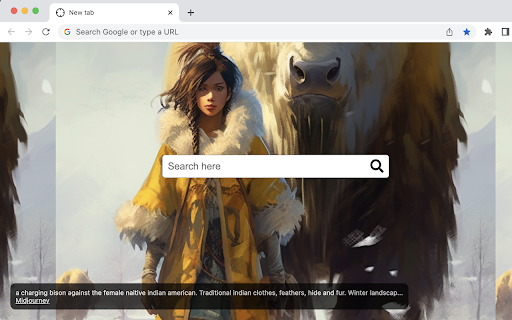
AI Image of the Day. This extension replaces the new tab with a new background image. The image are generated by AI. AI Image of the Day – your daily dose of artistry, merging technology and aesthetics. This captivating extension seamlessly transforms your new tab into an ever-changing canvas, showcasing unique, AI-generated images each day. Dive into the mesmerizing world of AI artistry where each image is a testament to the limitless creative potential of artificial intelligence. Discover the unexpected, the abstract, the utterly beautiful each time you open a new tab. Harness the power of AI and let your digital journey be painted with creativity and innovation. By clicking "Add to Chrome", I accept and agree to installing the AI Image of the Day Chrome extension and setting Chrome™️ New Tab to that provided by the service where search results will be provided by Microsoft Bing, and the Terms of Use and Privacy Policy.

Remove background
Remove background from image easily with our convenient background remover tool. Select or upload your image in the browser. 🚀 Introducing Your Ultimate Solution for Effortless Background Removal! Are you tired of struggling with complex photo editing tools just to remove the background from an image? Look no further — this tool is here to revolutionize your editing experience! - How to remove background from picture? - Easily with our AI background remover! 🤖 AI-Powered Precision: Our extension leverages cutting-edge artificial intelligence to ensure precision in background removal. The advanced algorithms distinguish between foreground and background elements, delivering impeccable results that save you time and effort. 💻 User-Friendly Interface: Designed with user convenience in mind, image background remover boasts an intuitive interface. Whether you're a beginner or an expert, navigating through the extension is a breeze, ensuring a stress-free editing experience. ⚡ Instant Results: Witness the magic unfold in real-time! The extension works swiftly, providing instant previews of your image with the background removed. Enjoy a hassle-free editing process without the need for extensive manual adjustments. 🪄 Effortless Background Removal: Our tool simplifies the tedious process of removing background from image. Say goodbye to intricate tools and countless steps—achieve professional results with just a few clicks. 1️⃣ Install the Extension: Simply add image background remover to your Chrome browser from the Chrome Web Store. 2️⃣ Select a Picture: Right-click on the image you want to edit -> Remove background. Alternatively, click on the extension icon and upload an image from your computer. 3️⃣ Select one or more key objects: Click on the key objects you want to keep. The more clicks, the higher the accuracy and quality. 🔗 Seamless Integration: Image background remover seamlessly integrates into your Chrome browser, eliminating the need for external software. Whether you're working on a design project, enhancing product photos, or creating engaging social media content, this extension enhances your workflow. 🌈 Unleash Your Creativity: With image background remover, creativity knows no bounds. Remove image backgrounds effortlessly, explore new design possibilities, and elevate your visual content. Join the ranks of satisfied users who have transformed their editing experience with this game-changing extension! 🚨 Say Goodbye to Frustration: No more wrestling with complicated software or settling for subpar results. Our extension empowers you to achieve professional-grade background removal effortlessly. Download the extension today and experience a new era in image editing! 📈 Optimizing Your Experience with image background remover: Uncover Advanced Features and Pro Tips! 🌐 Extended Compatibility: Beyond its seamless integration with Chrome, image background remover stands out for its extended compatibility. This versatile tool supports various file formats, ensuring that whether you're working with JPEGs, PNGs, or other popular formats, the background removal process remains consistent and reliable. 💻 Cross-Platform Accessibility: Take your editing prowess to new heights with image background remover's cross-platform accessibility. Whether you're on a Windows PC, Mac, or even a Linux machine, this extension ensures a uniform experience across different operating systems. Embrace flexibility and edit on the platform of your choice without compromising on quality. 🌟 Future Roadmap: What's Coming Next? Exciting developments are on the horizon for this tool! Stay tuned for upcoming features, enhancements, and collaborations that will elevate your editing experience. We are committed to continuous improvement, ensuring that our product remains at the forefront of innovation in the world of image editing. 🎉 Conclusion: Elevate Your Editing Experience Today! With our tool, the possibilities are limitless. Dive into a world where background removal is not just a task but a creative journey. Download the extension now and experience the evolution of image editing. Join a community of innovators, explore advanced features, and redefine what's possible in the realm of visual storytelling. Elevate your editing experience with image background remover—the ultimate solution for effortless background removal!

My News 4 Free
The extension will update your search settings and will change your new tab search provider to Microsoft Bing. Get quick & easy access to popular news sites, right from your new tab! This tool contains links to external websites that are not provided or maintained by or in any way affiliated with our company or this product. Please note that our company or this tool does not guarantee the accuracy, relevance, timeliness, or completeness of any information on these external websites. For more information visit our Terms of Use page listed below. By clicking "Add to Chrome", I accept and agree to installing the My News 4 Free Chrome extension and setting Chrome New Tab to that provided by the service and the Terms of Use and Privacy Policy. Uninstall Instructions: https://www.mynews4free.com/uninstall.html EULA/Terms of Use - https://www.mynews4free.com/terms.html Policy - https://www.mynews4free.com/policy.html Contact Us: http://www.mynews4free.com/terms.html#terms-contact To remove our extension from Google Chrome: 1) Click on the three horizontal lines icon in the upper right-hand corner of your Chrome browser. 2) Go to "Settings". 3) In the menu that appears click on "Extensions". 4) From the list of installed Extensions, find the name of the toolbar extension you wish to uninstall. 5) Click on the trash can icon to the right of "Enable" (for the toolbar extension you wish to uninstall). 6) Close your browser completely and reopen it. Our toolbar extension should be removed from your Chrome browser.

JoyVault Tab
JoyVault Tab gateway to your favorite websites and a treasure trove of JoyVault ecards for every occasion. Presenting JoyVault Tab, an incredible tab extension that revolutionizes your browsing experience into a personalized and delightful journey. With this extension, you can personalize your new tab page with a wide range of vibrant ecards and heartfelt greetings for any occasion imaginable. By clicking "Add to chrome", I accept and agree to installing the "JoyVault" tab extension and setting Chrome New Tab search to JoyVault provided by the service and the Terms of Use at https://joyvault.info/?pg=3 and Privacy Policy at https://joyvault.info/?pg=2

Backgrounds for Chrome-Chan
Sets a random anime wallpaper for your new tabs. Experience beautiful anime artwork in each of your new tabs! Backgrounds for Chrome-Chan features a collection of 100 wallpapers sourced from some of the most popular anime, including Demon Slayer, Your Name, Fullmetal Alchemist, and many more. Chrome-chan will never be boring again! FEATURES: - Menu for customizing your wallpapers - Add your own wallpapers by uploading their image addresses. - Activate/Deactivate wallpapers to your liking - Click any wallpaper to toggle it USAGE TIPS: - When copying the image addresses you want to upload, ensure you select “Copy image address”, not “Copy link address” - Once your chosen wallpaper shows up below the input box, it’s ready to be added! - Click Done to save all changes, or Cancel to discard them - If necessary, you can reset all added wallpapers by clearing your browser’s local storage
