
kmjnjgngkjhmdpgdppbhnolpbjhkodil


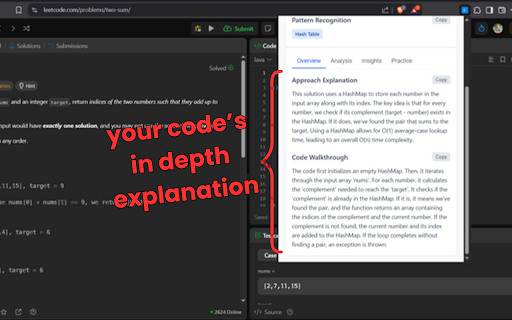
Analyzes time and space complexity of LeetCode solutions using Google Gemini, offering optimization insights and visualizations. Supercharge your LeetCode practice with AI-powered code analysis and optimization insights! 🚀 What it does LeetCode Analyzer Pro transforms your coding practice by providing instant, intelligent analysis of your solutions directly on LeetCode. Powered by Google Gemini AI, this extension helps you understand, optimize, and visualize your code like never before. 🔍 Instant Code Analysis Get detailed time and space complexity analysis with just one click Understand the "why" behind your solution's performance characteristics Receive clear explanations in plain English 🎯 Smart Optimization Suggestions Discover alternative approaches to improve your solution Learn advanced techniques and patterns Get personalized recommendations based on your code 💡 AI-Powered Insights Leverages Google Gemini's advanced language understanding Context-aware suggestions tailored to each problem Learn best practices and coding patterns 🎯 Perfect for Students preparing for technical interviews Developers looking to improve algorithmic thinking Competitive programmers seeking optimization insights Anyone wanting to level up their problem-solving skills 🔧 How it works Write your solution on any LeetCode problem page Click the analyzer button that appears in your interface Get instant insights including complexity analysis, optimizations, and visualizations Learn and improve with detailed explanations and suggestions 🌟 Why choose LeetCode Analyzer Pro? Seamless Integration: Works directly on LeetCode without leaving the page Privacy Focused: Your code is analyzed securely through Google Gemini API Always Learning: Helps you understand concepts, not just solve problems Time Saving: Get expert-level insights without manual research 📋 Requirements A Google Gemini API key (free tier available) Works on all LeetCode problem pages Compatible with all major browsers 🔒 Privacy & Security Your code is processed securely through Google's Gemini API. No data is stored permanently, and all analysis happens in real-time for your current session. Transform your LeetCode journey today! Install LeetCode Analyzer Pro and start getting AI-powered insights that will accelerate your coding skills and interview preparation. Note: Requires a Google Gemini API key. Free tier available with generous usage limits.

BetterLC
Chrome extension to unlock leetcode company tags. BetterLC - Unlock Company Tags on LeetCode for Free Enhance your LeetCode experience with BetterLC! Unlock company tags effortlessly by simply opening any LeetCode problem and hovering over the embedded BetterLC icon. Gain insights into which companies ask specific problems, helping you prepare more effectively for interviews. Empower your preparation with BetterLC!

LeetCode Forcer
An extension which force you to solve daily leetcode problem. Say no to procrastination. Occasionally, we all make a commitment to solve at least one problem daily on Leetcode. However, in today's fast-paced and distracting world, it can be challenging to stick to this commitment despite having made it multiple times. To motivate you to tackle the daily Leetcode challenge, we have developed this extension. Instead of sending reminders, it will automatically redirect you to Leetcode until you have completed the problem of the day. What is the function of this extension? 1. After installing, if you browse anything on chrome and you have not solved the problem for a day it will redirect to that. Basically, it's virtual implementation of the principles outlined in book 'Eat That Frog'. 2. In case of an urgent need to browse, the extension includes an emergency button that can be used once per day to temporarily disable the redirection to Leetcode for a period of 3 hours. 3. You have the option to choose between two modes: redirecting yourself to the daily Leetcode challenge or to any problem on Leetcode. This is beneficial for users who are beginners and those who are on their way to becoming pro and do not want to solve the daily Leetcode challenge. What's new in version 2.0.6 1. There appears to be an issue with the extension not functioning properly on the new UI of Leetcode. If you are experiencing this issue, we recommend switching back to the old UI. In order to assist with this, we have included instructions in the extension popup on how to switch back to the old UI. What's new in version 2.0.5 1. Now Leetcode Forcing For Mode Daily Leetcode Challenge will happen according to UTC 12 AM as daily leetcode problem changes accordingly. 2. Minor bugs are fixed.

AlgoMeter AI: Big O Insights for LeetCode
Get the Big O notation of your LeetCode code. Time and space complexity analysis using AI. Algorithm analysis tool for LeetCode. Provides Time/Space complexity and explanation of algorithm.

LeetSync - Leetcode to Github Synchronizer
LeetSync is a Chrome extension that enables you to sync your LeetCode problem submissions with a selected GitHub repository. LeetSync is a Chrome extension that enables you to sync your LeetCode problem submissions with a selected GitHub repository. With this extension, you can easily track your coding progress and share your solutions with others on GitHub. 🤔 Why LeetSync? 1. LeetSync helps you save, review, and share your LeetCode solutions with others by submitting your solutions into your selected Github repository in a second. 2. LeetSync works on any LeetCode interface. 3. LeetSync help you motivate yourself by challenging yourself day after day 4. LeetSync saves a lot of time if you wanted to push your submissions manually to Github each time you solve an issue LeetSync utilizes the LeetCode API to fetch your submission data and the GitHub API to create a new file or update an existing one in your selected repository with the option to specify different subdirectories for your solutions. To configure LeetSync, follow these steps: 1. Click on the extension icon in your Chrome toolbar. 2. In the popup window, Give Access via Github. 3. Login via LeetCode (Optional and might be automatically skipped if already logged in) 4. Select the repository you want to sync your submissions to. 5. Start solving some problems 🔥 🫶 Contributing Contributions are welcome! If you want to contribute to the project, please follow the contributing guidelines using this link: https://github.com/3ba2ii/LeetSync/blob/main/CONTRIBUTING.md ⭐️ Star the project on Github and help us reach more and more people https://github.com/3ba2ii/LeetSync
