
kmhdplcfiijnmcikebddnebmcnlnbfap
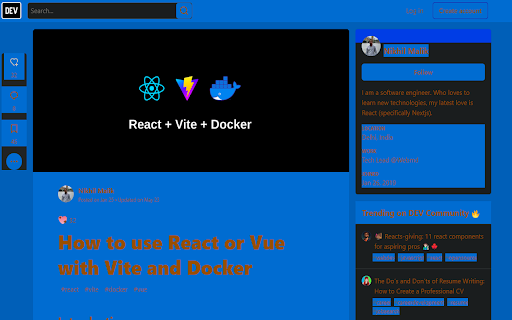


Accessible high contrast color schemes for the colorblind This is an Chrome extension that allows Colorblind individuals to use high contrast colors to reduce eye strain and make browsing the web easier. Featuring 8 high contrast color sets specifically for the colorblind, users can select the one that works best for their vision and experience the web with new clarity. Tested on websites you use! Such as Reddit, Google, GitHub, Dev.to and Medium. The current implementation works well on most websites. All websites are built differently and some may have bad practices that interfere with this plugin which are mostly inline styles with the important property with high specificity(CSS). No ads for spyware. 100% free. Try it for yourself and see better today! Credit to David Nichols at https://davidmathlogic.com/colorblind/#%23D81B60-%231E88E5-%23FFC107-%23004D40 for color schemes.

Colorblind Vision Extension
Overview: The Colorblind Filter Extension is a Chrome extension designed to enhance web accessibility for users with color vision deficiencies. It provides a set of colorblindness filters that can be applied to any web page(except chrome tabs like chrome://.......) to simulate how it appears to individuals with various types of color vision impairments. Users can also reset the filters to return to the normal view. None: Removes any applied filters, showing the page in its original color. Grayscale: Converts the page to grayscale, useful for those with certain types of color blindness or for users who prefer a monochromatic view. Protanopia: Applies a filter that simulates protanopia (red-green color blindness), which affects the ability to perceive red hues. Deuteranopia: Applies a filter that simulates deuteranopia (another type of red-green color blindness), affecting green hues. Tritanopia: Applies a filter that simulates tritanopia (blue-yellow color blindness), affecting the perception of blue and yellow hues.

Colorize
Accessibility tool that helps those with color blindess to distinguish colors by applying a daltonization filter to images. Colorize allows colorblind users to distinguish colors by correcting for their type of color vision deficiency (Protanopia, Deuteranopia, Tritanopia). Users can also increase saturation of images on the Chrome browser to more clearly differentiate colors. Colorize works by utilizing the LMS Daltonization Algorithm. The idea of the algorithm is to convert the RGB values into LMS, compensate for the values that are being lost from the type of color blindness, and convert the values back using the CVD matrix. This method is notable for being the most accurate in correcting for color blindness. Works on websites like Google Images, YouTube, Pinterest and countless others. Available in all regions.

Visual-able
Accessibility tool including color blindness simulation, magnifier, TTS, night mode, and high contrast mode. Visual-able is a user-friendly Chrome extension crafted specifically for visually impaired individuals, people with color vision deficiencies, and anyone looking to enhance their web browsing experience. Struggling with color recognition on websites? Visual-able offers comprehensive colorblind simulations, including Protanopia (red-blind), Deuteranopia (green-blind), Tritanopia (blue-blind), and various other forms. Additionally, it provides helpful visual enhancements like Night Mode and High Contrast, making webpages clearer and easier on the eyes. Find yourself squinting at small text or images? Activate the customizable magnifier tool using quick keyboard shortcuts, enabling effortless zooming into any webpage content. You control the zoom level, size, and even the magnifier border color, adapting the browsing experience perfectly to your preferences. Prefer listening to reading? The built-in Text-to-Speech (TTS) feature allows you to select or enter text and listen comfortably instead of straining your eyes. Fully customize the language, speed, and playback options to match your listening needs. All your preferences are automatically saved, creating a personalized browsing experience each time you open your browser. Visual-able isn't just an accessibility tool; it's your gateway to a more comfortable, clearer, and empowering web browsing experience. Install Visual-able now and transform the way you browse the web!

Fix Contrast
Low contrast text is the most common accessibility issue and affects 85% of pages. Text with sufficient contrast makes text readable to all users, including those with low vision, color blindness or environmental interference. This extension will automatically fix low color contrast on any site you visit. Set your minimum level of contrast and this extension will automatically force any site you visit to meet your preferences. Make every site readable without overwriting the rest of the design. Easily pick between ""Medium"" (WCAG AA level) and ""High"" (WCAG AAA level) contrast and optionally force the background color to change when needed as well for optimal readability. Fix Contrast is free, does not run any external code, has no tracking and is supported by the Polypane browser for developers. For more, visit https://polypane.com We are always looking for people to translate it into more languages, please reach out!
