
kmcfomidfpdkfieipokbalgegidffkal


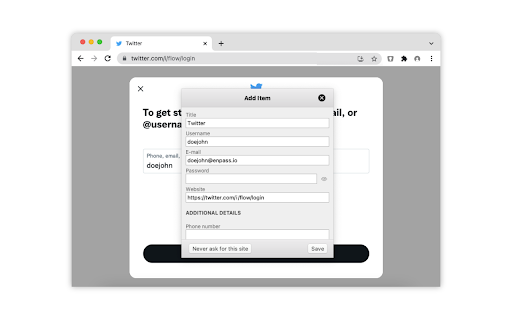
Enpass extension autofills logins, passwords, credit cards and identities from the Enpass desktop application. Attention:- This extension requires the Enpass Password Manager Desktop application to be installed and running on your computer in order to autofill your data. You can download the desktop application free of charge from here: https://www.enpass.io/downloads/ ##More about Enpass Enpass is the “offline” password manager that keeps all your passwords, credentials and important files organized and secure. “Offline” means we don’t store your passwords, credentials or files on our servers. You keep control of your most sensitive information – your data is stored (encrypted) locally on your device(s), and, you can still synchronize it across your devices using your own cloud accounts, without sending it to our servers.

Synology Web Clipper
Synology Web Clipper saves web content to your Synology NAS for quick and easy access. A complete page of text, pictures, and li... Synology Web Clipper clips web content and saves it to your Synology NAS. A complete web page including text, pictures, and links can be saved. Spare yourself from managing countless browser tabs and bookmarks. With Synology Web Clipper, you can quickly and easily access clipped content via Note Station. You can also add tags and comments to manage clipped content.

Buttercup
Browser extension for Buttercup, the secure and easy-to-use password manager. Manage your online identities and credentials with Buttercup: An open-source, free and secure password manager. Buttercup uses the strongest industry techniques to encrypt and store your details in a variety of locations of your choosing. Use Dropbox, Google Drive or a WebDAV connection to remotely host your archive for high accessibility. You can also connect local files - all via the Buttercup desktop application (required for this extension). Buttercup's browser extension allows you to easily log in to all of your online profiles and sites, is extremely secure, is easy to use and completely free of charge. We collect no data about you or any activities you perform. Keep your master password safe as it is the only way to open your archive and access your credentials. Newly detected logins will cause the extension to prompt you to save them - add all of your online authentication details to keep your accounts safe!

floccus bookmarks sync
Sync your bookmarks privately across browsers and devices **Floccus Bookmarks Sync: Private, Cross‑Browser & Device Sync** *Securely synchronize bookmarks across Chrome, Firefox, Edge, and more using your own cloud storage.* **Seamless Cross‑Browser & Cross‑Device Sync** - Sync bookmarks between Chrome, Firefox, Edge, and any browser that supports extensions. - Works on desktop, mobile, and tablet. - Syncs instantly when you add or edit a bookmark. **Ultimate Privacy & Control** - No data is stored on Floccus servers. - All data stays on your chosen backend (Nextcloud, WebDAV, Google Drive, or Git). - Optional end‑to‑end encryption for WebDAV and Google Drive. **Flexible Backend Support** - Nextcloud, Linkwarden, KaraKeep any WebDAV server, Git repositories, Google Drive, Dropbox - Choose the backend that best fits your workflow. **Easy Setup & Usage** - One‑click installation from the Chrome Web Store. - Simple wizard guides you through selecting a backend and configuring sync. - Automatic updates keep your bookmarks in sync. - **Privacy‑First** – Your bookmarks never leave your chosen storage. - **Cross‑Platform** – Works on all major browsers and devices. - **No Ads / No Fees** – Free to use, no hidden costs. Although, I do appreciate donations :) - **Customizable** – Pick any backend you trust. - **Community‑Supported** – Open‑source code and active community. **Get Floccus now and take control of your bookmarks!** If you'd like to support the creation and maintenance of this software, you can donate here: https://floccus.org/donate/ Please file bug reports or requests for help over on Github: https://github.com/floccusaddon/floccus

KeePass Tusk - Password Access and Autofill
Readonly KeePass password database integration for Chrome and Firefox Tusk adds KeePass functionality to your browser. It does not require KeePass to be installed, and is suitable for using KeePass with Chromebooks. Tusk is read-only and can be configured without granting the extension access to manage your cloud storage accounts. It can be used with these cloud providers. * Google Drive (somewhat reliable) * Dropbox (recommended) * OneDrive (unreliable) * OwnCloud and NextCloud via WebDav (somewhat reliable) * KDBX Version 4 Support * WebDAV support * OTP support * Shared Link support * HTTP fetch support * Better security practices and updates. Tusk is a fork of CKP and seeks to provide improvements to the UI, better security practices, and KDBX version 4 support. Visit https://subdavis.com/Tusk for more information. Tusk is Open Source and provided under an MIT license. ** UPDATE LOG ** ================ v2024.8.12 - Google Drive permissions regression fix --------------- v2024.8.10 - Fixes for OTP and Credential caching --------------- v2024.8.7 - Fixes for non-Chrome browsers. --------------- v2024.8.2 - Updates Google Drive integration, fixes for shared URLs. ---------------- v2024.07.30 - Upgrade to manifest v3, various bug fixes. Removes PCloud. Updates many dependencies. ---------------- v2018.9.27 - Bugfix #257 ---------------- v2018.9.16 - UI Update, new settings, bug fixes. ---------------- v2018.6.27 - Bug fixes ---------------- v2018.6.16 - CRL+SHIFT+SPACE opens popup, other fixes. ---------------- v2018.5.19 - Pcloud and hotkey navigation! ---------------- v2018.2.25 - WebDAV support! ---------------- v2018.2.17 - KDBXv3.1 (chacha20+AES KDF) ---------------- v2018.2.12 - Solve race condition when opening before cache expires. ---------------- v2018.1.31 - TUSK_URLS custom field ---------------- v2018.1.23 - KeeOTP support; clipboard timeout preferences. ---------------- v2018.1.16 - solve #64, add Hotkeys Ctrl+Shift+Space ---------------- v2018.1.8 - fix bug with XML-based keyfiles ---------------- v2018.1.7 - use persistent background page ---------------- v2018.1.5 - Tusk! A ground-up rewrite of the UI + major bugfixes.
