
kmbnbjbfpnchgmmkbeidpllpamcahljn
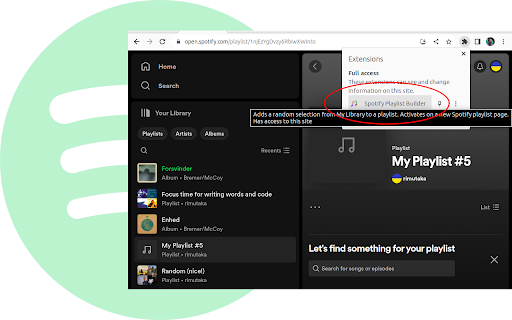


Generate a random playlist from everything stored in My Library, including liked tracks, albums and playlists. This extension no longer works. Do not install. I'll fix it one day when I need to use it again. ========================================================================= 1. Create an empty Spotify playlist 2. Click on the extension button in the browser toolbar 3. Enjoy a random selection of your favourite tracks added to the playlist Chrome activates this extension only when you navigate to a Spotify playlist. If you click on the extension button it will: * download the list of albums, playlists and liked tracks from your Spotify library * pick tracks at random and add them to the current playlist * you can select how many tracks to add Only tracks from your library are considered. This extension does not make recommendations or unwanted additions. If the playlist already has tracks, the new ones are added at the end. It is safe to navigate away from the playlist or close the tab - the extension will continue working in the background. This extension does not store any data or communicates with any website other than Spotify. Any data it downloads is kept in local memory and is disappears when you close Chrome. ABOUT THE PROJECT Spotify apps do not have a Play button inside My Library to play all our music on shuffle with a single click. This extension is workaround for that missing feature. This is a non-commercial project by a solo dev. I built it to meet my own needs and hopefully it can help others too. I am open to suggestions for new features and improvements. All the code is open source. PRs are welcome.

Spotify artist's all songs
As you know Spotify doesn't provide method to listen all songs of artist in single playlist. With this extension you can simply… As you know Spotify doesn't provide method to listen all songs of artist in single playlist. With this extension you can simply create playlist with all songs of any artist on Spotify. Just go to artist's page, click on extension icon and click "Show all songs" button. After couple of seconds you will be redirected to new playlist with all songs of this artist. **Why do we need Spotify authorization?** This extension uses official Spotify Web API to create playlists in your account, which requires your permission. When you first use the extension, you'll need to authorize it with Spotify. Here's what we need access to: - **Read your playlists**: To check if an artist playlist already exists and avoid duplicates - **Create playlists**: To make new playlists with all the artist's songs - **Add tracks to playlists**: To populate playlists with the complete discography **Your privacy is protected**: We don't collect any personal information about you or your musical preferences. The extension works entirely within Spotify's secure environment and doesn't send your data toexternal servers.

Lyrics for Spotify
This is an unofficial extension that puts back the Spotify Lyrics! It puts back the lyrics for us. Look for the mic icon and click on it, that's it :D NOTE: This extension uses free resources and can be unavailable for a while when You first open Spotify. Yeah yeah, its kinda sad, but this is a simple extension made initially for myself :P

Chorus - Spotify Enhancer
Enhance Spotify with controls to save favourite snips, auto-skip tracks, and set global and custom speed. More to come! 👋 Welcome! I hope you enjoy using chorus as much as I do building it! ⭐ Please leave a review/rating and share if you find it useful. For community, support, feature requests, or bug reports: Discord: https://discord.gg/6nwYZsBw8G (most active & quick to respond) Google Forms: https://forms.gle/hxUed8wcfYUoYBeQ7 Github: https://github.com/chorus-studio/chorus-dev This is an open-source project—your support (feedback, feature ideas, bug reports, reviews, ratings) is greatly appreciated and motivates me to maintain and build new features! Become a supporter to support the developer! I release updates semi-frequently, so check for new features often! Join the discord for questions, issues, requests, and just music sharing! Let's build a community for music lovers! 🚀 ✅ Apply pitch shifting and semitone (key) changes to audio ✅ Save Favourite Track Section – Replay your favourite part of any song or podcast. ✅ Custom Equalizer Effects - Select from a wide range of equalizer presets based on Spotify's own and some custom common ones. ✅ Custom Reverb Effects – Apply unique audio effects like mufflers, filtered phone, or drum reverb. Additionally, common simulated reverbs like bathroom, large room, arena, etc, are available. ✅ Playback Audio Controls – Set custom rate, pitch, and semitone (key) for songs, podcasts, and audiobooks. ✅ Block Songs Forever – Skip unwanted tracks in albums, playlists, and queues. ✅ Artist Discography Playlists – Create playlists from an artist’s full discography. ✅ Share Your Snips – Generate and share links to your saved snips (future social sharing support). ✅ Advanced Looping - Toggle between Infinite & Counter Loop. Counter Loop allows for looping a track or snip a set amount of times before going to next track. ✅ Keyboard Shortcuts – Control playback, skip tracks, toggle features, and more. For setup, see: How to set extension shortcuts: https://www.makeuseof.com/open-browser-extensions-keyboard-shortcut/ ✅ Track notifications - Show quick track info as a notification. Notifications can be auto-triggered on track change or shortcut key. Notification buttons can also be used to block and toggle track liked state (not supported on FireFox). ✅ PiP V2 - Upgrade to Spotify PiP. Quick access all chorus features and UI in a floating window. ✅ Volume V2 - Increased volume up to 300%. Toggle between linear and logarithmic volume scaling. ✅ Progress Bar V2 - Click to exact song position based on time. Also available in popup. ✅ Popup Theming V2 - Select theme for popup based on vibrant colours from track cover image Blocks tracks natively from the Spotify Queue (requires the Queue Sidebar to stay open, for now). If the sidebar is closed, the extension mutes and skips blocked songs until an unblocked one plays. Future update: Option to reinsert a blocked track if it hasn't been skipped yet. Stay tuned for more updates! 🚀

Nice Playlist Generator
Makes Spotify playlists from rateyourmusic.com and sonemic.com charts or lists If you like this add-on, spread the word. Help us by liking or sharing our Facebook page. Do you want to find new music? Are you interested in this year's releases, are you trying to get into a new genre or get to know 1993's field recordings of melting ice? Would you like to do this without the tediousness of searching single songs and making playlists of them? Do you like simple and functional things? If so, Nice Playlist Generator might be just what you want. Useful data gathered by rateyourmusic.com users in the form of charts and lists can be turned into Spotify playlists in a few easy steps. In your browser, navigate to a rateyourmusic.com's chart or an user submitted list. Click the Nice Playlist Generator icon in your address bar. If the add-on finds at least one item representing an album (or other kind of release) on the current page, the "Get spotify links" button activates. After you click it, the search on Spotify is started. You are informed about the amount of releases successfully found on Spotify and about the ones that could not be found. After the search finishes the "Copy playlist to clipboard" button activates. When you click it, you can go to the Spotify desktop application and choose a newly made or existing playlist you want to add the new tracks into. Click into the content pane of the playlist and paste the tracks found by Nice Playlist Generator into it by pressing Ctrl + V
