
klpdfepkejnangjnebfmnbodbkjlpkjn
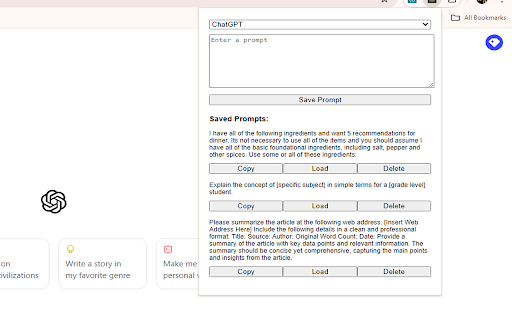


Save and manage prompts for different LLMs including ChatGPT, Claude, CoPilot, and Gemini LLM Prompt Saver is a user-friendly Chrome extension designed to streamline your interactions with multiple Language Learning Models (LLMs). It allows you to effortlessly save, manage, and reuse up to five prompts each for most of the major LLMs. With a clean interface featuring a large text area for comfortable editing, users can easily switch between LLMs, save new prompts, and access their stored prompts with options to copy, load for editing, or delete as needed. This tool is perfect for researchers, writers, developers, and anyone who frequently uses multiple LLMs and wants to maintain consistency and efficiency in their AI interactions, ultimately boosting productivity and streamlining workflow.

AI Exporter: Save ChatGPT, Gemini to PDF, Word, MD and Notion
Export ChatGPT, Claude, Gemini and NotebookLM chats to PDF/Word/Markdown/Txt. Supports content selection, and Notion sync, download. 📌 Introduction Want to save your AI conversations forever? AI Exporter is a professional browser extension supporting 10+ major platforms including ChatGPT, Gemini, Claude, and NotebookLM. With just one click, export your AI chats perfectly to PDF (Latex supported), Word, Markdown (MD), JSON, Image, or sync directly to Notion. Never worry about losing your chat history again. Archive, share, and edit your AI knowledge assets with ease. 🔥 Popular Features 🆕 Precise Timestamps: Automatically extracts and displays the exact creation time of each session, making your history fully traceable for better timeline management. 🆕 Super-Long Chat Export: Engineered to handle massive conversations effortlessly without crashing or truncating, ensuring every detail of your deep dives is captured. 🆕 Accurate Model Versioning: Displays the specific AI model version used in each session (e.g., Gemini 3 Pro, ChatGPT 2.5 thinking) in exported docs, making academic research and sourcing more rigorous. 🆕 Cross-Platform Collection: Sidebar mode lets you save chats locally with one click for multi-model comparison and merged exports. 🆕 Deep Research Export: Full support for downloading content from ChatGPT Deep Research and Gemini Deep Research modes. 🆕 Stylish Templates: Choose from Highlight, Dark, Note, and other beautiful templates for a professional look. 🆕 Extensive Compatibility: Supports 10+ sites, including DeepSeek, Perplexity, Copilot, Google AI Studio, and more. ✨ Powerful Export Experience ✅ Perfect PDF Layout: Automatically handles Latex formulas and code highlighting while maintaining the native UI feel. ✅ Sync to Notion: Seamlessly bridge AI and your knowledge base by turning chats into Notion pages instantly. ✅ Flexible Selection: Skip the fluff—select only what you need with multi-selection support. ✅ Image & Text Preservation: Perfectly retains images and charts; supports generating long-image sharing cards. ✅ Local Knowledge Base: Save important AI inspirations to a local database for instant offline preview. ✅ Search Overviews Backup: One-click backup for Google Search AI Overviews results. 📌 Why Choose AI Exporter? 👨💻 Community Focused: We listen to user feedback with frequent updates for a reliable experience. 🎓 Academic Friendly: Precisely identify and export academic discussions with complex Latex formulas. 👨💻 Dev Empowered: Export Markdown with one click; code snippets can be seamlessly integrated into your docs. 📊 Knowledge Accumulation: Quickly backup data analysis and reports to build your personal AI think tank. 📢 Preserve Inspiration: Save full image-text chats as beautifully formatted PDFs for easy sharing. 🌟 Install for free now and give your AI assets a permanent home!

ChatHub - ChatGPT, Gemini, Claude side by side
Use ChatGPT, Gemini, Claude, Llama and more chatbots simultaneously Stop switching apps. Compare AI responses side-by-side with ChatHub! ChatHub is a powerful browser extension that revolutionizes your AI chatbot experience. With ChatHub, you can simultaneously use multiple AI chatbots, such as ChatGPT/GPT-4o, Gemini, Claude 3.5, Llama, and more, and compare their responses side by side. We offer users various ways to access AI models: 1. Use your own account: If you're already logged into services like ChatGPT or Claude in your browser, we automatically utilize them, meaning you can use your own ChatGPT Plus privileges within ChatHub! 2. Use your own API key: We've integrated official APIs from various services, allowing you to use them with your API key on a pay-as-you-go basis, ensuring stability and reliability. 3. Use our AI service: We provide ready-to-use AI services, giving you access to over 20 AI models with a simple subscription to ChatHub. In addition to these, ChatHub offers: 1. Prompt library: Manage and discover commonly used prompts. 2. Local chat history: Save your chat history locally and perform full-text searches. 3. Markdown support and code highlighting for enhanced readability. 4. Dark mode for comfortable viewing in low-light environments. 5. Smart web access: Improve chatbot responses by incorporating up-to-date information from the internet. 6. Custom chatbots: Integrate any OpenAI-compatible API to create your own chatbots. 7. Quick access within your browser using keyboard shortcuts. Experience the future of AI chatbot interaction with ChatHub. Install the extension now and unlock a world of powerful AI conversations at your fingertips.

Open Prompt Manager
Open Source Prompt Manager for ChatGPT, Claude, Gemini, Grok and more. --- Free, open-source prompt manager. Save, organize, and load your AI prompts across ChatGPT, Claude, Gemini, Grok, and other LLMs - with full privacy. Organize your best prompts, switch between models instantly, and streamline your workflow. Whether you’re a prompt engineer, researcher, or just an AI enthusiast, Open Prompt Manager gives you the tools to manage your prompt library with speed and simplicity. - Multi-service compatibility: Works with ChatGPT, Claude, Gemini, Grok, and 15 other LLMs. - **NEW** : Custom website support : now supports any website you want to use it on :) - Create your prompt library : Save, tag, and organize your prompts for quick access. - One-click prompts: Get your prompts sent in a single click. - Variables support: Create reusable prompts with dynamic placeholders. - Import / Export: Backup or share your prompts with others. - Lightweight & private: No login required, no data collection, no hidden costs. - Customizable UI: Auto dark-mode, hot-corner trigger, keyboard shortcuts, and more. - 100% free & open source, transparent and community-driven. - Works everywhere: Compatible with ChatGPT, Claude, Gemini, Grok, and 15 other LLMs. - Privacy-first: No data leaves your browser. - Boost productivity: Save time by organizing your prompts once and reusing them anywhere. - Keep a library of ChatGPT prompts for writing, coding, marketing, or learning. - Quickly switch between LLMs prompts for side-by-side benchmarking - Store prompts for customer support, content creation, or research workflows. - Share prompt collections with teammates via import/export. Open Prompt Manager runs entirely locally in your browser. No logins, no accounts, no tracking. Your prompts belong to you — always. 👉 Install Open Prompt Manager today and simplify your AI workflow with a free, open-source prompt manager built for the future of LLMs.

SpacePrompts: AI Prompt Manager for ChatGPT, Claude, Gemini & More
Organize and manage your AI prompts. Store, search, and access your favorite prompts for ChatGPT, Claude, and other AI assistants. Your AI Prompt Manager — Built Right Into Your Favorite AI Tools SpacePrompts lives where you work. Instead of switching tabs or digging through notes, save and enhance prompts directly from your favorite AI tools without ever leaving the page. Works Inside Your AI Tools A floating toolbar is injected into supported AI platforms, giving you: • Save as Prompt — capture any prompt you write with one click • Enhance — let AI polish your prompt before you send it • Apply — paste your saved prompt back into the editor instantly Your Personal Prompt Library • Guest mode — unlimited prompts, no account required • Cloud sync — access your library on any device when signed in • Search & filter — find any prompt instantly by title or tag • Organize — categorize prompts with custom tags • Privacy control — keep prompts private or share them publicly • Quick copy — one click to clipboard, always ready Built For Teams Work together without losing your best prompts in scattered docs and chat threads. - Shared team libraries — see prompts your team has shared, right in the extension - Apply team prompts anywhere — use shared prompts inside your AI tools just like your own - Stay in sync — new team prompts show up automatically, no manual syncing - One workspace, everyone aligned — keep brand voice, workflows, and best practices consistent Sign In With Perfect For • Content creators building writing templates • Developers storing code generation prompts • Marketers organizing campaign copy • Researchers cataloging AI queries • Students building study prompt libraries • Teams keeping prompts and workflows aligned • Anyone tired of rewriting the same prompts Your best prompts took time to craft. SpacePrompts makes sure you never lose them, and helps you make them even better.
