
kloodacdcdmefdelbanijdonpljlbjnp

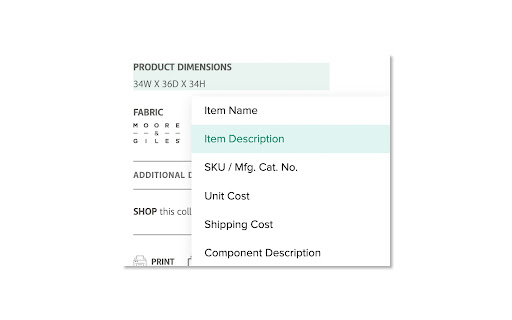
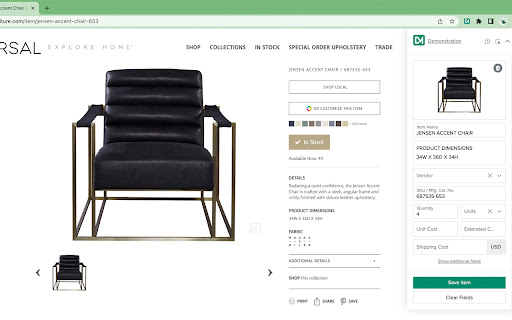

Clip pictures & product information from vendors' websites for use in Design Manager Pro Cloud. The Design Manager Product Clipper helps you capture item specification pictures & product details from vendors' websites. Simply click on pictures and text of your product details to bring them into Design Manager, saving you time and effort.

Batch Cache
The Batch Cache allows you to organise your extensions in a neat dashboard. You can create lists for different use cases and edit the names of the lists and listed extensions. The next feature we added was the ability to append URLs. This is really helpful and saves time by taking a URL you are visiting and by clicking the extension and one of your saved sites you can open in a new tab and run the URL through a scan like a website page speed loading test as an example. Some use cases: Ahrefs Wayback Machine Google Page speed Insights and many more. This extension was designed to keep your browser clean and organised and to save you time. Enjoy using the Batch Cache. We dont capture any personal information, we do bookmark your saved URL addresses to your account for quick reference as is the nature of this extension.

Wecora
Creative Professional Product Library - Capture and Access Anything Anywhere The Wecora chrome extensions lets you quickly capture products from anywhere on the web to store in your library. Using our chrome extension, a Wecora user can grab products from any website easily along with import product information to use in their projects. In addition, the extension allows the user to browse their entire library from anywhere on the web without leaving the page they are on, as well as view history of product pages they have visited so they can find things they may have missed later.

Materio Selection Clipper
Quickly clip product photos and info from vendor websites for projects in Materio Materio's Selection Clipper saves time by grabbing prices, descriptions, and images off of vendor sites for you. Instantly save the products to your design library to use in your Materio projects. We’ve made several improvements in this new version based on your feedback and our vision for a more seamless workflow: * Non-obstructing side panel The clipper now opens in a sleek side panel that keeps the website fully visible. * Better manual image selection on top of auto-selection You can now manually choose images more easily while still benefiting from automatic image detection. * Auto-matching vendor and ability to create a new one on the spot The clipper will try to detect the vendor automatically, and you can quickly add a new one if needed. * Add to a library category group—and create one if needed Categorize your selections more effectively with new options to assign or create library groups. * Add to a project Selections can now be tied directly to an active project from within the clipper. * Improved reliability for image and attachment uploads Uploading visuals and files is now more consistent and stable across sites.

Uzera
Empower users with Uzera. Integrate tours and demos seamlessly. Design interactive tours, record engaging DemoX. Uzera: Elevate User Experience with Product Tours and DemoX 🚀 Welcome to Uzera, the ultimate Chrome extension designed to revolutionize user engagement on your website or application. With two powerful features – Product Tours 🎯 and DemoX 🎬 – Uzera empowers you to provide an immersive and user-friendly experience for your audience. 1. Product Tours 🌐: Easily create interactive product tours that guide users through the essential features of your website or application. The intuitive design interface allows you to define step-by-step instructions, ensuring users grasp the full potential of your product. 2. DemoX - Video Guides 📹: Take user guidance to the next level with DemoX. Record step-by-step actions within your website or application, transforming them into captivating video guides. Share these DemoX videos to enhance user understanding and streamline the onboarding process. - Product Tours: - Design Engaging Steps 🎨: Craft visually appealing and informative steps for your product tour. Customize each step to showcase specific features or actions. - Seamless Integration 🚀: Integrate product tours effortlessly into your website or application, enhancing user onboarding and feature discovery. - DemoX - Video Guides: - Effortless Recording 🎥: Capture user interactions and workflows within your website or application effortlessly. - Shareable Video Guides 🌐: Generate shareable DemoX videos to provide users with a dynamic visual guide for using your product. - Enhanced User Engagement 🤝: Keep users engaged and informed with interactive product tours and video guides that cater to different learning preferences. - Simplified Onboarding 🛤️: Streamline the onboarding process for new users by providing them with comprehensive product tours and step-by-step video guides. - Versatility 💼: Whether you're a developer, marketer, or product manager, Uzera Toolbox is a versatile tool that adapts to your needs, enhancing user engagement across the board. 1. Install the Uzera Chrome extension. 2. Access the intuitive design interface for Product Tours or start recording with DemoX. 3. Elevate your user engagement and provide an unparalleled experience for your audience. Transform user engagement today with Uzera – Your Gateway to Intuitive Product Tours and Dynamic DemoX Video Guides! 🚀
