
klmkcejemfephoojgoodjllcdnnnehln
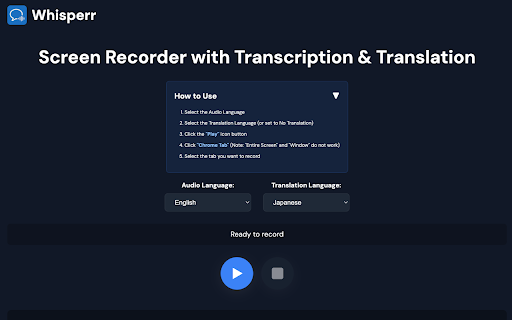


The extension allows you to listen to any audio or video and it transcribes and translates in realtime. It's the fastest and the… The extension allows you to listen to any audio or video and it transcribes and translates in realtime. It's the fastest and the most accurate translator in the world covering over 100 languages. It's super easy by tapping the "play" button, you can choose from the lit list of Chrome Tabs. This can capture audio including YouTube, Google Meet, and many more.

AI Audio Translator
Translate audio and voice with Transmonkey's AI Audio Translator. Transmonkey’s Audio Translator extension turns any audio or video into multilingual content directly in your browser. It combines OpenAI Whisper for transcription, large language models such as ChatGPT, Gemini and Claude for translation, and OpenAI TTS for dubbing, so you can move from original audio to natural‑sounding voiceovers in over 130 languages without leaving. With a few clicks, you can upload a local file or paste an online URL, let the extension transcribe and translate, then download both the translated audio and the accompanying transcript or subtitle files. Background music and ambience are preserved while the translated voice track is mixed in, which makes the output suitable for tutorials, marketing videos, webinars and more. Key capabilities include support for common audio and video formats such as MP3, MP4, MOV, M4V and WAV, file sizes up to 500 MB and 60 minutes, and coverage of 130+ languages including English, Chinese, Spanish, Arabic, French and Russian. The same AI translation stack that powers Transmonkey’s document, image and video tools is used here, so teams can keep a consistent translation quality across all media types. Using the extension is straightforward: choose or open the media you want to translate, set source and target languages, click “Translate”, and wait for processing to finish. When the job is done, the extension provides downloadable translated audio plus text and subtitle outputs that you can edit, repurpose or share with your team. The service offers free trial credits for new accounts, with paid plans available when you need higher volume or frequent usage. Files are processed on secure US‑based servers and translation data is deleted within a short time window, while only a lightweight history is stored locally in the browser to help you track past tasks.

TransVoice Live Voice Translator
Translates audio from your browser tab in near-real-time. Unlock the Power of Global Communication with TransVoice AI! TransVoice AI is the ultimate Chrome extension designed to translate audio from any browser tab into your native language in real-time. Whether you are watching a YouTube tutorial, attending a global Zoom meeting, or enjoying a livestream on Twitch, TransVoice AI ensures you understand every word with crystal-clear AI voiceovers. 🔴 Near Real-Time Voice Translation: Experience instant translation overlay as you watch or listen. No waiting for subtitles! 🗣️ High-Quality AI Voices: Enjoy natural, human-like voice output that makes listening effortless and engaging. 💻 Works on Any Site: Compatible with major platforms like YouTube, Vimeo, Coursera, eLearning sites and more. ⚡ Easy to Use: Simple interface—just select your language and click start. 🔒 Privacy Focused: Your audio is processed securely to ensure maximum privacy. 💎 FLEXIBLE PREMIUM PLANS: Choose the plan that fits your workflow: Bronze Starter: 35 Minutes/mo (Perfect for casual users). Gold Lite: 70 Minutes/mo (Great for weekly meetings). Platinum Plus: 140 Minutes/mo (For content lovers). Diamond Pro: 210 Minutes/mo (For heavy professional use). Install the TransVoice AI extension. Click the extension icon and select your Target Language. Click "Start Translation" and listen in your language! SUPPORT & INFO: For account management and support, please visit our official website. Break the language barrier today with TransVoice AI!

TranslateSub
Real-time audio & video transcription and translation with subtitles This extension automatically transcribes audio from web pages (including videos and live streams) into real-time subtitles while providing translations in 75 languages. Whether you're learning a new language, watching international news, or attending global meetings, this tool ensures you never miss important content. Key Features: Live Transcription – Converts spoken audio into text subtitles in real-time. Smart Translation – Supports 75 languages to help you understand foreign content effortlessly. Live Stream Support – Supports live audio & video streams. Synchronized Subtitles – Displays subtitles directly on web pages. No Extra Software Needed – Works instantly without requiring third-party apps or manual audio uploads. Use Cases: Watch Foreign Videos – Easily understand content from YouTube, Netflix, Bilibili, Twitch, and more. Stay Updated with Global News – Follow international media like BBC, CNN, NHK, DW without language barriers. Enhance Language Learning – Improve listening skills by combining subtitles with real-time audio. Assist in Live Events & Meetings – Get instant captions and translations for international conferences and webinars. Why Install This Extension? Boost Productivity – No need for manual translations—get subtitles and translations instantly. Break Language Barriers – Understand and communicate across different languages effortlessly. Smart & Efficient – Automatic transcription and translation with minimal effort.

Sokuji - AI Meeting Translator
Real-time AI voice translation for video meetings. Speak your language, be heard in theirs — works with Meet, Teams, Zoom & more. 🗣️ Speak your language. Be understood in theirs. Instantly. Sokuji is an AI-powered real-time speech translator that works directly inside your video meetings — no extra apps, no copy-pasting, no awkward pauses. Just speak naturally, and your words are translated and spoken aloud in your teammate's language, in real time. Unlike text-based translators or clunky meeting bots, Sokuji provides voice-to-voice translation that flows naturally into your conversation: • Real-time voice translation — Your speech is translated AND spoken aloud, not just displayed as text • Virtual microphone — Others hear the translation directly through their meeting audio, no setup needed on their end • Works inside your meetings — No separate window, no screen sharing, just seamless integration • Multiple AI engines — Choose from OpenAI, Google Gemini, Volcengine (ByteDance Doubao), Palabra AI, or Kizuna AI based on your needs • Offline AI models — Run translation entirely on your device with built-in AI models, completely free, no API key needed, no internet required • True privacy by design — Your voice NEVER passes through our servers. Not even we can hear your conversations • 35+ languages supported — From English, Japanese, Chinese to Arabic, Hindi, and beyond 🖥️ WORKS WHERE YOU WORK Sokuji works seamlessly with all major web-based video meeting platforms. Whether you're on a team call, a client meeting, or a virtual conference, just select "Sokuji Virtual Microphone" in your meeting's audio settings and you're ready to go. It supports any web-based meeting tool that allows microphone selection. 1. Open your video meeting on any supported platform 2. Click the Sokuji icon and configure your AI provider & languages 3. Select "Sokuji Virtual Microphone" as your mic — done! Your colleagues hear the translated voice automatically. No installation or setup needed on their side. 💡 PERFECT FOR • International teams with daily standups and meetings • Customer calls across language barriers • Global conferences and webinars • Remote workers collaborating across countries • Language learners practicing in real conversations • Content creators working with international collaborators • Privacy-conscious organizations that cannot send audio to third-party servers 🔒 PRIVACY-FIRST — YOUR VOICE STAYS YOURS Sokuji is built so that your voice data NEVER touches our servers. By architecture, not by policy. • Zero data collection — We have no server that receives your audio. It's technically impossible for us to hear your conversations • Offline AI mode — Use built-in AI models that run 100% on your device. Your voice never leaves your computer. Completely free • Cloud AI mode — When using OpenAI or Gemini, you use YOUR OWN API keys. Data flows directly between you and your chosen AI provider — we are never in the middle • No third parties — Your voice is only heard by meeting participants and (if you choose cloud AI) your selected AI provider. No one else. Ever • Open source — Don't take our word for it. Inspect the code yourself at github.com/kizuna-ai-lab/sokuji • No account required for basic usage • Chrome/Edge browser extension (this listing) • Desktop app for Windows, macOS, and Linux We'd love to hear from you! • Report issues: github.com/kizuna-ai-lab/sokuji/issues • Star us on GitHub if you find Sokuji useful ⭐ Made with ❤️ by Kizuna AI Lab
