
kljjdpaicefcaofhajdnpokmiflaagja
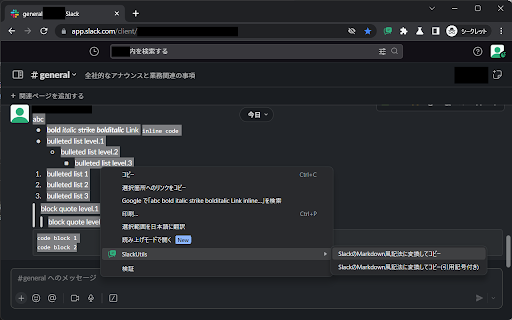

Tools to help you use Slack [^1]: 概ね [Formatting text for app surfaces | Slack](https://api.slack.com/reference/surfaces/formatting) に記載のSlack API向け記法である mrkdwn (!= Markdown) と同等に見えるが、リンクの記法やリストのマーカーが微妙に異なるため mrkdwn でもないようで、特別な呼称はつけられていないようだ。またよく知られたMarkdown (CommonMarkやGFMなど) の記法とも割と異なるので、ここでは「SlackのMarkdown風記法」と呼称する。 [^2]: [メッセージの書式設定を行う | Slack](https://slack.com/intl/ja-jp/help/articles/360039953113-%e3%83%a1%e3%83%83%e3%82%bb%e3%83%bc%e3%82%b8%e3%81%ae%e6%9b%b8%e5%bc%8f%e8%a8%ad%e5%ae%9a%e3%82%92%e8%a1%8c%e3%81%86) を参照。なお補足として、当該ページにはなぜか記載がないが、Slackの環境設定で「マークアップでメッセージを書式設定する」を「無効」(メッセージをリッチテキストで編集する最近のデフォルト設定)にした場合の利用方法を説明していると思われる [メッセージの書式設定 | Slack](https://slack.com/intl/ja-jp/help/articles/202288908-%e3%83%a1%e3%83%83%e3%82%bb%e3%83%bc%e3%82%b8%e3%81%ae%e6%9b%b8%e5%bc%8f%e8%a8%ad%e5%ae%9a?_gl=1*1qri8ym*_gcl_au*MTE1NDM0MDE0My4xNjg5NDk0MjQ0*_ga*NTIyNTAzNTAuMTY0NDkxMjMxMA..*_ga_QTJQME5M5D*MTY5MTk5NjY5Mi4yOS4wLjE2OTE5OTY2OTIuNjAuMC4w#u12510u12540u12463u12450u12483u12503) に記載のあるOrdered listやBulleted listも実際には使える。 [^3]: [メッセージの書式設定を行う | Slack](https://slack.com/intl/ja-jp/help/articles/360039953113-%e3%83%a1%e3%83%83%e3%82%bb%e3%83%bc%e3%82%b8%e3%81%ae%e6%9b%b8%e5%bc%8f%e8%a8%ad%e5%ae%9a%e3%82%92%e8%a1%8c%e3%81%86) にも「メッセージのコピーと貼り付けを行う時には、プレーンテキストとして表示されます。」と制限事項が記載されている。

Emoji Generator
This is an extension for convenient use of the Emoji Generator Emoji Generator is a tool to easily generate reaction emoticons and emojis for chats such as Slack. With this extension, you can easily register generate emojis directly with your Slack team. Emoji Generator browser extension is developed with open source. The source code can be freely used or modified according to the MIT License. https://github.com/emoji-gen/browser-extension Copyright (C) 2017-2022 Emoji Generator

Slack Channels Grouping
This extension groups Slack channels by prefix, making it easier to find channels visually. 🛠️ Features: - Groups channels with common prefixes automatically - Supports both hyphens (-) and underscores (_) for grouping - Works with channel names like: • prefix-name • prefix_name 🚀 How to Use: - Simply install the extension - Open Slack in your browser - Channels will be automatically grouped by prefix 💻 The source code is also available, and you can build and install it yourself. For more details, please visit: https://github.com/yamadashy/slack-channels-grouping

Create Link
Copy current page URL to clipboard in various formats. Copy current page title and URL to clipboard in various formats. *plain text ([page title] [page URL]) *HTML link ([page title] *markdown *mediawiki In extension options page, you can configure formats and shortcut key. Source code is available at http://github.com/ku/CreateLink Tweet @ku if something is wrong with Create Link

X Deck
Multi-column viewer for X.com ▎ Monitor multiple X keyword streams side by side in real time — a free multi-column dashboard built into your browser. When you're tracking multiple keywords, topics, or hashtags at once, X forces you to jump between searches — losing context every time. X Deck solves that by displaying all your streams simultaneously in a clean, multi-column layout. How it works: Open x.com/x-deck in your browser and add any keyword or hashtag as a column. Each column shows a live search feed. Add as many as you need, side by side. Features: - Real-time multi-column keyword monitoring - Drag & drop to reorder columns - Adjustable column widths - Dark / light theme - Hide X's search bar and menu bar for a focused view - Japanese / English UI - Your regular X experience stays completely untouched Privacy-first: X Deck is entirely local. No account, no subscription, no data collection — nothing leaves your browser. --- Built for journalists, researchers, community managers, traders, and anyone who needs to track multiple topics on X without losing focus.
