
kljdffoakidlbgjphoifldacbmnaclip
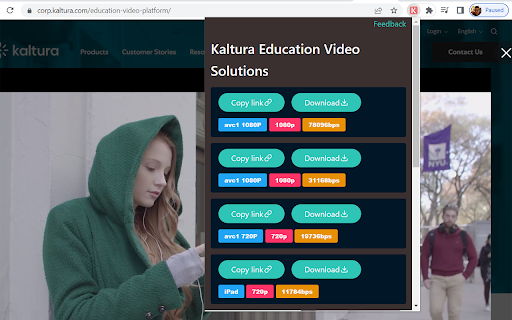
This add-on helps you download videos embedded using Kaltura player. The page may require a refresh for the add-on to work properly sometimes.

Kaltura Downloader
Download HLS videos and subtitles from Kaltura (KAF) players with one click. Kaltura Downloader adds a floating download button directly on the video player. No need to open developer tools or copy URLs manually — just play the video and click Download. [FEATURES] • One-click video download — plays the video, click Download, pick a quality, done. • Quality selection — choose between available resolutions (1080p, 720p, etc.) • Subtitle download — automatically detects and downloads WebVTT subtitles. • Copy m3u8 URL — for advanced users who prefer ffmpeg or other tools. • Real-time progress — see exactly how many segments have been downloaded. • Parallel downloads — 6 concurrent segment downloads with automatic retry. [HOW IT WORKS] 1. Navigate to any page with a Kaltura (KAF) video embed. 2. Play the video. 3. A blue Download button appears on the player. 4. Click it, select quality, and the download begins. 5. The extension downloads all HLS segments in parallel and merges them into a single file. Output format is .ts (MPEG-TS), playable in VLC, mpv, and most media players. To convert to MP4: ffmpeg -i video.ts -c copy video.mp4 [PRIVACY] • No data collection — everything runs locally in your browser. • No external servers — downloads happen directly from Kaltura CDN. • No account required. • Open source: https://github.com/gracefullight/kaltura-downloader [PERMISSIONS] • webRequest: to detect when a Kaltura video manifest is loaded. • host_permissions (*.kaltura.com): to parse the video playlist for quality options. This extension does not modify, block, or redirect any network requests.

BrightSpace Open In New Tab Extension
Allows users of BrightSpace to open PDF's, video's and text shown in the 'Content' tab in a separate tab using a button. Why this extension? The virtual learning environment BrightSpace is used by over 1000 educational institutions and businesses worldwide. However, files on the 'Content' tab such as PDF's and video's are shown using a built-in viewer. Users that would like to switch between several files either find themselves clicking between the various topics on BrightSpace or downloading them first and then opening them in separate tabs. This hinders productivity and is not the best user experience. It would be great if users could easily open such files in new tabs. What does this extension do? This extension allows the users to open PDF's and video's (such as lecture recordings) on BrightSpace in a new Google Chrome tab, by adding a new button on the content pages. Clicking this button will open a new tab containing the content that is currently active. Does it always work? The extension works with PDF files and video's both for students and course administrators. There are, however, several ways to upload documents, and not all are supported by this extension. Nonetheless, most should work. For a list of supported institutions, see https://github.com/WesselvanDam/bs-extension/tree/main#supported-institutions Don't see yours? Place the link that your institution uses in a comment and I will add support as soon as possible. For the source code of this extension, see https://github.com/WesselvanDam/bs-extension

Canvas – Video Downloader, Transcriber & Summarizer
Download, summarize, and transcribe videos from any website. Including popular LMS: Canvas, Blackboard, and Moodle. The All-in-One Video Downloader, Summarizer, and Transcriber for the Modern Web Canvas makes it easy to download, convert, summarize, and transcribe videos from across the web. Whether you’re watching a tutorial, webinar, lecture, or online course, Canvas helps you capture, understand, and organize content — quickly and securely. Built for anyone who values learning, productivity, and knowledge — from professionals and researchers to everyday learners. 🎥 Universal Video Downloading Download videos from a wide range of websites, including educational platforms like Canvas, Blackboard, and Moodle. Keep your videos stored locally for offline viewing. 🧠 AI-Powered Summaries & Transcriptions Generate concise summaries and accurate transcriptions from any video or audio. Perfect for note-taking, review, or accessibility. 🔒 Private and Secure All processing happens locally on your device. Your downloads, transcriptions, and summaries remain private — never uploaded or shared externally. Why You’ll Love It: - Download and store videos for offline access - Review long content faster with AI summaries - Convert and search transcripts easily - Works across most websites and LMS platforms - Keeps your data completely private Perfect For: - Learners & Educators: Ideal for studying or teaching from Canvas, Blackboard, and Moodle. - Professionals: Save and summarize webinars, training, and meetings. - Researchers: Transcribe and analyze academic or recorded materials. - Lifelong Learners: Capture and organize tutorials and online talks. By combining downloading, transcription, and AI-powered summarization, it helps anyone save time, learn faster, and stay organized across the web. What’s New (v2.2.0): - Added functionality to the popup and content interface - Added support for processing MP4 and HLS videos on any website - Improved performance and overall stability Download. Summarize. Transcribe. Learn more efficiently — with Canvas!

UCSD Schedule Visualizer
Optimize your UCSD class scheduling with our WebReg extension. 🚀 ‼️Key features‼️: - Visualize current schedule and custom events in recognizable colors. 📅 - Identify class fit in blue, and red if overlapping. 🔍 - Toggle timetable and class visibility by registration status. 👁️ - View planned, enrolled, or waitlisted classes. 👤 - Github page: https://github.com/WojtekTB/UCSD-Schedule-Visualizer
