
klionldfmicgnjofibfndghnebgamonm
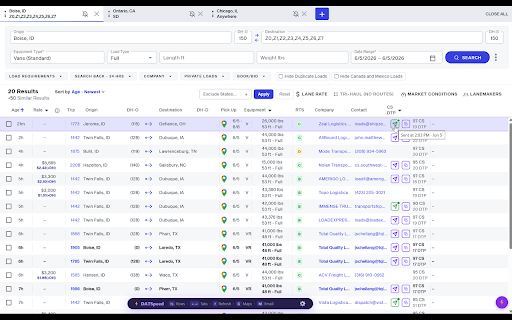


DATSpeed supercharges DAT One (one.dat.com) for freight dispatchers who want to move faster, book more loads, and waste less time. ⚡ KEYBOARD NAVIGATION Stop clicking. Start flying. Use arrow keys to navigate load rows, Enter to expand a load, G to open Google Maps, and M to email the broker — all without touching your mouse. Work through 100 loads in minutes instead of hours. 📧 ONE-CLICK EMAIL — GMAIL & OUTLOOK Connect your Gmail or Outlook account and send professional load inquiry emails directly from DAT One with a single click. Your email template auto-fills the origin, destination, pickup date, trip miles, and broker reference ID. Add your company signature with logo. Connect both Gmail and Outlook simultaneously and switch between them anytime. No more copy-pasting or switching tabs. 📊 LIVE RTS CREDIT RATINGS See broker credit scores, payment trends, and average pay days directly inside DAT One — on every load row and in the load detail panel. No more leaving DAT to check RTS Pro separately. Connect once and DATSpeed reads ratings automatically. 🏦 APEX CAPITAL FACTORING CREDIT If you factor with Apex Capital, DATSpeed connects directly to your Apex AMP account and shows each broker's factoring credit status right inside DAT One. See approval status, credit limit, available credit, verified payment domain, proof of delivery requirements, and fraud alerts — all without leaving the load board. Fraud alerts display automatically when a broker has been flagged for identity theft. 🗺️ EMBEDDED ROUTE MAP Every load detail panel shows a live route map with total miles, loaded miles, empty miles, deadhead drive time, and estimated trip time — powered by real routing data. Know your lane before you call. 🧮 INSTANT RATE CALCULATOR Rate per mile auto-calculates the moment you open a load. Trip miles and deadhead pre-filled automatically. RPM including deadhead miles displayed directly on every load row. Know your numbers instantly without opening a calculator or spreadsheet. 🔍 SMART FILTERS Hide Duplicate Loads — clean up your results instantly Hide Canada & Mexico Loads — US-only results with one click Exclude Destination States — select any states you never run to and hide those loads permanently Hide DAT Outgo Ads — remove factoring ads from your load board 🌙 DARK MODE Flip DATSpeed and DAT One to a dark theme with one tap. Easy on the eyes during long dispatch sessions or night shifts. WHO IS DATSPEED FOR? DATSpeed is built exclusively for freight dispatchers using DAT One. If you spend your day searching loads, emailing brokers, and checking rates — DATSpeed saves you hours every week. ---GETTING STARTED--- Install DATSpeed Open DAT One (one.dat.com) Sign in with Google, Microsoft, or your email Start your free 7-day trial — no credit card required $7/month after trial. Cancel anytime. ---REQUIREMENTS--- Active DAT One account (one.dat.com) Google Chrome or Microsoft Edge Gmail or Outlook account (for 1-click email feature) RTS Pro account (for credit ratings feature -- optional) Apex Capital AMP account (for factoring credit feature — optional)

DAT Snap
Book loads faster with DAT Snap. Our Chrome extension helps dispatchers and carriers book freight faster and more efficiently on DAT. Use your keyboard arrow keys to navigate through different searches. No more clicking. Also set a timer to automatically refresh the load board. Integrate Gmail or Outlook and instantly email brokers for posted loads with one click.

BPM RunWalkYou Ext
---------------------------------------------------------------------------- You will be able to do BPM running (walking) with your favorite YouTube videos. (Supports playback speed adjustment.) ・If you can use the chrome extension on your mobile device, you can easily perform BPM running (walking) on YouTube videos. ・You can keep the BPM you want to run even if you go to the next song in the playlist.

Apiary - Web Highlighter & Annotator
Highlight and take notes directly on what you read online and instantly share them with friends and colleagues. Easily highlight and take notes on what you read online and then easily save them for later and share them with friends and colleagues in one click. Apiary is a free to try chrome extension based product that allows you to easily highlight and take notes on what you read online. After you have annotated something online it will be saved to your Apiary account where you can then organize in any way you like with our folder system. You can than easily share directly from the website where you took the notes or from your Apiary account later on with anyone you want. Just highlight and get a shareable link you can send to anyone with one click. When using Apiary on a website or email online you have two options. You can choose to just highlight some text or you can highlight and add a comment to that highlight. Allowing you to save and share you favorite parts and current thoughts while reading it with others. You can view your annotations live by clicking the chrome extension and having the Apiary sidebar appear showing all the highlights and notes you have made on that page. Or you can view them later in your Apiary account where we save all the contents of what you were reading and the highlights and notes you took. Allowing you to get the full context of whatever you were taking notes on. Annotate, save, and share what you read online instantly today. ----------------------------------------- Key Features: Web and Email Highlighting Take Notes On What You Read Online Apiary Account Access With Organization Systems Quick and Easy Shareable Notes Private Notes That Only You Can See Automatically Saving Notes ------------------------------------------- How To Use: In order to use the Apiary Chrome Extension you will need an account with Apiary. Please visit www.myapiary.io to create an account today. 1) Create An Account On Apiary (www.myapiary.io) 2) Download Chrome Extension 3) Sign Into Chrome Extension w/ Your Apiary Account 4) Select Text (Left Click & Drag) You Wish To Annotate 5) Click On Apiary Popup To Either Highlight Or Take Note On Selected Text 6) Delete An Annotation By Clicking On A Highlight And clicking Delete Icon 7) Share Your Notes For A Page By Clicking The Apiary Share Button On Bottom Left Corner Of Window 8) View A Note By Either Visiting Your Apiary Account Or By Clicking View On A Currently Annotated Web Page ------------------------------------ Pro Tips: 1) Make Sure You Are Logged Into Apiary Chrome Extension If You Are Having Issues Annotating 2) Organize Your Notes Into Folders On Apiary To Easily Find Notes Later 3) Share Your Notes With Friends By Clicking Share Button And Sending Link To Friends. --------------------------- Got Feedback? Please reach out to us at support@myapiary.io If you find bugs please let us know at https://forms.gle/rHvoLZwaXfVcbAMJ7. If you have a feature request please let us know at https://forms.gle/vguFD2Rxi2FCsSQi8. By installing the extension, you agree to Apiary's Terms of Service, Privacy Policy, and Community Guidelines (which can be found here: https://www.myapiary.io/term-services and https://www.myapiary.io/privacy-policy)

Stop It Grandpa
NOW AUTOMATICALLY UPDATES! Boomer parents becoming increasingly radical over time? Got a friend who's starting down the path of white supremacy? Thinking your friends are sneaking in that direction and it's freaking you out? No problem! Just get this app onto their browser and they'll be redirected from their favorite propaganda to more rational news sources. It's like child block for the elderly!
