
kkljcdmkkidepgbfielpdbaeaemlhfco
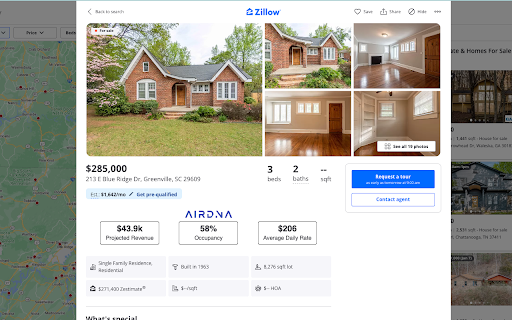
Connecting your professional projection tools from Airdna and Rabbu directly onto the zillow listing. Welcome to the Zillow Projection dashboard from Revnest! Find deals faster. This dashboard connects your Airdna and Rabbu accounts directly to one Zillow page so you can analyze without needing multiple tabs or windows. Instructions: 1) Create a free Revnest account 2) Pin the extension and connect your Airdna and Rabbu accounts 3) Turn on and find deals! Note: You will need to create free accounts with Airdna, & Rabbu in order to bring all the data onto one Zillow screen. They are both offering free accounts at this time, visit their respective sites to get more info. Revnest.com is the global listing site for buying and selling turnkey vacation homes.

GetClearing
This extension is used with GetClearing.co, a solution for property managers to track their cashflow and automate bookkeeping. The extension allows users to easily connect their Airbnb account to sync their payouts to Clearing.

OwnerRez Channel Bridge
Download your booking and review data from channels. Export bookings from Vrbo in Excel format. This extension was created by the OwnerRez.com dev team as part of the OwnerRez Channel Management feature. This extension acts as a "bridge" between vacation rental channel Vrbo and OwnerRez so that users can easily extract information from their listings. Using the provided buttons, you can quickly download bookings and reviews from Vrbo into your OwnerRez account, via Excel format. The booking and review data that is exported out of the listing site is extremely thorough and includes every detail of the booking and review. Get the guest info, charges, trip details, transactions, payment schedule, commission and a lot more in just one click!

AirReview: BnB Hosting Tools
AirReview helps Airbnb hosts & investors see every Airbnb listing's income. We also help Airbnb hosts with guest screening features AirReview makes your life easier as a host and investor on the Airbnb platform. With the extension installed, you can do the following: ⚡ Screen guests easily by seeing the reviews they’ve left other hosts. This helps improve your hospitality and avoid negative reviews. ⚡ See currently booked income for any property on the Airbnb platform. Just click the “Get listing data” button for any listing. ⚡ Get easy-to-read charts of your listing's most important metrics 🏆 AirReview was featured on Forbes as a must-have hosting tool as well! https://www.forbes.com/sites/sethporges/2017/07/27/all-airbnb-hosts-should-use-this-chrome-extension-for-screening-guests/?sh=7a6319474081 Install the extension & our quickstart page will guide you the rest of the way Rankbreeze is best known for our listing optimization platform for Airbnb properties. This includes features such as A/B testing for your Airbnbs, search funnel metrics, and pricing tools.

Real Estate Data Scraper
Scrape and extract properties from Zillow search results, and export to CSV/Excel with one click. Zillow Scraper, your key to real estate data, scrapes and extracts data from Zillow search results pages effortlessly. No need for programming knowledge or coding skills. Download the data as XLSX (Excel Document) and CSV formats to facilitate better real estate investment decisions. Perform your personal real estate market analysis for buying or selling properties with ease. # Features ✓ Extract property search results and all pages automatically ✓ Extract current page results as you browse automatically ✓ Scrape detailed listing data ✓ Custom export fields ✓ Preview data in a user-friendly Dashboard ✓ Export data as XLSX (Excel Document) and CSV # Supported fields: - Zillow Property ID - Listing Status - Time on Zillow - Price - Property Area - Zestimate - Rent Zestimate - Lot Area - Bedroom and Bathroom Count - Address - Street - City - State - Zipcode - Geolocation (Latitude, Longitude) - Broker Name - is zillow owned - Sold Date - Sold Price - Image URL - Property detail URL - URL of the search result where the property is found - etc. If you need to extract data from individual listing pages, simply turn on the corresponding switch in the Popup settings area. - HOA fees - Agent Name - Phone Number - Property Type - Parcel Number - Parking Capacity - Year built - Home Insights - Annual Home Insurance - Original Photos - Description - etc. # How to use 1. Open the Zillow search results page 2. Click on our tool's icon 3. Click "Start Extracting" 4. Once extraction is done, click "Export" # Use Cases Zillow Scraper is perfect for: - Identifying real estate investment opportunities - Monitoring home prices - Real estate market research - Forecasting real estate trends # It's free? Yes, Zillow Scraper - Extract Data from Zillow is free. You can get basic functionality and upgrade to get more functionality. # FAQ https://realestatedatas.com#faq With Zillow Data Extractor, your real estate market analysis is just a click away! For any problems or further queries, don't hesitate to contact us at hello@realestatedatas.com. In the popup, we offer these extra features: Relevant-Ext: Brief recommendations and introductions to related extensions. # Data Privacy All the data you process is on your local computer and never passes through our servers. # Statement Zillow is a trademark of Zillow, LLC. Zillow Scraper is not affiliated with, endorsed, sponsored, or otherwise related to Zillow, Inc. or any of its affiliates or subsidiaries. # Change logs New Update v1.2.2 ✓ Add Support: Customize export columns in Options Page New Update v1.1.0 ✓ Support for new fields: Sold Date, Sold Price ✓ Sort the Zillow property from the preview dashboard
