
kkfonkfimoopdpgblkfdefmlbfpkkgnf
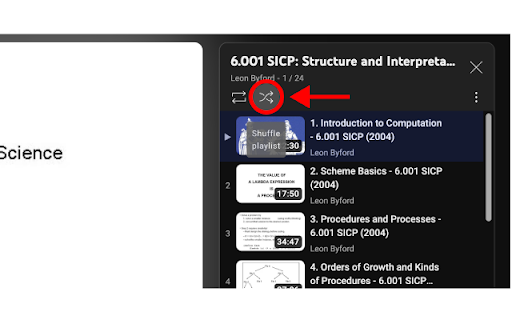
After installing the extension if you're watching a video in a playlist and you click the 🔀 it will immediately navigate to another random video in the playlist you're in. The main downside is that you have to give it some time before it's done. The reason for this is the trick I had to use to make this work. I can't really speed this up sadly. I recommend turning your ad blocker off the first you test the extension, an ad blocker could interfere with the extension. If the shuffle button does nothing when you click it, refresh the page and try it again.

YouTube TC AutoTrans Corrector
Corrected the issue that prevented the proper display of YouTube's automatic translation in Traditional Chinese. The options in the subtitles menu will be modified to "Corrected Chinese (Traditional)" when your YouTube language is set to Chinese (Traditional). However, the modification will still take effect without the "Corrected" tag. If you'd like to support me in maintaining/producing higher-quality content, perhaps consider buying me a cup of coffee! https://www.buymeacoffee.com/yuanchuang You can also download it on Firefox: https://addons.mozilla.org/zh-TW/firefox/addon/youtube-繁體自動翻譯修正/

YouTube Arrow Keys Fix
Fixes YouTube's inconsistent player controls. Right and left always navigate. Up and down always volume control. This extension ensures that the left and right arrow keys always navigate the video timeline, while the up and down arrow keys always control the volume, regardless of the focus on the player.

Streamline - YouTube Queue Manager
Streamline for YouTube transforms your viewing experience by adding a persistent, cross-tab queue management system directly to your browser. WHY STREAMLINE INSTEAD OF YOUTUBE'S BUILT-IN QUEUE? YouTube has a native queue feature, but it has one fatal flaw: it only works in a single tab. Open a video in a new tab or navigate away? Your queue is instantly lost. Streamline solves this with a persistent queue that works across all tabs and browser sessions. KEY ADVANTAGES: - Cross-Tab Persistence: Your queue works everywhere, in every YouTube tab - Survives Browser Restarts: Close Chrome and come back - your queue is still there - Add From Anywhere: Queue videos while browsing without interrupting playback - Built for Real Browsing: Designed for how people actually use YouTube - with multiple tabs - No login: Create a YouTube queue without ever logging in. FEATURES: - One-Click Adding: Hover over any video thumbnail and click the orange + button - Drag & Drop Reordering: Arrange your queue exactly how you want it - Search: Quickly find videos or channels in your queue - Automatic Playback: Videos play sequentially when the current one ends - Total Duration Display: See the combined length of all queued videos - Play History: Track recently watched videos with timestamps - Pause/Resume Control: Stop or resume auto-play with one click - Bulk add Playlists: One click to add whole playlists to the queue - Integrate with Playlist: Plays queued videos after you finish a YouTube playlist - Sync across browsers: Your queue follows you wherever you go, provided you have sync enabled in the Chrome and Streamline settings. PERFECT FOR: - Music listening sessions - Research projects requiring videos from different channels - Entertainment binge-watching curated your way HOW IT WORKS: 1. Hover over any video and click the orange + button to add it to the queue 2. Click the extension icon to view, search and manage your queue 3. Videos automatically play in sequence when each one ends NO ACCOUNTS OR SIGN-UPS: Everything is stored locally and syncs via Chrome. This means your queue stays private and secure. Stop losing your queue every time you open a new tab. Experience YouTube the way it should work with Streamline! Streamline for YouTube is a third-party extension and is not affiliated with YouTube. YouTube is a trademark of Google LLC. Use of this trademark is subject to Google Permissions.

YouTube Blur
Avoid distractions on YouTube by blurring the thumbnails on the homepage With YouTube Blur you'll be able to focus on your work, education or creativity without getting distracted by YouTube's recommended videos in the homepage. Simply install the extension on chrome, toggle on the YouTube Blur switch, and prepare for a new level of focus! PRIVACY I do not read, examine or track your browser history or any other personal information. The only permissions required for are "tabs" to insert the functionality and "storage" to store your settings.
