
kkendaacffjgfnjaolejgaopcoakacpb

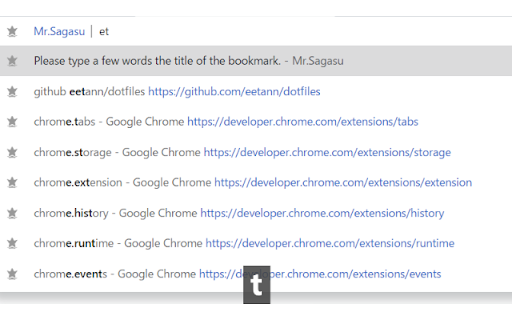
Bookmark Nickname & Search bookmark in the address bar * Bookmark Nickname: Open bookmarks with hashtags at once * search to only titles of bookmarks at the address bar * fuzzy match = All you have to do is type a few characters Bookmark Nickname 0. Add hashtag to the title of bookmark 1. Enter key bindings(default Ctrl + Shift + Y) 2. Enter hashtags on the popup screen 3. Press Enter key or Enter button on the screen Search titles of bookmarks at the address bar 1. Move at the address bar 2. Type "b" and space key 3. Type a few characters 4. Choice a suggest by using arrow keys and enter key

Notion Tweaks
For Notion. Development of this extension is in stop. Development of this extension has been discontinued and is deprecated. Chrome Extension to tweak Notion. Features ・Open or Create Today's Page of a specific database ・Create Page of a specific database quickly ・Enter the timestamp(HH:mm) quickly ・Close Slash command menu and Emoji menu ・Narrow the page margins when page width is less than 850px ・Narrow the margin at the bottom of Code Block ・Always show the language of Code Block

Chrome Palette
Command Palette for Chrome Open source tool to access all internal chrome commands without using the mouse or remembering hotkeys. Does not upload data to any server, and it will never do (not even telemetry) Start by setting up the shortcut: 1. Click on the extension icon 2. Click the cog icon at the right of the search field 3. The chrome hotkeys page will open, the pencil to edit the shortcut 4. Then set your key combination by pressing it (recommended: cmd+shift+p) - Search tabs - Search history - Search bookmarks - Search installed extensions - Add to bookmarks - Split screen - New Tab - New Window - Open History Page - Open Passwords Page - Open Downloads - Open Extensions - Open Extension Shortcuts - Open Bookmark Manager - Show/hide Bookmarks Bar - Open Settings - Close Current Tab - Terminate Current Tab - Reload Tab - Reload All Tabs - Clear Cache and Reload Tab - Toggle Pin - Duplicate Tab - New Incognito Window - Close Other Tabs - Close Tabs To Right - Close Tabs To Left - Mute/Unmute Tab - Move Tab To Start - Move Tab To End - Move Tab Left - Move Tab Right - Reopen/Unclose Tab - Deattach Tab (Move to New Window) - Reattach Tab (Move Tab to Previous Window) - Split screen (vertical or horizontal) - Toggle full screen - Clear browsing history, cookies and cache - Open Chrome SignIn internals - Open Chrome Apps - Configure Chrome internal flags - Configure Third-party Cookies - Configure Ad privacy - Configure Sync and Google Services - Configure Chrome Profile - Import Bookmarks & Settings - Configure Addresses - Configure Autofill & Passwords - Configure Payment Methods - Configure Site Settings & Permissions - Configure Security - Configure Privacy and security - Configure Search engine - Configure Default browser - Configure on Start-up - Configure Languages - Configure Accessibility - Configure System & Proxy - Reset chrome settings - About chrome - Print page - Reset command history # Changelog * v2.2.0 Added split screen * v2.1.0 Added search installed extensions * v2.0.0 Full rewrite, smaller, faster, new features and more modern look * v1.2.3 Improved search performance * v1.2.2 Added shortcuts for sub-palettes (edit from the shortcuts editor. The popup needs to be open before using the secondary shortcut) * v1.2.1 Reduced load time by 50% (ported to Preact) * v1.2.0 Added "Bookmark this tab" * v1.1.0 Added Bookmark, Audio Tabs and History search support

Book Makuri Search
Search your saved Chrome bookmarks from a compact popup.

Choomame
Choomame shows the following link to Popup and the Google search results. - `Time`: restrict results to a specific time period - example: 3 years, 1 month, 1 week ... - `Language`: restrict results to a specific language - example: English, Japanese, Spanish ... - `Custom Link`: easy access to frequently viewed pages, site searches, official documents - Check https://github.com/eetann/choomame-custom-link-collection#readme for details. - Please operate links at your own risk. These can be freely customized on the option page. If you want to use a shortcut key to open a popup, type `Ctrl(Command) + q`. This shortcut key can be assigned freely at `chrome://extensions/shortcuts'. Choomame is an improved versioin of my previous extension "Amazing Searcher".
