
kkdkjfbpldapfdcngapjigdgcafjopli
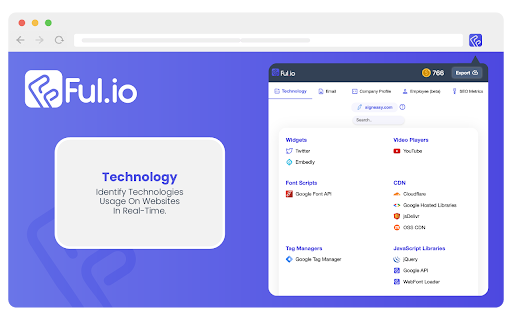




In a click, find out what websites are built with. Ful.io's Profiler and Lookup tool is the one solution for your profiling needs. The generated reports are the richest you’ll find in the industry, and it takes no time to generate them. Avail the following features for free in a single click: ✨ Find the complete technology profile of any website including the tech stack, frameworks, widgets, CDNs, CMSs, and more. ✨ Access a bountiful repository that tracks 15,000+ technologies, with more added every day. ✨ Real-time tracking of version changes ensures you are always on the same page as your prospect. No hassle of version mismatches or incorrect data, ever! ✨ Streamline tech discovery by seamlessly integrating the lightweight extension in your workflow What’s in it for you? ✨ No credit card information needed. ✨ No personal information is collected and processed. How to use: ✨ Add the extension to Chrome or a Chrome-based browser. ✨ Navigate to the prospect’s website and click on the extension. ✨ Done. The complete technographic profile of the website will be shown blazingly fast. The extension is especially useful for: ✨ Sales professionals ✨ SDRs ✨ AEs ✨ HRs Thanks for the support! We’re constantly iterating our products to make them better, so feedback would be extremely appreciated.

SalesGPT by Ful.io
Swiss Army Knife for SDRs, Sales Professionals, HRs and Lead Generation experts. Just navigate to your prospect’s website and open Ful.io’s prospector extension to find: ✅ Technology Usage: 25,000+ technographic signals and more added every single day. Version Tracking Non-bloat technology tracking. ✅ Company attributes: Including size, employee count, industries, subsidiaries, HQ location, phone numbers, descriptions and a LOT MORE! ✅ Emails: 1 billion+ emails. GDPR compliant. We crawled over 10 billion pages to aggregate emails for millions of domains. ✅ Web Metrics: Traffic , PPC budgets , social signals and a LOT MORE. ❌ No more “We do not use X technology anymore”, “ We stopped renewing this software a while ago” ❌ No more “I don’t work in X company anymore ”, “ I got promoted to Y” ❌ No more unverified emails ❌ No more generic emails from footer to shoot your outreach emails. ❌ No more incomplete prospect profile ❌ No more incomplete tech maturity profile ❌ No more calling wrong the decision maker

Technology Lookup - cmlabs SEO Tools
Technology Lookup is a tool that you can use to identify what technology was used to build a website by simply entering its URL. Introducing Technology Lookup, a comprehensive and complimentary tool developed by cmlabs, designed to assist you in identifying the underlying technologies utilized in constructing a website. With Technology Lookup, you gain insight into the intricate details of a website's architecture, including the operating system, web server, widgets, and access to the full version details of the technologies integrated into the site. Download and try now! - Here are some of the tool’s benefits you should know about: - This tool is available for free. - Identify Technology On Your Website: You can use this tool to do research and identify the technology used on your website and make some technology upgrades if necessary. - Technology Analysis on Competitor Websites: This tool can also help you analyze the technology used by your competitors. This will later give you an idea of the advantages of your competitors, what technology they use, and what kind of technology is most appropriate for your business. - Website Monitoring: Monitor the technology of a website to take security or surveillance measures. 1. Open the Technology Lookup On that page, you can add the URL you want to see the technology for, identify the technology on the website being tracked, and view the history of Technology Lookup usage. 2. Enter Website URL In order to identify the technology on a website, you must enter the website URL in the field provided. Make sure you have entered the URL in the correct format (e.g. https://example.com). Then, click the "LOOKUP URL" button to give the command to this tool to start checking the technology on the website. 3. Identify Technology Stacks on Websites After a while, you can see the stack of technology used on the website in the Technology section. The Technology Lookup tool allows you to view widgets, operating systems, javascript libraries, and web servers, and identify the full version of the technology a site uses. 4. Monitor Technology Lookup Usage History Finally, you can also view a list of Technology Lookup usage history. In the list, you will see a list of website URLs that you have monitored through the Technology Lookup from cmlabs. We value your feedback! If you have any suggestions for improving the Technology Lookup or encounter any issues while using the tool, please don't hesitate to let us know. Our support team is here to help. Reach us by email at:

Tech Stack Analyzer - TechPeeker
Instantly analyze any website's tech stack - frameworks, libraries & analytics tools powering the sites you browse. TechPeeker is a powerful Chrome extension that instantly analyzes and reveals the technology stack behind any website you visit. Perfect for developers, marketers, and business owners who want to understand how websites are built. - CMS Detection: Instantly analyze and identify Shopify, WordPress, WooCommerce, Wix, and other popular CMS platforms - E-commerce Platform Analysis: Perfect for analyzing competitors in online retail - Real-time Framework Detection: Analyze React, Vue.js, Angular, and more - Marketing Tool Insights: Analyze and track analytics, CRM, and marketing automation tools - Social Media & Contact Info: Extract and analyze social links and contact details automatically Discover and analyze the exact tools and technologies powering successful online businesses with TechPeeker.

Fork.ai - Identify Technologies on Mobile App
Fork extension helps you identify technologies and publisher contacts of Apps from Google Play & App Store. You can get a complete view of an App lead with: - ℹ️ App Details: Comprehensive overview with details for any mobile App. - 🧠 SDK Intelligence: Go in-depth with technology SDK integration analysis. - ✅ Contacts: Reach out with verified email and social contacts. 👀 How is Fork's data? Fork reveals more than a thousand technologies with industry category standards such as Audio and Video, Advertising and Marketing, Game and others. We leverages this data to build technographics which help technology providers better understand their target customers and potential partership as well. 👀 How is Fork different from extensions like Wappalyzer, BuiltWith, Apollo, Lusha and Datanyze? While all of these are good products, but Fork offers the best technographics of App while others have more data of websites. Fork accurately identifies the Tech Stack used in Apps and provides publisher contacts to help turn leads into opportunities efficiently. Fork is determined to its key value and is easier to use while others can be too complex to use sometimes. To have more ways to work better with Fork, please visit 👉 www.fork.ai
