
kkdhnobdacfnbdageilfchkhcjdbkhgf
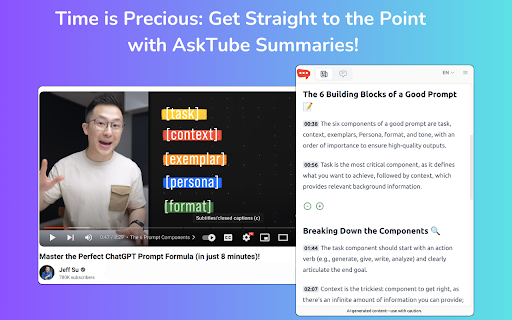


Save time by summarizing and chatting with long educational YouTube videos. Instantly summarize YouTube videos and interact with content using AI technology. 📝 Quick Summaries: Concise, accurate video overviews 💬 Interactive Q&A: Ask questions about video content 🕒 Timestamp Navigation: Jump to relevant video sections 📚 Learning Optimization: Ideal for students and skill-seekers ⏱️ Time-Saving: Get video essence without full playthrough 🧠 Enhanced Learning: Interact with content for better retention 🚀 Boosted Productivity: Efficiently acquire new knowledge 🔌 Easy Integration: Seamless installation and usage Transform your YouTube learning experience with AskTube! # CHANGELOG ## 1.0.5 [2024.10.23] Fix: extension not able to load on Chrome due to CSP Issue on Chrome 130+ ## 1.0.6 [2025.10.12] Add extension popup to tell user how to use

YouTube Summary with ChatGPT & Claude
Summarize YouTube videos, web articles, and PDFs to save time, powered by ChatGPT, Claude, Mistral AI, and Gemini. YouTube Summary with ChatGPT & Claude is a free Chrome Extension that lets you quickly summarize YouTube videos, web articles, and PDF you're consuming. Use this extension to save time and learn more quicker. YouTube videos, web articles, and PDF summarization functions are powered by ChatGPT (OpenAI), Claude (Anthropic), Mistral AI and Google Gemini. ## What are the benefits of using YouTube Summary with ChatGPT & Claude? The main benefits are saving time, increasing productivity, and improving learning. YouTube Summary with ChatGPT & Claude reduces the need to watch long videos when you're just looking for the main points. The summaries let you absorb information quickly so you can spend time on other tasks. ## How do I use YouTube Summary with ChatGPT & Claude? Using YouTube Summary is easy. After installing the browser extension, simply open a YouTube video you'd like to summarize. Click the YouTube Summary icon in your browser toolbar, and it will generate a summary and provide an option to access the video transcript if available. You will see a summary of the video with or without timestamps. You can click on the timestamps to jump to the corresponding part of the video. You can also click the "Copy Transcript" button to copy the transcript of the YouTube video to your clipboard. ## Can I customize the length of the YouTube video summaries? Yes, you can customize the length of the video summaries generated by YouTube Summary. Adjust the settings within the extension to tailor the summaries to your preferred level of detail. Also, you can customize the prompt to use to summarize the content. ## Is YouTube Summary with ChatGPT & Claude suitable for educational purposes? Yes, YouTube Summary with ChatGPT & Claude is a valuable tool for educational purposes. It provides concise summaries and transcripts that can aid in research, studying, and learning from YouTube videos. ## Can YouTube Summary with ChatGPT & Claude handle videos in languages other than English? Yes, YouTube Summary is capable of summarizing videos in multiple languages, making it a valuable tool for international users. You can also choose what language you want the transcript to be in. Fore more details, please visit the website: https://glasp.co/youtube-summary

Eightify: AI YouTube Summarizer
Summarize YouTube videos with AI. Save time on long videos — get instant, high-quality summaries and key insights. Top Features: ✅ Instant Video Summary: Get a concise YouTube video overview in just 5 seconds. ✅ Key Insights Extraction: Understand main points without watching the entire video. ✅ Timestamped Navigation: Skip unnecessary content and jump to important parts. ✅ Multilingual Support: Summarization and translations in 40+ languages. ✅ Top Comments Overview: See what others think at a glance. ✅ Improved Transcript Generator: Access transcriptions that outperform YouTube subtitles. ✅ One account, unlimited devices: Use on Chrome, iOS, and Android. Eightify is your ultimate YouTube summary tool, powered by Claude and ChatGPT. This Chrome Extension creates concise video summaries and extracts key insights from any YouTube video. Save hours and grasp main ideas instantly while researching, learning, or enjoying your free time. Perfect for: • Podcasts and interviews • AI, Science and Tech videos • Business, Investing, and Trading • News, Politics, and Trends • Health, Wellness, and Personal Growth How to Use: 1. Install Eightify Chrome Extension. 2. Go to any YouTube video. 3. Click the Eightify button. 4. Get your summary and insights instantly. FAQs: Q: Can I try Eightify Summarizer for free? A: Yes! We offer a 7-day free trial of our Chrome Extension. Experience unlimited YouTube video summaries, key insights extraction, and transcript generation powered by ChatGPT and Claude. No charge until trial ends. Q: How do I cancel my subscription? A: Visit our app or website, log in to your account, and navigate to the subscription section. You can cancel anytime, even during the trial period. Q: Can I customize key insights? A: Yes! Customize focus (insightful, actionable, controversial, funny), format (list or Q&A), length, and grouping. Enable/disable emojis, and titles for insight clusters. For more information, visit our website: https://eightify.app/youtube-summary-chatgpt Summarize news, tutorials and podcasts right in the YouTube tab! Install Eightify now and save time on long videos.

YouTube Video Summary & AI Chat - Summd
AI-powered YouTube video summarizer with timestamps. Chat with any video - ask questions and get instant answers SUMMD sits right next to your YouTube video and gives you the key points in seconds. No more scrubbing through timelines, no more watching at 2x speed hoping you don't miss the good part. How it works: Open a YouTube video. That's it. SUMMD automatically summarizes it with clickable timestamps so you can jump straight to what matters. Want to go deeper? Ask questions about the video - like having a conversation with someone who already watched the whole thing for you. What people use it for: → Students pulling key points from lecture recordings → Devs skimming through hour-long conference talks → Curious people who watch way too much YouTube (no judgment) → Anyone tired of "this video could've been 5 minutes" Features: • Auto-summary with smart timestamps — appears the moment you open a video • Chat with the video — ask specific questions, get precise answers • Frame analysis — pause and ask about what's on screen • Works in 17 languages Works with any YouTube video: tutorials, lectures, podcasts, reviews, documentaries, conference talks, interviews, music breakdowns, cooking videos, tech reviews, and more.

YouTube Summary & Transcript AI | Summarize Long Videos with AI
Summarize Long YouTube videos with AI, generate Transcripts, Summaries & Chat with Transcripts Generate YouTube video summary, Transcript and main points powered by ChatGPT, AI Assistant in one click. Summaries any Podcast or Long Video No need to watch the whole video, one click to get a summary, transcript, and main points we are using AI to generate the summary, Transcript & main points In just opening the extension you will get: - A YouTube video summary in a single paragraph. - Digest the main points with bullet-point summaries. - Download the YouTube video transcript - Copy the YouTube video summary to the clipboard to re-use it - added the option that embeds the extension into YouTube, so no need to click on the extension to open it - Chat with Video & Ask any questions. - Bookmark the notes, or add notes to the video. FAQ: What is the extension about : It Generate Transcript, Main points using AI ChatGPT, is a Chrome extension that generates a summary, main points, and a transcription for a YouTube video, any video can work Do I need a ChatGPT or Open AI account to run this extension? Yes, Bring your own Key, either open AI, Gemini or Claude Does it only work for YouTube? That is correct, but we can extend that. If you have any requests, please add it in the support tab. How can I request adding a new language? Please request the new language from the support tab and we will try to prioritize it. We have one time payment, pay once and use forever, using your own API keys, think Like you bought a car but you need to fuel (your Own API, you take control of what you are using) instead of subscriptions Please if you have any questions feel free, to contact us support@summarizemyvideo.com
