
kkclafcgallpoabnikcmdndheichkeck
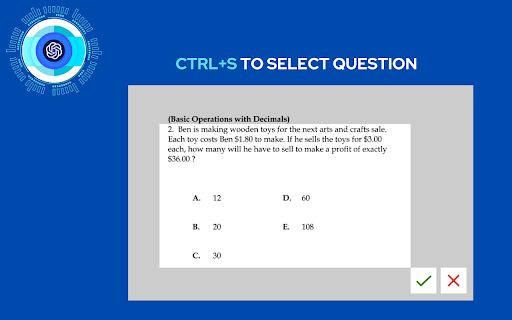
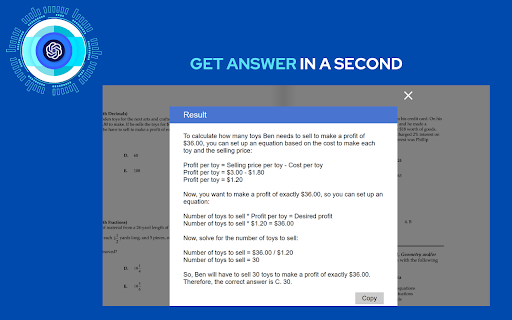
📚✨ Ace Your Exams and Assessments with the Chrome Extension for GPT Image Analysis ✨📚 NOW WITH GPT VISION - get insights from… 📚✨ Ace Your Exams and Assessments with the Chrome Extension for GPT Image Analysis ✨📚 NOW WITH GPT VISION - get insights from any type of content. 🤔 Tired of Questions in Image Form? 🖼️ Can't copy text or picture directly to GPT? We've got the solution! Introducing our Chrome extension for GPT Image Analysis. 🚀 Seeking that extra boost in your exam or assessment? 🤓 Harness the power of the chrome extension for GPT image analysis! This tool effortlessly converts images of your exam or assessment into answers, ensuring you're completely ready for our next career and education step. 🌟 Why You Need This Extension: 🚀 Instant Study Answers: Just snap a picture of the question and receive an instant analysis. Value every second, especially during those crucial exam and assessment hours. 📖 Deep Dive into Study Materials: Go beyond skimming your notes. Dive deep into every element with our extension's flawless GPT integration. 🖱️ User-Friendly Experience: Tailored for both high school scholars and those in higher education, our extension guarantees a seamless study experience. 🔍 Features Crafted for Stellar Exam Preparation: 🖱️ One-Click Analysis: CTRL+S on any study-related image and click . 🧠 GPT-Powered Insights: With the latest GPT technology at its core, expect precise and in-depth results every single time. 🔒 Safe & Secure: Your study materials are analyzed in real-time and never stored, ensuring both your privacy and academic integrity. Boost your exams and assessments with the Chrome extension for GPT image analysis. Dive deep into study materials and gain unparalleled insights instantly.

QuestionAI Homework Powered AI Assistant
AI Copilot can answer screenshot queries and assist with writing, summarizing, translating, and grammar checking. Question.AI is your comprehensive AI Copilot, powered by GPT, and accessible in the sidebar for all your needs. It is designed to answer screenshot queries, questions on learning platforms and assist with writing, summarizing, translating, and grammar checking. It's a versatile tool available directly in your browser, ensuring you have the support you need anytime, anywhere. Your Ultimate Homework and Learning Assistant Question.AI, integrated as a ChatGPT plugin, serves as your AI Copilot. It's ready to tackle complex questions and assist with your homework, offering instant, accurate answers. Simply take a screenshot of your query, and Question.AI will provide precise solutions in no time. Key Features 🔥 Get answers to questions with easy screenshots Take or upload a screenshot to receive accurate answers to your learning inquiries. Perfect for all subject questions, espeically mathematical questions. Our AI tutor powered by advanced technology provides precise and step-by-step answers instantly. 💡 Real-Time AI Conversations with no fees Click the Question.AI icon for real-time conversations or select text on any webpage to get instant and detailed AI responses. Stop wasting time searching for answers. Our AI learning tool is available 24/7 to provide answers and support without usage limits or hidden fees whether you're studying late at night or during the weekend. 📏 LaTeX Equation Recognizer Identify LaTeX equations on any webpage and ask AI for explanations. Perfect for students dealing with complex formulas. 📝 Perfectly compatible with learning platforms Get correct answers and suggestions for coursework, quizzes, and tests directly within your learning platforms like Canvas, Blackboard, McGraw, etc. You can use Question.AI on any website. 📚 Supports All Subjects and Grades with High-Quality Answers From math and history to literature and foreign languages, Question.AI covers a wide range of topics for students at all levels. Benefit from our advanced AI technology that ensures accurate and quick solutions to your queries. ✍️ AI Writing Assistance Create high-quality content in seconds. Provide you with intelligent suggestions and create engaging and well-structured content, making writing tasks easier and faster and saving time and effort. 🔗 Easy Chrome Integration Install the Question.AI Chrome extension with a few clicks and start getting answers instantly. 🔒 Safe and Secure We prioritize your privacy. Question.AI ensures the safety and protection of your data. 🚀 Quick Start Tips 1. Click the Question.AI icon on the side of the screen to start a conversation. 2. Select any text on the webpage, click the Question.AI icon that appears, and let the AI give you answers. 3. Press Cmd+E or Ctrl+E to take a screenshot and send your question to Question.AI for immediate answers. 4. Press Cmd+K or Ctrl+K to open Question.AI and ask any question. 5. Use the prompt library with user-provided prompts for inspiration and streamline your ChatGPT interactions. 💻 How to use: 1. Click the "Add to Chrome" button and pin it to your toolbar. 2. Log in to your Question.AI account. 3. Start using Question.AI in the sidebar. It's accessible in the sidebar for all your needs 24/7. ❓ Frequently Asked Questions: 📌 Do I need a ChatGPT/OpenAI account? No, you don't need a ChatGPT account to use this plugin. You can set up a free account directly with us. 📌 Is it free to use? Yes, we offer a free version with limited usage. 📌 What platforms does Question.AI support? Question.AI is available on multiple platforms. You can download our app from the Apple Store for iOS or Google Play for Android. For Windows and Mac users, you can enjoy the extension via Chrome or access our services directly on our webpage. Contact Us For any questions or feedback, reach out to us: ● Email: feedback@questionai.net ● Website: https://www.questionai.com Enhance your learning and productivity with Question.AI, your versatile GPT AI assistant. Start using it today and experience the benefits firsthand!

PhotoSolve - Scan & Solve Any Question
The most efficient way to finish assignments. Scan and Solve any questions effortlessly with PhotoSolve powerful AI! Introducing PhotoSolve 🚀, the ultimate Chrome extension that will revolutionize the way you solve problems! Say goodbye to spending hours on difficult questions, and let our powerful AI do the work for you! 🧠💡 Why should you install PhotoSolve? 🤔 🚀 Instant answers: With our state-of-the-art OCR and AI technology, PhotoSolve can quickly and accurately provide answers to any question you have! No more searching the internet for answers – PhotoSolve has got you covered. 💯 🧮 Math with Wolfram Alpha: Dive into complex problems with the confidence of having Wolfram Alpha's accuracy integrated directly into PhotoSolve. 🤫 Stealth Mode: Scan with discretion. With Stealth mode, your scans will remain undetectable, maintaining your privacy. 🔒 🔎 Related Resources: Dive deeper into your learning journey! PhotoSolve offers a curated list of resources related to your queries, ensuring you get a comprehensive understanding of the topic. 📖 🌐 Easy integration with Chrome: PhotoSolve is a breeze to install and works seamlessly with your Chrome browser. Just a few clicks, and you're all set to conquer the world of problem-solving! 🖥️ ⏳ Time-saving: Don't waste any more time looking for answers. With PhotoSolve, you'll get instant solutions, helping you save precious time and focus on what matters most. 🎯 🔒 Secure and safe: Your privacy and security are our top priority. PhotoSolve ensures your data is safe and protected at all times. 🛡️ 🎒 Perfect for students: Whether you're in high school, college, or university, PhotoSolve is the ultimate study buddy. Get answers to questions and learn faster with this amazing Chrome extension! 📚 Ready to revolutionize your problem-solving experience? 🤩 Install PhotoSolve now and join the community of satisfied users who have unlocked the power of instant learning with our innovative Chrome extension! 🥳

Test Bro - Smart Web Test Assistant, Exam Helper & Homework Quiz Solver
Smart AI based test assistant, quiz resolver, homework helper. Solve online tests, pass exams, improve skills for skill assessments. Test Bro app is a simple Chrome extension that can assist and help you to pass online tests. It can help you pass all tests containing text-based questions and text-based answer options. ⚡ Just click the ASK button and see the correct answer for apps and websites where Test BRO is fully optimized (see the optimized for section). ⚡ You can use SELECT TEXT and ask Test BRO through the context menu to resolve online tests. ⚡ If text selection is protected, you can SELECT AREA using the context menu to pass the exam. (https://youtu.be/xUwYspJpU_U) ⚡ The Context Menu is also blocked - use the capture feature in the side panel. (https://youtu.be/xUwYspJpU_U) 🚀 NOW TEST BRO OPTIMIZED FOR! 🚀 ✅ For LinkedIn skill assessments. (https://youtu.be/rjKEXb_8tbk) Check out how it works. I think you'll find it enjoyable. Let's try it, and be sure it will help you pass LinkedIn tests. It's not guaranteed to give you a 100% result, but you can watch the video (https://youtu.be/hXI_bKhOsNk). I passed the LinkedIn assignment and ranked in the top 15% of other people. It's a success! I've never read about Django. I don't even know what it is. Is it a programming language? Is it a framework? :) I don't know... 🚨(If you want your quiz site to be fully optimized for Test Bro, please write to me with the quiz site URL.)🚨 Just click the Test Bro button and get the test resolved. 😠 - How do you do the LinkedIn assessment? 🧐 - Use Test BRO, it will increase your productivity and save your time, Bro. 🙄 - Can you cheat on LinkedIn assessments? 🤫 - I ask you a small secret, use Test Bro, to pass axam - save your time... no one else, shh... 🤔 - What about the LinkedIn assessment quiz answers? 🕵 - You don't need answers. Don't waste your time. Use Test Bro. 🤷 - How can I pass the LinkedIn assessment? 🤦🏼 - Seriously? Pass the exam with Test Bro. 🗣 - How often do people fail LinkedIn assessments? 🗣 - Did you score above 70% on the LinkedIn assessment test? 👨👨👧👦 - We never fail assignments; we always score over 70% because we use Test Bro! 🤩 Let's try it out! And please add a 5-star review if it helped you!!! 🤩

Moodle GPT Quiz Solver
A Chrome extension to generate answers for moodle quizzes using ChatGPT API. Shift + S to hide/show answers Moodle GPT Quiz Solver is a tool that allows you to quickly and easily generate solutions for your Moodle quizzes through the OpenAI API. It enables generating solutions using OpenAI's leading language models. It also leverages the new OpenAI Assistant API to work with files, which you can upload and delete through the extension's interface, and use them to generate answers based on the information contained in them. Among the main supported file formats for the use of the "files" section, you can find: .pdf, .docx, .txt, .pptx. However, you can find a comprehensive list of all allowed file types in the following OpenAI documentation: https://platform.openai.com/docs/assistants/tools/supported-files.
