
kjlooechnkmikejhimjlbdbkmmhlkkdd
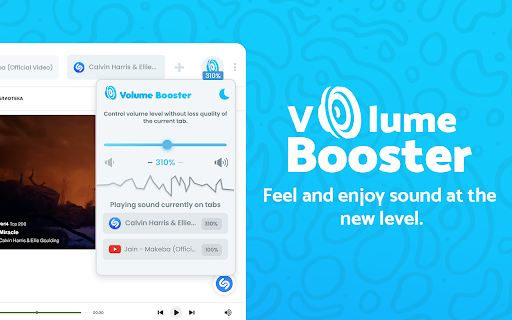


Volume booster with control. Amplify sound by up to 600% also bass booster. Sound booster that really works! Volume Booster that explodes your system! If your speakers or headphones don't reproduce sufficient sound volume for comfortable listening to music or watching video content - use Sound Booster as a speaker amplifier, setting the volume level settings to more than 600%. Stylish Volume Booster popup with a volume switch with a list of tabs that a now playing audio content. Just regulate the sound in the current web tab through the slider. What is special about the extension? ✔️ Increase volume up to 600%; ✔️ Control the volume of any tab that is playing music or video; ✔️ Dark Theme for the best user experience (ability to change the popup window to a dark mode); ✔️ Switch to any tab that is playing audio with one click; ✔️ Fast volume up and down buttons; Make a sound from your browser really awesome with this extension. Use the audio booster of it on your favorite websites. Audio Equalizer allows you to improve sound quality of your Chrome browser to get more enjoy of listening music and watching videos. Play music in your browser and adjust the sound to your headset or speakers just how you want it! Click on the Sound Equalizer icon to adjust the sound level. Bass Booster Bass Boost is a simple to use audio amplifier that's got several settings to make videos, music, movies, gameplay and more sound incredible at the click of a button. It's like having expensive headphones/speakers for completely free, so download it now! Sound Booster works on any website, so that means you can use it on Youtube, SoundCloud, Netflix or any other site you want. Volume Control Volume Control helps you to set a desired speaker volume level for each individual tab in your browser. Websites are just bursting with media content such as videos, music, streams, audio and video ads. To take control over all that audio you need a power volume adjust tool with the ability to set individual volume settings for each tab. We will be glad to see your comment for our extension in the section "Reviews".

Sound Booster - Increase audio volume above maximum
Adjust volume in Chrome tabs separately. Boost music volume and video up to 60 lvl. You may boost your system's sound output by up to 600% with the help Sound Booster. It improves the sound quality of films and music in your browser. Use Sound Booster to boost the audio or video playing in any tab if you feel that the volume is too low. A straightforward slider on the extension allows you to change the volume as necessary. Most websites only offer two options for controlling sound by default: site-based controls, which may be limited, and system volume, which modifies the entire browser. By allowing you to modify the sound of each tab independently, Sound Booster provides an additional degree of control. You may adjust the volume of a video or audio clip without impacting other tabs or the browser's volume level if it's too loud or too quiet. Simply choose the extension icon on the tab that is now open to bring up a slider that allows you to adjust the volume level. Additionally, the emblem provides a fast reference to the current volume level. Whether you're using headphones or speakers, a sound booster enhances music quality without sacrificing clarity. All you have to do is click the extension icon to change the sound.

Volume & Bass Booster – Amplify Audio in Chrome
🔊 Chrome Volume Booster & Bass Amplifier Boost and amplify your browser audio up to 500% per tab! Whether you’re watching YouTube, streaming on Twitch, listening to Spotify or Netflix, our lightweight extension gives you full control over volume and bass directly in Chrome. 🚀 Key Features • Increase volume in Chrome tabs by up to 500% • Powerful bass enhancer for richer low-end sound • Intuitive per‑tab volume slider—control each tab independently • Seamless support for YouTube, Twitch, Spotify, Netflix, and more • Lightweight popup UI with tab manager 🎧 Perfect For • Quiet videos and low-volume streams • Gaming with immersive audio depth • Music lovers craving deeper bass • Enhancing movies, podcasts, webinars, and online classes 🛠️ How It Works 1. Install the extension 2. Pin it to your toolbar 3. Click the icon to open controls 4. Drag the slider to your desired volume level 5. Enjoy louder, clearer, bass‑rich sound—no extra software needed ⭐ Love it? Please rate us in the Chrome Web Store!

Ultra Volume Booster
Introducing the game-changer in audio enhancement: Ultra Volume Booster! Elevate your sound experience to unprecedented heights with our cutting-edge browser extension. Use Cases: - Watch your favorite movies and TV shows with immersive audio that fills the room. - Enhance your music streaming sessions by amplifying the volume and enjoying every beat. - Attend virtual meetings and webinars with crystal-clear audio that captivates every participant. - Immerse yourself in educational content and podcasts, catching every detail with pristine sound. Key Features: - Amplify volume in a specific browser tab, allowing you to customize the audio experience effortlessly. - Set up amplification levels precisely to your liking, with options ranging up to a staggering 500% boost. - Rest assured, our advanced technology prevents any sound distortion, ensuring optimal audio quality. Experience the transformation as Ultra Volume Booster empowers you to unleash crystal-clear sound on any website. Elevate your audio journey and immerse yourself in a world of enhanced audio with our intuitive browser extension. Don't settle for mediocre audio. Upgrade your sound game today with Ultra Volume Booster. Discover a new dimension of audio excellence, where every website becomes a symphony of immersive sound.

Volume Booster
Customize music file by volume booster tool. Allow you to increase the volume of your audio and video files Volume Booster is a handy application designed to enhance the audio output of your Chrome browser. It is a browser extension that can be easily installed and integrated into your Chrome web browser, providing a convenient way to boost the volume of various multimedia content. The primary purpose of Volume Booster is to amplify the sound levels of online videos, music, podcasts, and any other audio-based content you encounter while browsing the web. It can be particularly useful in situations where the audio output is too low, allowing you to increase the volume and enjoy your media more comfortably. Once installed, Volume Booster typically adds an icon or a control panel to the Chrome toolbar, giving you quick access to its settings and features. The extension works by applying digital signal processing techniques to increase the volume levels without significantly distorting the audio quality. With Volume Booster, you can adjust the volume according to your preferences. It often provides a slider or numeric control that allows you to increase or decrease the volume levels incrementally. Some extensions may also offer additional customization options, such as equalizer settings, to fine-tune the audio output to your liking. It's important to note that while Volume Booster can effectively boost the volume, excessively high volume levels may lead to audio distortion or reduce the overall audio quality. Therefore, it's recommended to use this extension responsibly and avoid pushing the volume levels to their maximum limit. Overall, Volume Booster is a convenient Chrome extension that enhances the audio output of your browser, ensuring you can enjoy multimedia content with improved clarity and volume.
