
kjafdcgbeaoamegadobmjdlllmlgfina
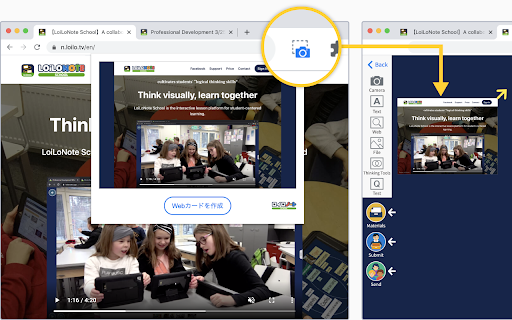
About LoiLo Web Card LoiLo Web Card is a browser extension that makes it easy to create Web Cards—URL links with webpage snapshots. Simply click the camera icon to create a Web Card. Using the Web Card Extension 1. Pin the extension After installing the Web Card extension, it needs to be pinned on each device. ① Click the puzzle piece icon in the top-right corner of the browser. ② Click the pin icon next to LoiLo Web Card to add it to the toolbar. *When pinned, the icon turns blue. 2. Create a Web Card from a website Open the website you want to save, then click the camera icon in the extension. Choose a LoiLoNote note to save it to. Notes A destination note in LoiLoNote must be selected to save a Web Card. The captured image may differ depending on how the website is structured.

線上會議自動接受工具
Let Google Meet™ automatically accept all join requests. This extension will be automatically activated after installation, so if you want to disable the feature, please go to the extension page to manually disable it.

NotebookLM Toolkit
Enhance your NotebookLM web experience with keyboard shortcuts, enhanced buttons, and quick access to NotebookLM. - Mind Map - Provide a "Clone" button that, when clicked, can copy the text of all expanded nodes in Markdown format. - Notes - Adds a button on the NotebookLM notes page to quickly copy the complete note content. - Custom Audio Summary Prompt Saving - Automatically saves prompt content you enter in custom audio summaries - Right-click the extension icon and select "Custom Audio Summary Prompt History" to view saved prompts - Supports prompt management: view, expand/collapse, and delete functions - Prevents duplicate saves, automatically manages the most recent 50 prompts

Plickers CSV import
A tool import CSV file into Plickers website (enabled in Plickers website) A tool to import CSV file into Plickers website.

TFabTile
TFabWorksのwebアプリケーション「TFabTile」のchrome拡張機能です TFabTileは少ないステップで簡単に 参加者のPC画面を一覧表示が出来るサービスです このChrome拡張を利用すると ウェブサイトより簡単に画面の共有をすることができます この拡張機能では以下の2点の機能があります ①Google Classroomのクラス内にTFabTileボタンを追加 ②Google Meet内にTFabTileボタンを追加 ①Google Classroomのクラス内にTFabTileボタンを追加 拡張機能の追加後にGoogle Classroomの授業タブにTFabTileボタンが追加されます。ボタンをクリックすると生徒の場合はTFabTileが立ち上がり、自動で部屋名と生徒氏名が入力されます。先生の場合も同様に自動で部屋名が入力されます。 ※生徒・受講者として入室するには講師側が事前に部屋を作成しておく必要があります。 ②Google Meet内にTFabTileボタンを追加 拡張機能の追加後にGoogle Meetのミーティング画面にTFabTileボタンが追加されます。ボタンをクリックすると先生・講師側の部屋名が自動で入力された画面に遷移します。 TFabTileの詳細は以下のページを参照してください https://tile.tfabworks.com/ ※ご利用にはインターネット環境が必要です
