
khpcanbeojalbkpgpmjpdkjnkfcgfkhb

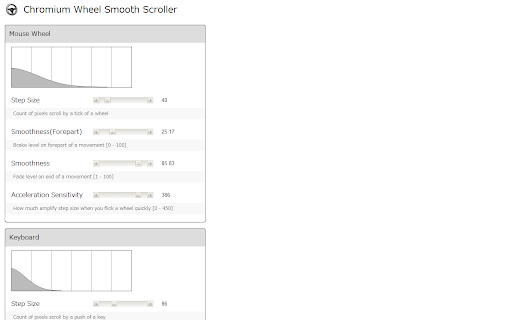
Make scroll behavior smooth, ease-in-out manner, customizable with dynamically plotted curve. With bouncy edge feature. This extension changes scrolling on pages loaded by http and ftp very comfortable smooth one. You can design animation curve of scroll as you prefer by previewing plotted curve in the options page. It has bouncy edge feature also. This is a port of a Firefox add-on that has same features: Yet Another Smooth Scrolling. If you like this extension, you should use YASS when you are on Firefox.

Easy Scroll
This brings you a comfortable reading experience with smooth scroll of necessary amount of webpage by pressing an assigned key. 'Easy Scroll' brings you a comfortable articles reading experience with smooth scroll of necessary amount of webpage by pressing an assigned key. Wherever you read an article, just hit the key to scroll. Then it will scroll down properly eliminating any interruption of your reading pace and article's context. Motivation : Basically, every time I read an article on website, there were some methods to scroll down. Spacebar or PageDown key scrolled too much amount at one use. And on the other hand, DownArrow key or Mouse Wheel took me too many pressing or wheeling. Both of these methods made me frustrated. Function : By pressing the RightArrow key, you can scroll down a half of your web screen smoothly. The assigned key, amount of scrolling, and scrolling velocity can be adjusted at preference menu.

Tab Wheel Scroll
Scroll tabs with alt + mouse wheel OR right click + mouse wheel. How to use: ----------- Way 1 : Hold the ALT key + scroll the mouse wheel. Way 2 : Hold the Right Click button + scroll the mouse wheel. Note: Your cursor must be positioned over the web page content (not over the tab bar itself). Important: If you disable and re-enable the extension, you must reload your open tabs or restart your browser to reactivate the shortcuts. Where it does not works -------------------------- For security reasons, Chrome restricts extensions on certain pages. The scroll will skip: - Internal pages (e.g., chrome://) - Chrome Web Store pages. - Search results (e.g., Google Search) unless you have explicitly allowed the extension to access these pages in your browser settings. On these tabs, the tab is skipped. Contact: ---------------------------- Since the Web Store does not send notifications for comments, please contact me via email or GitHub if you have a specific request or issue.

Scrollbar Anywhere
Click and drag anywhere to scroll the page. This extension makes it possible to to scroll pages as if the scrollbar was right under your pointer. Just press the right mouse button (or any other of your choice) and move the mouse. If you want grab-and-drag style scrolling, just set it up in the options. The extension is based on the Wet Banana extension and inspired by Scrollbar Anywhere for Firefox. Changes in 3.1: - Allows the extension to be properly enabled when disabled. Changes in 3.0: - Compatibility with future versions of Chrome with Manifest V3 Changes in 2.17: - Prevent the configured extra keys from interfering with scrolling. Changes in 2.16: - Stop gliding when a key is pressed or the mouse wheel is scrolled. - Fix a bug where the default mouse click actions were incorrectly prevented. Changes in 2.15: - Blacklist bug fix for file URLs. Changes in 2.14, 2.13 and 2.12: - Support for Chrome v60+.

ScrollAnywhere
Drag scrollbar with your middle mouse button anywhere on the page. Supports also "grab and drag" style. NOTE: ScrollAnywhere doesn't work on THIS page (all extensions are disabled on "Chrome Web Store" page due to internal security) Scroll Anywhere enables you to drag scrollbar with your middle / right / left mouse button without touching a scrollbar. Just hold the middle button and move mouse up-down or left-right. You can also change the behavior to simple "grab and drag" style. Features: - Momentum allows you to throw page to scroll it faster (just like on your phone) - Middle / Right / Left mouse buttons are supported, see the Options page - Customize scrollbars - make them thinner, change color or hide - Auto-disable on specified domains / sub-domains - Grab and drag scroll like on your phone - Multiplier to speed-up or slow down - On key down enable / disable - Custom scrolling cursor Contribution: - I'm full-time extension developer and your donations is my only income. There are no ads in my extensions! - Please support my work by: - Buy me a coffee - https://ko-fi.com/fastaddons - PayPal donation - https://paypal.me/fastaddons/ - Patreon - https://www.patreon.com/fastaddons Thank you! :) Your donation will help me keep this extension working in future versions of Chrome! Known issues: - does not work on https://chrome.google.com/webstore/ (blocked by Chrome) - does not work on browser specific pages like "chrome://extensions" (blocked by Chrome) - does not work on other extensions pages like options page of some addon (blocked by Chrome) - in Linux right click (context menu) cannot be canceled so only middle button is working correctly Recently added features: - The list of changes in last versions is available here: https://addons.mozilla.org/addon/scroll_anywhere/versions/
