
khkgeadeblhkbmmofhahgpcmcjllimkd
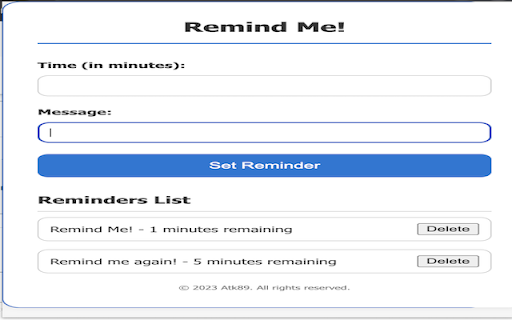
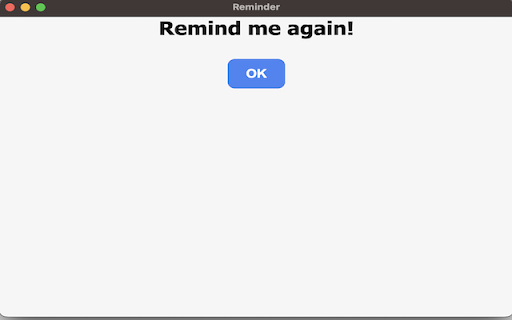
A simple reminder and alarm extension for employees. Stay on top of your tasks with the Short-term Reminder Extension for Google Chrome. This handy tool helps you set quick reminders for tasks or events within minutes, making it perfect for those last-minute to-dos or important tasks that you don't want to forget. With Short-term Reminder Extension, you can easily set reminders in minutes, ensuring that you never miss a deadline or appointment again. The extension keeps track of your reminders, allowing you to view a list of upcoming tasks and events at a glance. - Delete reminders with a simple click - Get notified when a reminder is due with a pop-up window Whether it's a quick email you need to send, a meeting you can't miss, or a simple task that you need to complete, Short-term Reminder Extension has got you covered. Keep your daily tasks organised and never miss a beat with this must-have extension for Google Chrome. Install Short-term Reminder Extension today and take control of your time!

Alarm U
This extension allows you to set alarms in chrome. On alarm triggered shows a notification and open an alert, if has configured a… This extension allows you to set alarms in chrome. On alarm triggered shows a notification and open an alert, if has configured a URL will open a new tab with the provided link.

Daily Reminder
Break, Water, and Posture reminders with sounds, time-of-day, counters, and a clean popup. Stay focused and feel better during your day with Daily Reminder, a lightweight, reliable timer for healthy breaks, hydration, and posture checks. It’s fast to start, easy to customise, and designed to work smoothly on Windows, macOS, Linux and ChromeOS. One-tap start, clear feedback: Start/Stop/Stop-All with instant visual confirmation and a live progress bar. Sounds (optional): Choose from built-in tones and loop until dismissed if you want a louder nudge. Snooze: Running late? Snooze a reminder and it’ll resume automatically (smart with repeating timers). Water goals: Set a daily reminder limit (“glasses goal”). The Water timer stops automatically when you hit it. Counters that matter: Log glasses and see today’s total in ml at a glance. Time-of-Day reminders: Pick a time and weekdays (e.g., 11:00 Mon–Fri) for a scheduled nudge. Advanced timers (power users): Optional split timers for Water and Posture with independent intervals. Action badge: A subtle dot on the extension icon shows when any timer is active. Uses the minimum permissions: Alarms, Notifications, Storage, and Offscreen (for audio playback). All processing happens in your browser. If you don’t see a notification, check system settings (Notification Center on macOS, Focus Assist on Windows, Do Not Disturb modes) and Chrome’s site notification permissions. Sounds follow your device volume. If you prefer silent reminders, select No sound. New Water goal (daily “glasses” limit) that auto-stops the Water timer when reached. Smart Snooze: pausing a repeating Break resumes the repeating cadence after the snooze. UI update + small accessibility updates, and general reliability improvements. If you’re enjoying Daily Reminder, please consider rating it and thanks for trying! UPDATED 07/06/2023 Reliability fixes, repeat tick box and extras sounds. UPDATED 26/11/2023 Reliability fixes, better support for Windows and Hibernation, extra sounds plus a Christmas theme added. Please Note: If the notification popup does not display at the end of the timer, please do check your notification settings. These settings can be found in the web browser and your operating system settings. Also, Windows has a focus mode and OSX has a DND option that can block the notification!! The reminder will only work while Chrome is open. PS: I created this to nudge myself to move more during the workday. I hope it helps you as well! Mat

Task and Notify
Easily add recurring Task-Reminders. To use the "Task and Notify" extension, - Click on the extension icon in the browser toolbar… Easily add recurring Task-Reminders. To use the "Task and Notify" extension, - Click on the extension icon in the browser toolbar to open the popup. - Add new tasks in the popup by entering the task name and selecting the desired notification time. - Tasks can be set for specific times and will recur daily if not manually deleted. - Click the "Submit" button to add the task to the list. - The extension will notify you with a popup and sound alert when the task's time arrives. - Manage your tasks in the popup, including deleting unnecessary ones. - Access additional settings by clicking on the gear icon in the popup to open the settings popup. - Customize the theme, font, font size, and time format in the settings popup according to your preferences. - Click the "Save" button in the settings popup to apply your customizations. Enjoy the convenience of task reminders and notifications to boost your productivity! Note: If a task is added and not deleted, it will automatically recur every day at the same time.

Simple Reminders
Set and manage simple reminders Simplify your life with Simple Reminders! This user-friendly Chrome extension allows you to set reminders effortlessly, helping you stay organized and on top of your tasks. With a sleek design, you can choose from predefined intervals (15 min, 30 min, or 1 hour) or set a custom date and time using an intuitive date picker. Once your reminder is triggered, you'll receive a sound notification to ensure you never miss an important task. All reminders are stored locally, allowing you to view and manage them easily without relying on popups. Experience the power of productivity right in your browser with Simple Reminders—your personal reminder assistant!
