
khjccacliojejgdnnaphdobdnlbhjifd
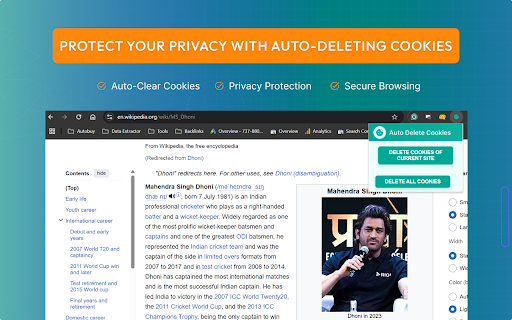
Activate the extension to auto delete cookies and protect your privacy effortlessly. Tired of websites tracking your every move? Auto Delete Cookies chrome extension is your ultimate privacy shield. This powerful extension instantly wipes out cookies as soon as you close a tab, keeping your data safe and your browsing clean. No more manual deletions, no more hidden trackers just pure, uninterrupted privacy at your fingertips. Activate it once, and let it do the rest. Stay anonymous, stay secure, and take back control of your digital footprint Customizable Controls – Keep the cookies you trust, erase the rest. Ultra-Light & Fast – Works silently without slowing your browser. Install the Extension- Add Auto Delete Cookies from the Chrome Web Store. Activate with One Click -Click the extension icon, you’ll see two options Delete Cookies of the Current Site Customize Your Preferences -Choose which cookies to keep or delete. Auto-Delete Instantly -It deletes all cookies from a single tab automatically, with an option to clear all cookies from all tabs. Enjoy Private Browsing -Stay secure and browse without trackers Every website leaves behind a trail—cookies tracking your data, preferences, and habits. This extension wipes them out automatically, boosting privacy and preventing unwanted surveillance. It also keeps your browser running smoother and faster by clearing unnecessary junk. Who Needs This Extension? Speed Lovers – Keep your browser clean and fast. Minimalists – Set it once, forget the rest

Easy Clean
Easily clear browser cache with one click and automatically clean it after closing the browser for enhanced privacy and security. One-click quick cleanup of browser cache, with automatic cache clearance upon closing the browser to ensure the security of your privacy. The extension contains no advertisements or pop-ups that affect user experience. It is clean and open-source. Features - One-click cache clearance - Customizable cleanup items - Domain whitelist (exclude specified domains from clearing cookies) - Automatic cleanup upon closing the browser - Close browser tabs with one click

Cookie Manager
Manage cookies and protect privacy. Add, edit and delete cookies through toolbar. Search cookies if there are many 🍪 Manage cookies and protect your privacy — directly from your toolbar. ✏️ Full Cookie CRUD • Add new cookies with all properties • Edit existing cookies (value, path, expiration, flags) • Delete individual cookies, domain cookies, or all at once • Copy any cookie value to clipboard with one click 📦 Import & Export • Export filtered cookies as JSON file • Import cookies from JSON backup • Timestamped filenames for easy organization 🛡️ Privacy & Protection • Protect/whitelist cookies from bulk deletion • No personal data collected • All operations happen locally — nothing leaves your browser 🎨 Customizable • 6 built-in toolbar icon styles • Upload your own custom icon • Context menu integration (toggle on/off) • Options page for all settings 📌 v2.0.0 — Complete MV3 rewrite • Modern service worker architecture (no background page) • Full cookie CRUD with modal editor • Search across all cookie fields • Export/import cookies as JSON • Copy cookie values, protect from bulk delete • 6 icon presets + custom upload

WebSafety - Privacy Protector
Block web trackers automatically and protect your data with privacy protector for secure browsing. WebSafety – Advanced Privacy Protector ensures your online experience remains secure and private. Modern websites rely on tracking pixels and scripts to monitor user activity, but this extension stops those attempts before they can access your personal data. 🔒 Stop Trackers Before They Start: Automatically detect and block analytics systems, tracking cookies, and advertising pixels across websites. WebSafety keeps your activity private from third-party monitoring. 🛡 Protect Personal Data: Prevent companies from collecting your online behavior, purchase intent, or page interactions. WebSafety keeps your personal information secure, reducing unwanted profiling. ⚙️ Smart Privacy Management: Turn protection on or off for specific websites in just one click. WebSafety provides full flexibility so you can manage your privacy without sacrificing usability. 🚀 Enhanced Browsing Speed: Pages load faster when unnecessary scripts are removed. By blocking trackers, WebSafety streamlines browsing performance for smoother navigation. 🌍 Always Active: Once installed, it runs automatically in the background - a consistent shield for your digital identity. WebSafety - Smart Privacy Protector gives you control in a world of hidden data tracking. It is designed for users who value safety, simplicity, and performance in their everyday browsing routine. The extension sends anonymized data regarding the number of blocked trackers and the hostname to our secure server and do not share this data with third parties, as this is necessary for the core functions of the extension to work properly. This allows us to continuously improve the accuracy of our blocklists and provide users with visual context via the widget regarding the threat level on a specific website. This way, users can make an informed decision on their own about restoring protection to safeguard their privacy.

Automatic Clicker
Enable this chrome extension to simplify your tasks and automate repetitive clicking easily. Tired of endless clicking and scrolling? Our powerful Chrome extension takes care of these repetitive tasks, allowing you to focus on what truly matters. With this efficient tool, you can automate monotonous actions, saving valuable time for more important activities It doesn’t matter if you’re gaming, doing projects, or just browsing the website: this extension makes your job easier and faster. Try the Automatic Clicker Chrome Extension right now and discover how simple automation is. Key Features of this Chrome Extension Customizable Click Intervals: Set your desired click intervals, such as 1 second or 2 seconds, for complete control over automation. Scrolling Automation: Automate scrolling with an interval of your choice, such as 3 seconds, to navigate through pages or games effortlessly. Keyboard Shortcuts for Efficiency: Start clicking with Ctrl + Comma, stop with Ctrl + Period, and begin scrolling with Ctrl + Slash. Game-Optimized Performance: Perfect for games like Minecraft, where repetitive clicking can be automated to enhance your experience. Install the Extension: Drive to the Web Store and install The Automatic Clicker Chrome Extension and pin it to chrome browser Start Clicking: To start clicking, press Ctrl + Comma and then set the number of click to be 10 for instance. Choose ,the length of clicks it should be 1 or 2 seconds depending with the nature of the task at hand. Start Scrolling: To start scrolling you press Ctrl + Slash and the scrolling starts automatically. Choose how long each item in the list would take to scroll, for example 3 seconds. Customize Settings: There is a settings button which should be pressed to set the time intervals and adjust the automation. Professionals: Ignores form filling, data entry and also web scraping. Students: Flawlessly browse through the database of eBooks and research papers. Everyone: Lead effective automatic clicking and scrolling. Improves gameplay drawing the Perl script for mining and building in Minecraft. Enhances browsing: Makes going through long documents faster and smoother. Easy to use: To work with the proposed VPLS service quickly and conveniently, they use keyboard shortcuts.
