
khgnndhdnkpmlflndgobodbhgheaegon
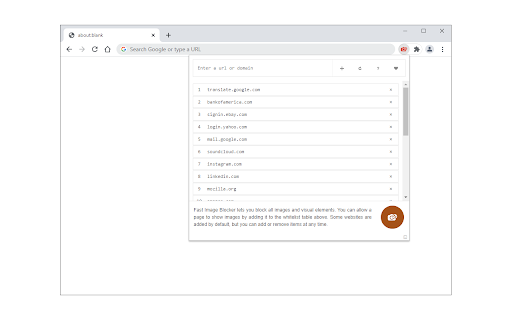

Blocks all images and visual content on desired websites. Fast Image Blocker lets you block all images and visual elements. You can allow a page to show images by adding it to the whitelist. Some websites are added by default, but you can add or remove items at any time. Few features: 1. Allows you to block all image contents (including objects) on all webpages. 2. Easily switch the extension ON or OFF from the toolbar popup interface. 3. Add or remove websites to the whitelist from the toolbar popup. To report bugs, please visit the addon's homepage (https://mybrowseraddon.com/image-blocker.html) and fill out the bug report form.

TAG Image Filter
The TAG Image Filter blocks out skin color when it senses any skin colors in an image. This way you can surf safely without accidentally seeing any adult images and not modest pictures. *Comments and Feedback* • We regularly monitor this google form, for your comments and feedback https://forms.gle/XeepEpexzu8tWTr26 Always on (Default) - • By default the filter is on for every website. Use the options to enable/disable different filter features. Note that filters currently do not wok on IFrame contents (embedded content from third parties, such as ads). You can select to hide all IFrames in the options, but this may cause issues with some normal website functionality (e.g. captcha). *Warnings* • This is not a replacement for an internet filter and should not be relied upon. It is only to provide you with an extra level of protection or for situations where you don’t have the option of installing a filter, such as your office computer. • Flash will not be blocked by the filter; you will also have to set Flash not to run automatically. To back Flash, type chrome://settings/content in the address bar, scroll down to the 'Plug-ins' section, and select 'Click to play'. • Videos will not be blocked by the filter. *Our mission* • Our mission is to help people surf safely, especially where a regular internet filter is not an option. • The extension will update itself automatically as we improve it and will always be 100% free. • This filter is donated for the hatzlacha of Moshe ben Ruth, and family. • This filter is donated for the Refuah Shelemah of Moshe Ben Chana by the Setton Family. • This filter is donated in memory of Elan Ganeles by the Simhon Family.

QuickBlock
This extension allows you to temporarily block images and scripts. QuickBlock is made up of two content blockers (an image blocker and a script blocker) that can be turned on and off separately. Each content blocker internally uses your browser's built-in content blocker that targets the same content type to block contents efficiently. For example, if you turn on the image blocker, it temporarily takes control of the built-in image blocker to block images for all websites. And if you turn it off, the built-in image blocker is restored to its original settings. You can turn content blockers on and off using: For more information, see "QuickBlock User Guide" (click "Website" on the right side of this page).

Image Blur Extension
A Chrome extension to blur images on web pages Are you concerned about your online privacy and tired of images on websites invading your personal space? Introducing Image Blur, your ultimate solution for taking control of your online visual experience. Image Blur seamlessly integrates with your Chrome browser to blur all images on the websites you visit. Whether you're on social media, news sites, or any other platform We understand that everyone has different preferences. That's why Image Blur allows you to customize the blur intensity. Choose the level of blur that suits your comfort level, from subtle to complete obscurity. You're in control. Easily toggle the extension on and off with a single click. When you want to enjoy high-resolution images, simply turn off Image Blur, and when you're concerned, turn it back on.

Image Blocker
An extension that simplifies browsing by letting you easily hide or show images with a single click. Image Blocker is a powerful Chrome extension designed to enhance your browsing experience by giving you control over the display of images on web pages, providing you with a cleaner and distraction-free browsing environment. 1. Works Everywhere: Whether you're browsing social media sites like Instagram, Twitter, Reddit, Facebook, watching videos on YouTube or reading a blog, Image Blocker seamlessly integrates with every web page. 2. Reduce Distractions: Say goodbye to distracting images with a simple click. Image Blocker lets you hide images effortlessly, allowing you to focus on what matters most. 3. Conserve Bandwidth: By blocking unnecessary images, Image Blocker helps conserve bandwidth, ensuring faster page loading times and smoother browsing sessions. 4. Protect Your Privacy: Maintain your privacy while browsing online. Image Blocker allows you to hide images that may contain sensitive content, giving you peace of mind as you explore the web. 5. Customized Experience: With Image Blocker, you can tailor your browsing experience to suit your preferences. Hide images by default or choose to reveal them as needed, creating a personalized and enjoyable online environment.
