
khginbgfcmiehchcdapcbkajmioejhka
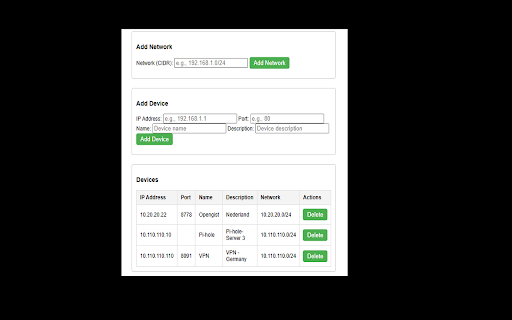

Managing network devices and IP addresses Application Description: Network Inventory Manager The Network Inventory Manager is a JavaScript-based application designed to help users efficiently manage networks and devices within a networked environment. It leverages Chrome's local storage to persistently store network and device data, making it ideal for organizing and maintaining inventory information. Below are its core functionalities and features:

DNS QuickCheck
Quickly query DNS settings without interupting your workflow. Quickly check DNS settings for the (sub)domain in your current tab, or any domain. The default query returns available A, CNAME, and NS records, and you can also check AAAA, MX, SOA, SRV, and TXT records. A time saver for web professionals who launch and troubleshoot client websites, often without direct access to DNS zone files.

Network Chunks
Track the chunks fetched over the Network Capture the chunks fetched over the Network and copy them to your .env.chunks.local file

Dev Tools - Web Dev Tools Suite
Streamline your workflow with a powerful, all-in-one browser extension designed for developers, designers, and tech professionals. Access 40+ premium tools directly from your browser, all optimized for speed, privacy, and productivity. Comprehensive Toolset: Everything you need for coding, debugging, testing, and designing in one place. Offline Functionality: All tools work seamlessly without an internet connection, ensuring privacy and speed. Customizable Interface: Pin your favorite tools for quick access or hide unused ones to declutter your workspace. Modern Design: Intuitive UI with light/dark themes for a comfortable user experience. Privacy-First: All processing happens locally in your browser—your data never leaves your device. Regular Updates: New tools and features added based on user feedback. Free Forever: No ads, subscriptions, or hidden costs. 🛠️ Tools Included: Code Formatter: Beautify and format code with syntax highlighting. Code Snippets: Save and organize reusable code snippets. Minifier/Beautifier: Compress or beautify JavaScript, CSS, and HTML. Regex Tester: Test regular expressions with live highlighting. Diff Checker: Compare texts and highlight differences. HTML Previewer: Live preview HTML with CSS (JavaScript disabled). API & Network Tools: API Tester: Test REST APIs with various HTTP methods. WebSocket Tester: Test WebSocket connections. Speed Tester: Measure network speed and latency. Network Speed Monitor: Monitor real-time network speed. Data Tools: JWT Decoder: Decode and verify JWT tokens. Base64 Encoder/Decoder: Encode/decode Base64 strings. Hash Generator: Generate MD5, SHA-1, SHA-256, and other hash digests. UUID Generator: Generate unique identifiers. Utility Tools: Calculator: Basic and programmer calculator. Unit Converter: Convert between different units (length, weight, temperature, etc.). Timestamp Converter: Convert Unix timestamps. QR Code Generator: Generate QR codes from text. Password Generator: Create secure passwords. Lorem Ipsum Generator: Generate placeholder text for layouts. Page Performance: Analyze webpage performance metrics. SEO Analyzer: Analyze webpage SEO and accessibility. Meta Tags Manager: Generate and analyze HTML meta tags. Visual Tools: Color Picker: Pick colors from webpages. CSS Grid Generator: Create CSS grid layouts visually. Flexbox Generator: Learn and generate flexbox layouts interactively. CSS Extractor: Extract CSS from selected webpage elements. Viewport Measure: Measure pixel distances and dimensions on webpages. Element Inspector: Advanced element inspection with detailed properties. Storage Tools: Cookies Manager: View, edit, and manage browser cookies. LocalStorage Manager: Manage browser local storage data. SessionStorage Manager: Manage browser session storage data. IndexedDB Explorer: Browse and manage IndexedDB databases. Storage Analyzer: Analyze storage usage across all browser storage types. 🎯 Extra Features: Pin Tools: Keep your most-used tools at the top for quick access. Hide Tools: Customize your interface by hiding tools you don’t use. Search Functionality: Quickly find tools using the built-in search bar. Keyboard Shortcuts: Access tools faster with configurable shortcuts. Export Options: Save results or configurations directly to your local storage. 🔥 Why Choose This Extension? Designed for Developers: Tailored for frontend/backend developers, designers, DevOps engineers, and students. Boost Productivity: Eliminate repetitive tasks with one-click solutions. Chrome Guidelines Compliant: Fully adheres to Chrome Web Store policies for security and performance. 🚀 Get Started Today! Transform your browser into a professional development powerhouse. Install now and experience the ultimate toolkit for coding, debugging, and designing—all in one extension.

Network Request Analyzer
Analyzes the timing of all network requests on the current page 🚀 Network Request Analyzer – Gain Full Visibility into Web Requests! Network Request Analyzer is a powerful Chrome extension designed for developers, performance engineers, and data analysts. It provides real-time insights into all network requests on the current webpage, helping you optimize loading speed, troubleshoot performance bottlenecks, and improve overall web efficiency. 🔍 Key Features: ✅ Comprehensive Network Request Analysis – Capture and analyze all HTTP/HTTPS requests, including DNS lookup, TCP connection, TLS handshake, request wait time, and response time. ✅ AI-Powered Performance Insights – Get intelligent recommendations and optimization suggestions using advanced AI analysis of your network requests. ✅ Visualized Timing Breakdown – A clear timeline view helps you understand request concurrency, blocking points, and load sequences. ✅ Performance Bottleneck Detection – Identify slow requests and optimize resource loading order for a faster browsing experience. ✅ Multiple AI Providers Support – Configure your preferred AI model (OpenAI, Anthropic, Deepseek) for detailed performance analysis. ✅ Downloadable Reports – Generate and download comprehensive performance reports to share with your team. ✅ A Must-Have for Web Performance Optimization – Ideal for tuning CDN, lazy loading, prefetching, and other front-end performance strategies. ✅ Real-Time Monitoring Without DevTools – Get instant insights into network activity without opening Chrome Developer Tools, making analysis more efficient. 🎯 Why Install It? For Frontend/Backend Developers – Optimize API response times, debug latency issues, and enhance rendering performance with AI-suggested improvements. For SREs & DevOps Engineers – Analyze network performance, detect slow queries, and eliminate network bottlenecks using intelligent pattern recognition. For Data Analysts – Understand the loading sequence of different resources and refine data transmission strategies with AI-driven recommendations. For General Users – Monitor page load speeds and identify slow resources that affect browsing experience. 📥 Install Now & Take Control of Your Web Performance! With Network Request Analyzer, you can effortlessly inspect all network requests with detailed timing data and get AI-powered optimization insights—making web performance tuning easier and more intuitive!
