
khaocdcbgnfgfoiplkbdaappfcdldgeb

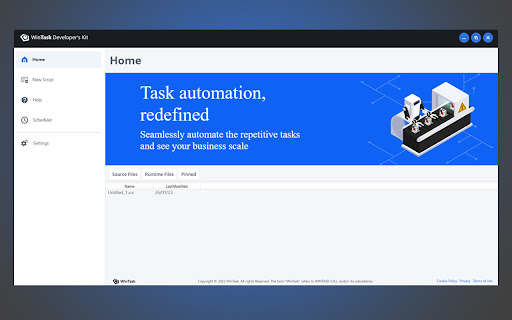
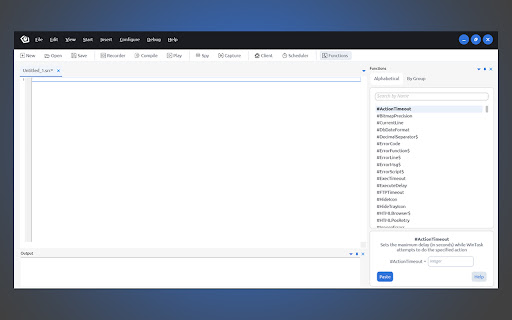
WinTask component browser automation. This extension is used by WinTask software. It's not intended to be used as standalone! WinTask component browser automation. This extension is to be used in conjugation with WinTask software, it allows the WinTask software to communicate with the browser in order to execute multiple actions like writing and clicking html elements. It's not intended to be used as standalone extension!

Microbots AI Platform
This extention allows to build automations using plain language. It is powered by GTP-3.5 and GPT4 models. Introducing the pioneering Microbots AI Platform Extension, a tool designed to revolutionize automation development by leveraging the power of AI, Open Source, and pro-code technologies. This extension was developed to extend the benefits of ChatGPT to automation developers. Microbots AI Platform is a non-commercial initiative aiming to be an AI experiment showing how automation development may look like in the future. The Microbots AI Platform Extension is an innovative browser add-on for Chrome and Edge. It works by streamlining the HTML code of a webpage, omitting information irrelevant to automation, and building precise prompts sent to GPT model. The AI subsequently returns a fully functional automation that typically functions right out of the box. By default, the extension generates solutions in Puppeteer, but the programming language can be adjusted in the prefix for Python Selenium or others as desired. Additionally, the extension incorporates a "Fix the Code" feature, allowing users to input new commands or error codes to facilitate code correction. It also offers a Code Notepad for the input of intermediate code when necessary. An important note: To operate the extension, users will need an OpenAI API key. This can be acquired by creating an account on the OpenAI portal (https://platform.openai.com/) and registering a credit card. Although ChatGPT 4 requires users to join a waiting list, the ChatGPT 3.5 model is immediately available, faster, cheaper, and perfectly adequate for this purpose. A single query generated by the extension may incur a cost ranging from $0.01 to $0.10 USD for the GPT 3.5 model and between $0.1 to $1 USD for a query to the GPT 4 model, so please mind these cost while using the tool. By default, the extension generates solutions in Puppeteer, but the programming language can be adjusted in the prefix for Python Selenium or others as desired. Additionally, the extension incorporates a "Fix the Code" feature, allowing users to input new commands or error codes to facilitate code correction. It also offers a Code Notepad for the input of intermediate code when necessary. The Microbots AI Platform Extension empowers users to automate processes up to ten times faster, based merely on a list of steps or process description. Through this extension, we envisage a future where the role of the developer might be drastically minimized or eliminated, accelerating the process of automation. Join us in this journey and let the AI revolution begin. Your feedback and experience with the tool are invaluable, so we encourage you to share your thoughts. The download link is available in the description. Terms of Use: By initiating the installation of this tool, you hereby consent to the ensuing terms and conditions of use. The "Microbots AI Platform Extension", hereinafter referred to as the "Extenstion" is provided to users free of charge, but it requires OpenAI API key, which can be aquired from the OpenAI platform https://platform.openai.com/. Please note that the OpenAI API key is not bundled with this tool and therefore expected to be provided by the user. Any expenses incurred in relation to OpenAI are the sole responsibility of the user of the extension. OpenAI API Key will be stored in the Local Storage of the browser. Will not be transferred outside of the browser or your local machine and will be used solely to send requests to OpenAI servers. The Microbots AI Platform Extension is delivered to you on an "as is" basis and carries no warranties or guarantees of any kind. By proceeding with the installation, you acknowledge and accept these terms in full.

NimRecorder Browser Automation
This extension is used by NimRecorder to automate browser actions. It is not intended to be used as a standalone extension. NimRecorder allows users to capture, replicate and execute synthetic user actions. This extension is to be used in conjugation with DX Unified Infrastructure Management's 'End-to-End Application Monitoring (e2e_AppMon) probe' to help monitor performance and availability metrics associated with these synthetic transactions. THIS IS A WHITE LABEL EXTENSION FOR WINTASK

Hyland RPA Automation Extension
Allows Hyland RPA to access and automate the browser. The Hyland RPA Automation Extension is used to connect Hyland RPA’s Web Automation to your browser. Leverage the browser for attended and unattended automation. Using this extension, you can automate tasks with ease. This extension requires additional software to build the automation flow. Make sure that you have downloaded and installed the Hyland RPA Designer before using this plugin. The Hyland RPA Designer is a low code tool that will convert your actions into an automation flow.

Embtion - Web Browser Automation
Browser Extension Support Edge and Chrome. Install the extension in the browser's store. Automate Any Websites Automation actions like clicking and typing in any websites. Automation without APIs Work with any websites, no APIs required. For Data For data scraping and data entry. Advance Javascript Mode Support custom Javascript code runs on the web pages.
