
kgnbnbifdjcokgodkgjliaegpollgafa
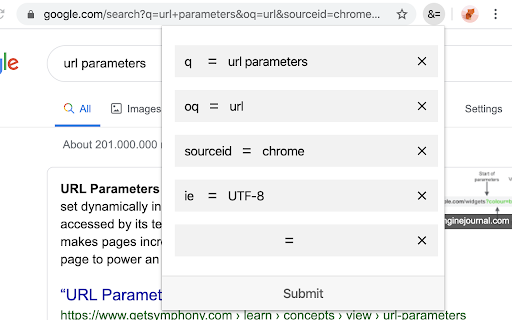
This is a tool for web developers. It makes editing URL parameters for long URLs much easier. You can use this tool to view each URL param, add new or delete existing ones.

URL Edit
Easy URL editing with a separate line and automatic decoding/encoding for each URL parameter.

URL Param Editor
URL parameter modification tool - easily edit URL parameters and switch between environments A powerful Chrome extension for developers to modify URL parameters and switch between different environments. Features: • Edit URL parameters directly in the popup window • Quick add/remove URL parameters • Switch between different environments (hosts) • Add custom debug parameters • Search through parameters • Parameter edit history • Customizable environments and debug parameters Perfect for developers who need to: • Test different URL parameters • Switch between development environments • Debug web applications • Manage multiple host configurations All data is stored locally in your browser. No data is collected or transmitted.

Params Editor
Edit URL query parameters with smart input types Query Param Editor is a lightweight Chrome extension to easily view and modify URL query parameters. ✅ Features: - Parse and display query parameters from the current URL. - Smart input fields: - Number inputs for numeric values - Date picker for dates - Boolean toggle for true/false - Tag editor for comma-separated values - JSON object & array editor - Search keys & values - Add, edit, or remove query parameters. - Apply changes on-demand by pressing Enter or using the Apply button. - Clean, minimal interface optimized for quick edits. - View the full URL with highlighted parameters for better readability. 🎯 Designed for developers, QA, and anyone needing rapid URL param changes.

Tiny Tags: instant query params
Tiny Tags is a Chrome extension that simplifies the process of adding query parameters to your URLs. If you're tired of manually modifying your URLs with query parameters every time you want to render a different page or settings, this extension is the solution for you. You can add query parameters' keys and values, save them, and add or remove them from your current tab's URL with a click. Let's say you are working on a website or web app and you are using the query parameters "mock=true" to render mock data for development or "user=123" to test a specific page view. Adding it manually each time can be a pain, especially if you have to do it for multiple URLs. This extension allows you to create query parameters and add them to your URL with a click. Click on the checkbox, then the respective query parameter is added to your current tab's URL. Click on it again, then it will be removed. You will find it extremely useful as Tiny Tags recognizes what query parameters are in your current tab's URL, so you can save time from manually typing them every time, stay organized with a list of your most used query parameters, and most importantly, focus on your task.
