
kgellgcbfceooklmfjcbofaldbacgpbm
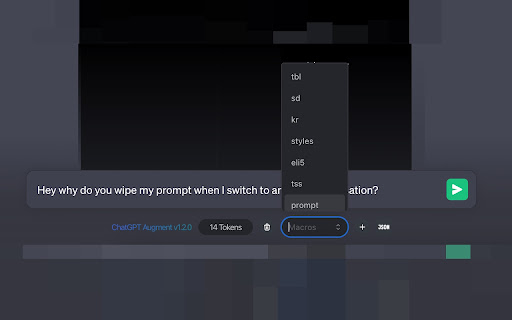
Enhance chat with ChatGPT-Augment: auto-continue, macros, token count, prompts, JSON format. This Chrome extension enhances your chat experience by adding several useful features. With ChatGPT-Augment, you can auto-continue conversations, use macros to expand shorthand, count tokens in real-time, restore prompts, clear prompts with a single click, mouse scrolling works over gradients, and even format JSON easily. Yes, you guessed it. This Readme is also written by ChatGPT. 🦊 1.8.6 updates - Update to the latest UI changes including List context menus - Access to the ? button is now easier than ever - Stays the least obstructive as always! 🦊 1.8.3 updates - Fix Code interpreter plugin compatibility - Fix Naver Whale browser (and possibly more browsers) compatibility 🦊 1.8.1 updates - Conversation context menu now stabilized! Yay! - Added ChatGPT Coder (beta) - Consider it as a "Question-based Boilerplate Builder" at the moment. - Works great with GPT 3.5, no worries about consuming GPT4 quota. - Even warns you if you're running it with GPT4! I got your back! - Select a language, answer a few questions and export the full result as a single zip file or as a raw JSON/JSON5 format! - It's a bit crude at the moment. I will polish further as time goes by 🤗 - Improved overall code structure and improved DOM reference logics - Improved Continue button's behavior and added "Force continue" feature (as "More" button) - Get more info from the ChatGPT with a single click, with a sleek vanilla-like natural UI. - Added custom User/Assistant option for Message Serializer Modal - Changed App location slightly so that the main app would stay alive between switching chat sessions 🦊 1.7.3 updates - Right click on a conversation list for a quick access (may fail sometimes due to Chrome's security limitations, expect an upgrade soon 🤗) - Tokenizer modal now supports stripping whitespaces out for token optimization - Macro modal improved - Message serializer modal now shows the whole conversation as a plaintext so that you could easily copy & paste. Great when your conversation was forbidden from sharing via link. * Regarding the seemingly randomized code fragments, I have meticulously commented each file with their intended purposes and the names of third-party modules to ensure transparency and assure users that the extension does not compromise their privacy. Also feel free to review the original source code at the linked homepage, which is a simple Github Repository that hosts a whole codebase. * It is important to note that this extension locally analyzes input text to derive expected GPT-3 tokens more accurately. To achieve this, the Chrome Web Extension includes a non-obfuscated, human-readable token list for the encoding/decoding process. * The list of tokens is compiled statically and transparently so that it would not trigger any remote scripts. * Without this measure, checking token numbers typically required submitting the entire text in advance over the wire, but with this local GPT-3 tokenizer, your privacy is safeguarded instead.

Promptly – AI Prompt Enhancer & Manager for ChatGPT, Claude, Gemini
Optimize, save & reuse AI prompts for ChatGPT, Claude, Gemini & more. Prompt library, one-click enhancer & conversation exporter. Promptly is your all-in-one prompt engineer, enhancer, optimizer, and prompt manager. Write better prompts, get better AI responses — in one click. Whether you're new to AI or an experienced prompt engineer, Promptly helps you craft clear, well-structured prompts that get dramatically better results from the AI tools you already use. Instantly improve any prompt with a single click or keyboard shortcut (Ctrl+M / Cmd+M on Mac). Promptly rewrites your input into a well-structured, context-rich prompt that gets more accurate and useful responses — whether you're working in ChatGPT, Claude, or Gemini. NEW: Highlight any text on any website and optimize it as a prompt. Works everywhere, not just inside AI chatbots. Save your best prompts and build a personal prompt template library. Access everything from a clean side panel. Pin your top prompts for one-click reuse across any AI platform. Save prompts instantly with Ctrl+S (Cmd+S on Mac). Never lose a great prompt again — organize, search, and reuse your templates whenever you need them. Explore our FREE community prompt library at https://www.promptly.fyi/library with hundreds of curated templates for writing, coding, marketing, research, and more. Favorited prompts sync directly to your extension. Save, export, and fork your AI conversations to continue them later or share with your team. Summarize long chats into concise overviews. Export any conversation with Ctrl+E (Cmd+E on Mac). This is perfect for bypassing context window and token limits, saving research sessions and brainstorming threads, creating documentation from AI-assisted workflows, or simply picking up where you left off without losing context. 🧩 COMPATIBLE WITH Works directly inside your favorite AI tools: - ChatGPT (OpenAI) - Claude (Anthropic) - Gemini (Google AI) - DeepSeek - Copilot (Microsoft) 👤 WHO IS PROMPTLY FOR? Content Creators — Write better AI-generated blog posts, social media content, video scripts, and marketing copy with optimized prompts. Students & Researchers — Get clearer, more structured answers from AI. Save and organize research conversations. Export summaries for notes and papers. Developers & Engineers — Optimize technical prompts for code generation, debugging, and architecture decisions. Marketers & Copywriters — Craft sharper ad copy, SEO content, email campaigns, and brand messaging. Product Managers — Summarize meeting notes, automate repetitive tasks, and organize prompt workflows across projects. ✅ Three tools in one — prompt optimizer + prompt manager + conversation exporter ✅ Free community prompt library with hundreds of templates ✅ Keyboard shortcuts for power users — Ctrl+M to optimize, Ctrl+S to save, Ctrl+E to export (Cmd on Mac) ✅ Lightweight and fast — no bloat, no slowdowns ✅ Privacy-focused — your prompts stay yours Install Promptly, pin it to your toolbar, and start getting better AI responses in seconds. Open any AI chatbot, type your prompt, and press Ctrl+M (Cmd+M on Mac) to see the difference instantly.

ChatGPT Enhancer
Enhance ChatGPT with collapsible responses, timeline navigation, and bulk controls. Organize long conversations distraction-free. ✨ Collapse & expand ChatGPT replies with one click ⏳ Navigate conversation timelines easily 📦 Bulk control for messages 🧹 Keep your chats clean

Chatgpt chat to pdf,docx,html,markdown,json and etc. Free Forever
Export ChatGPT conversations to multiple formats: PDF, HTML, Markdown, DOCX, Text and more- Free Forever ⚠️ You may see a Chrome safety alert during install. This extension runs 100% locally — no backend, no data collection, ever. ❌ Do not use the system theme. Use either Dark or Light theme for best results, as shown in the video preview. 🚀 The Ultimate ChatGPT Export Tool - Completely FREE Forever! Transform your valuable ChatGPT conversations into professional documents with our powerful, feature-rich extension. Whether you need to save research, preserve important discussions, or share insights with others, we've got you covered with 7 different export formats! 📄 Multiple Export Formats: - PDF - Authentic ChatGPT styling with dark theme - HTML - Web-ready format with full formatting - Markdown - Developer-friendly with code blocks - DOCX - Microsoft Word compatible documents - CSV - Spreadsheet-ready data export 🎨 Authentic ChatGPT Styling: - Preserves original dark theme appearance - Maintains conversation flow and formatting - Includes user and ChatGPT avatars - Code syntax highlighting preserved ⚙️ Advanced Export Options: - Message Selection - Export all, specific range, or custom selection - Timestamp Control - Include/exclude conversation timestamps - Metadata Preservation - Conversation titles, dates, and context - Custom Formatting - Professional document layouts 🔧 Smart Features: - Visual Message Selection - Click checkboxes to choose messages - Range Export - Export messages 1-50, 10-100, etc. - Batch Processing - Handle long conversations efficiently - Error Recovery - Robust export process with fallbacks 💝 Why Choose Our Extension? ✅ Privacy First - No data collection or tracking - Everything processed locally - Your conversations stay private ✅ Developer Friendly - JSON export for data analysis - Markdown for documentation - CSV for spreadsheet analysis 🎯 Perfect For: 👨💻 Developers - Export code discussions and solutions - Save debugging conversations - Create technical documentation 1. Install the extension from Chrome Web Store 2. Navigate to any ChatGPT conversation 3. Click the extension icon in your toolbar 4. Choose your preferred export format 5. Select which messages to include (optional) 6. Download your professionally formatted document - No Server Communication - Everything processed in your browser - No Data Storage - We don't save or access your conversations - Local Processing - All exports happen on your device - Open Source Friendly - Transparent functionality - Coffee Support - Optional way to support continued development - Regular Updates - New features added frequently - Cross-Platform - Works on Windows, Mac, Linux Chrome browsers - Fast Performance - Optimized for speed and reliability Download now and start preserving your valuable ChatGPT conversations in professional formats! This extension is not affiliated with OpenAI or ChatGPT. It's an independent tool designed to enhance your ChatGPT experience.

ChatGPT Automation - Auto ChatGPT on chatgpt.com
Auto ChatGPT for your prompts at scale. Batch generate and auto-download responses and images on ChatGPT.com. ChatGPT Automation is an Auto ChatGPT tool built to fully automate your workflow on OpenAI's chatgpt.com. No more manually typing prompts one by one — let ChatGPT run automatically. This extension turns ChatGPT into a batch-processing engine, allowing you to auto-submit prompts, auto-generate content, and auto-download results at scale. 🔥 What ChatGPT Automation does Auto ChatGPT prompts continuously without manual interaction Batch generate AI text, images, and visual content Automatically download results with smart file naming Handle long prompt queues safely with smart random delays 🤖 Auto ChatGPT Batch Processing Queue dozens or hundreds of prompts and let ChatGPT Automation automatically: - Submit prompts to ChatGPT - Wait for generation to complete - Move to the next prompt No clicks. No babysitting. 🎨 Image to Image Transformation Batch transform and enhance images using AI with text prompts Chain mode: automatically use the previous generated image as input for the next prompt 🧩 Ingredients to Text Mode Upload reference images and batch-process them with prompts Auto-add character images based on filename matching ⚙️ Professional Automation Controls - Smart Random Delay System to avoid rate limits - Configurable min/max delay between prompts - Auto Download once generation completes with custom folder organization - Auto-rename files based on prompt content - Max Retries on failure — automatically retry failed prompts 📊 Real-time Queue Monitoring - Live prompt queue with per-prompt status (Queued → Running → Completed) - Visual progress tracking inside the Side Panel - Retry counter per prompt ✅ Perfect for - Content creators and copywriters - AI image and visual producers - Automation & productivity users - Anyone who wants to Auto ChatGPT at scale
