
kfpfapjafgkabbbikodemfnohdmefhlf
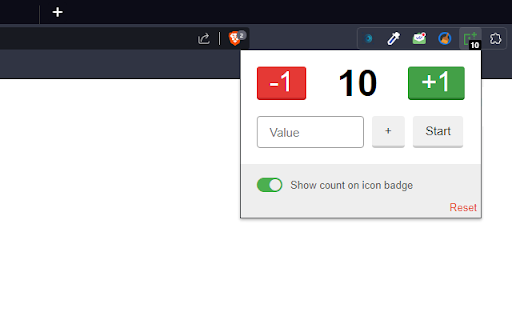
The best simple counter in the world. Increases, decreases and starts from a defined value. This minimalist and efficient simple click counter gives you all the tools you need to keep track of your counts easily and conveniently. • Increase or decrease your count with a single click, making task counting simple and fast. • Add a specific quantity using the custom input field to meet your precise counting needs. • Start the counter from a set value, perfect for projects that require a specific starting point. • Reset the counter at any time with just one tap. • Minimalist, intuitive design that keeps you focused on your counting. • Easily track your important counts right in browser. • Whether you're a professional who needs an efficient way to keep track of tasks or just someone who loves counting things, Simple Counter is the perfect choice. Simplify your life with the best counting tool available. Download now and start number counting with ease! Your counting has never been so easy and accurate!

Tally counter
Easy & intuitive tally counter for keeping track of anything you want. - lightweight - syncs between all your devices - super easy to use - ability to export data to .csv - reorder items - toggle dark mode - keyboard shortcuts so you don't have to click :-) To set hotkeys / keyboard shortcuts, copy this link into the address bar: chrome://extensions/shortcuts If you want any features added, you find a bug or something is behaving unexpectedly, please contact me at capdavidd@gmail.com. Donations are welcome at https://ko-fi.com/davidcap.

Number Counter (Tally)
Count anything you want, with an easy to use number counter. 📊 Overview Track counts and tallies directly in your browser. Whether you need to keep track of scores, inventory, habits, etc., Tally makes it simple and efficient. 🌟 Features - Add Tally Items: Easily add new tally items to your list. - Increment/Decrement Buttons: Simple + and - buttons for quick adjustments. - Dark Mode: Toggle between light and dark modes to suit your preference. - Reorder Tally Items: Drag and drop to rearrange your tally items. - Export/Import Tallies: Export your tallies to a CSV file or import from an existing CSV. - Reset & Clear: Quickly reset all tally numbers or clear individual tallies. - Persistent Storage: Your tally data is saved in Chrome storage and stays intact across sessions. - Responsive Design: Clean, modern UI that looks great on any screen size. - Track Unlimited Tallies: Keep track of as many tallies and tally counts as you need. - Side Panel Access: Quickly access your tallies by right-clicking the Tally icon and selecting "Open side panel" to keep your tally list visible and accessible at all times. 📋 How to Use - Add a New Tally Item: Click the "Add Tally" button to create a new tally item. - Customize the Tally: Enter a label for your tally and adjust the count using the + and - buttons. - Reorder Tallies: Drag and drop tally items to reorder them as needed. - Export/Import: Use the Export button to save your tallies as a CSV file. Import tallies from a CSV file by selecting the Import option. - Reset/Clear: Reset all tallies to zero or clear individual tally counts using the provided buttons. - Access the Side Panel: To keep your tallies always visible, right-click the Tally icon in the Chrome toolbar and select "Open side panel." The side panel will display your tally list and can be accessed alongside your other browser tasks. 📌 Use Cases - Board Games: Keep track of scores and game points. - Inventory Management: Count and track items in your inventory. - Habit Tracking: Monitor daily habits and routines. - Event Planning: Count attendees, supplies, and more. - Exercise & Fitness: Track sets, reps, and workout progress.

Task Counter
Count tasks, an ideal extension when your workplace pay you based on task done, you can set your payment per task, and the amount of time you should spend per task in the settings.

Simple Click Counter
Simple counter for clicks! A simple extension that can add or subtract from a total.
