
kfonioidcoibmccipgaihpkjiakcadkh
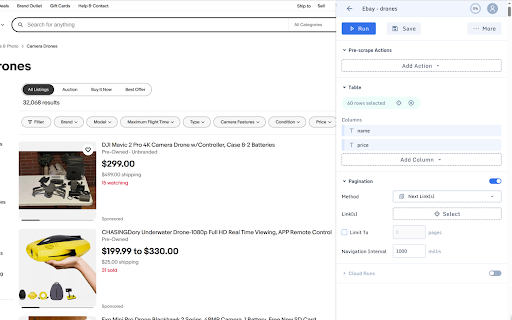


DataGrab allows you to extract data from web pages via a point-and-click interface, supporting a variety of use cases such as lead generation, price monitoring, data aggregation, real estate listings, and more. It is primarily designed for non-coders, but it still offers the flexibility for developers to tweak the generated CSS selectors. You can set up your scrapers using this extension, then it in your local browser or enable running it on our cloud platform at scale. Our cloud service offers monthly subscriptions for users with recurring data needs as well as the option to purchase credits in bulks (for occasional data needs). Bulk credits never expire. Features * Visual scraper setup * Pagination (next link, infinite scroll, or "load more" button) * Complex workflows to scrape any website * Javascript rendering * Proxy rotation * Google Sheets integration * Exporting data in CSV or JSON format * Data retention for 7 days

Web Scraper, Easy, Visual Web Data Extractor
With Web Scraper for Chrome Browser, you can get data from the current webpage easily by clicking on the data fields when you hover your mouse over the data fields on any webpage. When Web Scraper finds a repeating data pattern, an orange shadow will appear on the repeating data fields with similar patterns. After you left-click mouse button, the data preview pane will be filled with the selected data. To add more data columns, simply click on more repeating data fields. If you click on an unwanted data field, you can simply click the "Delete Icon" on the data preview pane. After extracting the data from the web page, you can export it as a CSV file. You can open this CSV data file with Microsoft Excel on Windows or Numbers on Mac. I hope you enjoy my extension. Please leave your feedback if you have any ideas for improvement on it, and thank you very much for your support. Finally, you can watch this 1-minute video to better see its capabilities:

Data Scraper
extracts content from web pages, with the ability to navigate through multiple pages using pagination. Data Scraper is a powerful browser extension that enables you to easily extract content from web pages. With this extension, you can quickly and effortlessly scrape information from various websites without having to write any code. Whether you need to collect data for research, analysis, or any other purpose, Data Scraper can simplify the process and save you time. One of the key features of Data Scraper is its ability to navigate through multiple pages using pagination. This means that if you're trying to scrape data from a website that spans multiple pages, you can simply set up the extension to navigate through each page and collect the desired data. This feature is incredibly helpful if you're working with large data sets and need to automate the data collection process. Data Scraper also allows you to configure the specific data you want to extract from a web page. You can select which elements you want to scrape, such as text, links, images. The extension's user-friendly interface makes it easy to set up and run data scraping tasks. You can save and export your data in CSV format. With Data Scraper, you can streamline your web scraping process and focus on the insights and analysis that matter.

Free Web Scraper: Fast, Simple Web Scraping
Blazing fast web scraping. Easily scrape any web page data into a spreadsheet table or CSV, for free. Free Web Scraper is the the ultimate web scraping tool for blazing fast data extraction from web pages! With Free Web Scraper, you can extract data from any website for free in record time, with just a few clicks. Here are some reasons why Free Web Scraper is the go-to tool for web scraping: ★ Lightning-fast data extraction - Free Web Scraper is the fastest way to get structured data from any website quickly and efficiently. No more clunky manual copying and pasting. ★ The friendliest interface - Free Web Scraper has a super simple interface, making it easy to extract data from any site without code. ★ Smart data scraping technology - Free Web Scraper uses smart data scraping technology to extract data from even the most complex websites, without any manual configuration required. ★ Customizable data extraction - With Free Web Scraper, you can customize your data extraction to extract exactly the data you need, without any unnecessary data cluttering up your results. ★ CSV and Spreadsheet Export - You can download your results as a CSV file or import into Data Blaze, the spreadsheet that lets you use your data anywhere. ★ Free to use - Free Web Scraper is completely free to use. Simply install the extension and start scraping! ★ E-commerce sites: Free Web Scraper can be used to scrape product data from e-commerce sites like Amazon, eBay, and Walmart. This data can then be used for price comparison, market research, and more. ★ Social media sites: Free Web Scraper can be used to scrape data from social media sites like Facebook, Twitter, and Instagram. This data can be used for social media monitoring, sentiment analysis, and more. ★ Job boards: Free Web Scraper can be used to scrape job postings from job boards like Indeed, Monster, and Glassdoor. This data can be used for job searching, applicant tracking, and more. ★ News sites: Free Web Scraper can be used to scrape news articles from sites like CNN, BBC, and The New York Times. ★ Real estate sites: Free Web Scraper can be used to scrape real estate data from sites like Zillow and Realtor.com. This data can be used for house hunting, property valuation, and more. ★ Stock trackers: Free Web Scraper can be used to scrape data from stock trackers like Yahoo Finance, Google Finance, and Nasdaq. This data can be used for stock market research, portfolio tracking, and more. Whether you're a seasoned web scraper or just getting started, Free Web Scraper is the ultimate tool for fast and efficient data extraction. Try it out today and see for yourself how easy web scraping can be!

Simple Web Scraper (Free)
Scraping the values of multiple web page META tags, JS variables, etc. at once. This tool is for bulk checking the values of multiple web page META tags, JavaScript variables and functions, Google Analytics function parameters, etc. at once. It is also possible to customize the tag to be checked and the function name / variable name. The results can be downloaded in CSV. Tags and attributes to be checked are freely customizable. In addition to meta tags, you can also specify the value of any HTML tag, such as bread crumbs, or the value of an attribute. Please set according to the markup rules of each site. The values of Java Script variables and function names can also be set as acquisition targets. Since the page is opened once in the browser and then the HTML is checked, the tags drawn in the tag manager are also checked. - The check results and registered configuration data are not sent to any servers. - According to correspond to manifest v3, analyzed via Google Analytics is stopped.
