
kfmplmijeffknchbkhbdocilgfcokmec

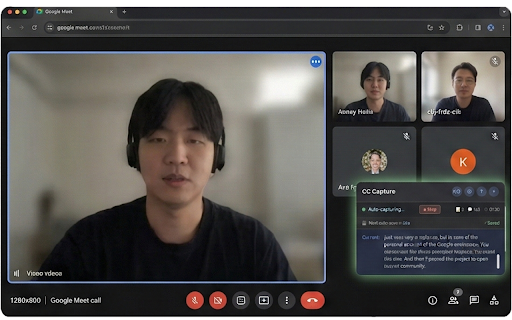

Google Meet CC to Text: Capture and download Google Meet closed captions. copy to clipboard, live preview, No API required! Detailed Description (English) Capture Google Meet Captions Effortlessly Google Meet CC Capturer is a lightweight Chrome extension that captures Google Meet's built-in closed captions and allows you to download them as TXT or SRT files. Unlike other solutions, it works entirely offline with no API keys required. Key Features 🎯 Automatic Capture • Auto-detects when captions are enabled • Real-time preview of captured text • Smart deduplication prevents repeated content 📥 Flexible Downloads • Download as TXT or SRT format • Preview before downloading with file statistics • Include or exclude timestamps • One-click copy to clipboard 📚 Meeting History • Browse all past meeting recordings • View detailed caption content • Download individual sessions • Delete unwanted recordings 🌐 Multilingual Support • Full English/Korean interface • Works with any language Google Meet supports • Language toggle for easy switching ⚙️ Highly Configurable • Adjustable debounce delay (500-3000ms) • Memory management for long meetings • Optional speaker name detection • Customizable auto-save settings ⌨️ Keyboard Shortcuts • Ctrl+Shift+C: Copy to clipboard • Ctrl+Shift+D: Download captions • Ctrl+Shift+H: Show help • Esc: Close modals Privacy & Security ✅ 100% privacy-focused - runs entirely in your browser ✅ No external servers or tracking ✅ No analytics or telemetry ✅ No API calls to third-party services ✅ All data stays local in your browser Simple 3-Step Usage 1. Join a Google Meet meeting 2. Enable closed captions (CC button) 3. Watch it capture automatically! Perfect For • Meeting note-takers • Accessibility needs • Language learners • Content creators • Researchers and journalists Technical Highlights • Chrome Manifest V3 compliant • Circular buffer prevents memory leaks • Tab visibility handling (works during screen sharing) • Comprehensive error handling • Performance monitoring No API Costs, No Hassle Unlike transcription services that require API keys and charge per minute, this extension uses Google Meet's free built-in captions. Save money and protect your privacy. Installation Simply add the extension and join a Google Meet. Enable captions, and start capturing. That's it! Support Having issues? Visit our GitHub repository for documentation, troubleshooting guides, and community support. --- Detailed Description (Korean) Google Meet 자막을 손쉽게 캡처하세요 Google Meet CC Capturer는 Google Meet의 기본 자막을 캡처하여 TXT 또는 SRT 파일로 다운로드할 수 있는 가볍고 강력한 Chrome 확장 프로그램입니다. 다른 솔루션과 달리 API 키가 필요 없으며 완전히 오프라인으로 작동합니다. 주요 기능 🎯 자동 캡처 • 자막 활성화 시 자동 감지 • 실시간 텍스트 미리보기 • 스마트 중복 제거로 반복 방지 📥 유연한 다운로드 • TXT 또는 SRT 형식으로 다운로드 • 파일 통계와 함께 미리보기 • 타임스탬프 포함/제외 선택 • 클립보드에 원클릭 복사 📚 회의 기록 • 과거 회의 녹음 전체 검색 • 상세 자막 내용 보기 • 개별 세션 다운로드 • 불필요한 기록 삭제 🌐 다국어 지원 • 완전한 영어/한국어 인터페이스 • Google Meet가 지원하는 모든 언어 작동 • 간편한 언어 전환 ⚙️ 높은 구성 가능성 • 조정 가능한 디바운스 지연(500-3000ms) • 긴 회의를 위한 메모리 관리 • 선택적 화자 이름 감지 • 사용자 정의 자동 저장 설정 ⌨️ 키보드 단축키 • Ctrl+Shift+C: 클립보드에 복사 • Ctrl+Shift+D: 자막 다운로드 • Ctrl+Shift+H: 도움말 표시 • Esc: 모달 닫기 개인정보 보호 및 보안 ✅ 100% 개인정보 보호 중심 - 브라우저에서만 실행 ✅ 외부 서버나 추적 없음 ✅ 분석 또는 원격 측정 없음 ✅ 타사 서비스에 API 호출 없음 ✅ 모든 데이터가 브라우저에 로컬로 저장 간단한 3단계 사용법 1. Google Meet 회의 참가 2. 자막 활성화(CC 버튼) 3. 자동 캡처 확인! 이런 분들께 완벽합니다 • 회의록 작성자 • 접근성이 필요한 사용자 • 언어 학습자 • 콘텐츠 제작자 • 연구자 및 저널리스트 기술적 특징 • Chrome Manifest V3 준수 • 순환 버퍼로 메모리 누수 방지 • 탭 가시성 처리(화면 공유 중에도 작동) • 포괄적인 오류 처리 • 성능 모니터링 API 비용 없음, 번거로움 없음 API 키가 필요하고 분당 요금이 부과되는 전사 서비스와 달리, 이 확장 프로그램은 Google Meet의 무료 기본 자막을 사용합니다. 비용을 절감하고 개인정보를 보호하세요. 설치 확장 프로그램을 추가하고 Google Meet에 참가하기만 하면 됩니다. 자막을 활성화하고 캡처를 시작하세요. 그게 전부입니다! 지원 문제가 있으신가요? GitHub 저장소를 방문하여 문서, 문제 해결 가이드 및 커뮤니티 지원을 받으세요.

Form AutoSave & Autofill (Local)
Automatically save form input locally and restore last-filled values with one click. If a page is refreshed, closed, or crashes accidentally, users can restore their last-filled form data with a single click. Key Features: • Real-time automatic form input saving • One-click restore of last-filled data • Works on all websites and portals • Data stored securely in the local browser only • No form data is shared or sold • License-based access for premium features Who is it useful for? • Online application forms • Government portals • Students and job applicants • CSC / kiosk operators • Long or complex web forms Privacy & Security: All form data is saved locally in the user’s browser. No personal form data is transmitted to external servers. Only license validation requests are sent securely to the developer server.

Caption Saver for Meet
Save live captions from Google Meet™ meetings as a .txt file. No data leaves your device. Caption Saver for Meet helps you capture and save live captions displayed in Google Meet as a plain text (.txt) file on your device. This extension is designed for users who want to review meeting content, take notes more efficiently, or keep a lightweight transcript of discussions without relying on external tools. Key features: - Capture caption text currently visible in the Google Meet interface in real time - Include speaker labels (as displayed) and segmented speech content - Handle interrupted or continuous speech naturally as separate entries - Export captions to a .txt file with a single click - Simple, lightweight interface with no unnecessary complexity - Bilingual interface (English / Vietnamese), automatically adapting to your browser language How it works: Caption Saver for Meet reads text content already rendered in the Google Meet interface, specifically the visible caption area. When you choose to save, the extension collects the currently displayed caption data and generates a text file directly on your device. The extension does not rely on external APIs or services to function. Privacy and data handling: - Designed to process data locally on your device - No analytics or tracking services are integrated - No external servers are used for data processing - Files are generated only when you explicitly trigger the save action Important notice: - Caption content may include information provided by meeting participants - This extension does not control or verify the content of captions - Users are responsible for ensuring their use complies with applicable laws and the terms of the - platform they are using This extension is an independent tool and is not affiliated with, endorsed by, or sponsored by Google LLC.

Knoi - AI Note Taker for Meetings
The easiest AI note taker for teams. One-click meeting notes, summaries, and action items for Google Meet, Zoom, and Teams. Knoi - AI Meeting Minutes is a work tool that lets you record a meeting with one click, automatically organize the content, and share the minutes right away. Right after a meeting ends in Google Meet, Zoom, or Microsoft Teams, it summarizes key points, decisions, and action items in one place to help your team move faster. [Key Features] * Converts meeting content into text so it is easy to find and review later. * Summarizes key points and organizes important decisions in a clear structure. * Automatically creates action items with owners and due dates. * Shares minutes to your workspace/channel and builds a searchable meeting history. [Recommended Use Cases] * Teams with frequent meetings where important details are often missed * Situations where it is unclear what was decided and who is responsible after a meeting * Work environments where delayed sharing slows down execution [How to Use] * Launch Knoi Noy in Chrome to start a meeting. * After the meeting ends, the summary and action items are generated automatically. * Share to your team channel/workspace or use it in the format you need. [More Features] The extension is optimized for fast meeting capture and minutes creation. More features such as advanced templates, collaboration, and the “Ask Questions” feature are available on the official Knoi service. [https://www.knoi.ai/meet](https://www.knoi.ai/meet) [Privacy / Security] Knoi accesses only the data needed to create meeting minutes, and only when you actively use the feature. Recording meetings may require participant consent depending on applicable laws and your organization’s policies.

Meet Recorder
An extensin to save your google meet captions to files Save the captions of your Google Meet sessions to your local disk. We value your privacy, ensuring that no data is transmitted to the cloud. Instructions: Simply enable captions during your meeting, Caption file saving prompt will be displayed immediately upon exiting the meeting.
