
kfkdboecolemdjodhmhmcibjocfopejo

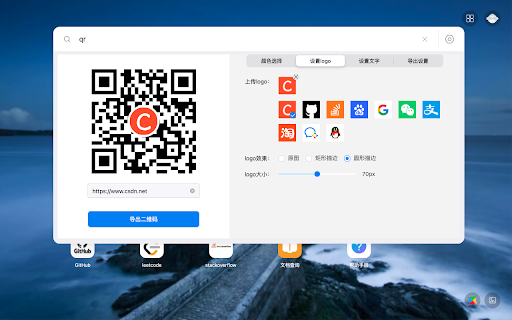


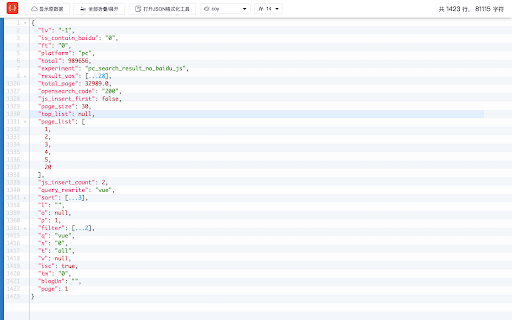
一款集成本地书签、历史记录与 CSDN搜索(so.csdn.net) 的搜索工具 帮助您的浏览器提升10倍效率,打造更酷的chrome、Edge! CSDN浏览器助手插件 由CSDN官方开发,集成一键呼出搜索、万能快捷工具、个性化标签页和底层免广告四大功能,让您在工作学习场景中,告别繁琐复杂的切换,快速解决问题,打造专属你的效率神器!支持Chrome插件安装、Edge插件安装。 【主要功能】 ①一键快捷搜索 📛 在页面任意网页下,点击键盘的 "C",即可弹出 [极简搜索框], 输入关键词即可快速展现 "网页、书签、历史记录"的搜索结果。 其他快捷键及功能如下: shift + o :在新页面打开搜索结果 b : 仅搜索书签 shift + b :搜索书签,并在新页面打开 shift + t :搜索并切换标签页 ②万能快捷工具 🔍 按C呼出搜索框后,输入代码即可快速搜索(支持书签、历史和百度等结果),代码口令如下 json: 调出json格式化功能, 支持手动编辑、格式化、折叠 qrcode: 快速生成二维码 doc:在线文档 ③个性化标签页 ✅ 新标签页可自定义换肤,自动展现程序员热门网站,并可以自定义常用网站,同时可选择多种搜索引擎,打造专属你的清爽标签页! ④底层永久免广告 🚫 即日起,安装该插件新用户,可永久去CSDN站内广告。从底层去广告,占用内存极小,让上网体验更清爽。去广告特权版本限时下载! 🧰更多彩蛋功能更新中,欢迎各位提出好的idea~ 在浏览器使用过程中,您可能因为需要不断查找、切换内容,不仅需要打开密密麻麻的标签页,还浪费了大量时间, 现在只要安装CSDN浏览器助手,即可一键解决多种问题。 💡 截至今天,本插件已经为专业的开发者服务200w+次 ,功能也在不断更新迭代,欢迎参与体验! 💌 此浏览器扩展由CSDN社区提供支持,详情及问题反馈请访问 https://plugin.csdn.net/

Sourcegraph
Connect Sourcegraph to GitHub. Open repos, compare revisions and search code directly from Chrome's Omnibox for faster development. Make it work on your code host • GitHub: No action required. Your extension works here by default. • GitHub Enterprise: click the extension icon and update the "Sourcegraph URL" Make it work for private code To use the browser extension with your private repositories, you must set up a private Sourcegraph instance and connect it to the extension.

Octotree - GitHub code tree
Browser extension that enhances GitHub code review and exploration. Features * Fast IDE-like code tree * Quick search in tree format * Bookmark repos, issues, PRs, files * Support GitHub themes * Support private repositories * High performance, working with repositories of any size NO BS POLICY: Octotree doesn't track you or share/care about your data at all. GitHub tokens are only needed when you want to access private repositories or exceed GitHub API rate limit. Octotree stores tokens in your browser storage and only uses them to authenticate with GitHub.

Saladict - Pop-up Dictionary
Look up and translate selected text with multiple dictionaries, flexible selection modes, vocabulary notes, and PDF lookup. Saladict is a free, open-source browser extension for focused cross-language reading. Select text on a web page or in the built-in PDF viewer to open a dictionary panel with results from multiple dictionaries and translation services. Core features: - Look up and translate selected text on web pages and in PDFs. - Use flexible selection modes, including icon-triggered lookup, double-click lookup, modifier keys, and instant capture. - Combine multiple dictionaries and tune which dictionaries appear by language and word count. - Keep search history and save words to the vocabulary notebook. - Open a standalone quick-search panel for clipboard text or manual lookup. - Configure supported sync or export workflows with services such as WebDAV, Shanbay, Eudic, and Anki Connect. - Customize profiles, panel appearance, context menus, blacklists, whitelists, and keyboard shortcuts. Dictionary content and translation results come from the third-party dictionary services you enable.

JSON-handle
It's a browser and editor for JSON document.You can get a beautiful view. And transcoding Unicode Base64 URL with decode & encode. Edit and browse JSON document in a node tree diagram. After installed, open the URL will trigger JSON-handle: 安装后打开下面网址可以看到JSON-handle启动的效果: http://jsonhandle.sinaapp.com/demo.json
